Facebook marketing: a complete strategy guide
Just getting started with Facebook marketing? Read on to see how our own Facebook foray goes as we take you through the basics.
Key Takeaways
- Start with a specific goal, not "get more followers": A measurable target like reaching 10,000 followers by Q3 tells you what to build toward and how to measure success.
- Know your audience before you create anything: Facebook Insights and direct polls reveal who's actually engaging, so targeting and content get sharper the more specific you get.
- Organic reach has declined, so paid ads carry the weight: Test headlines, images, targeting, and calls-to-action with small budgets before scaling what works.
- Facebook drives traffic, but email converts it: Use Facebook to build awareness and capture email addresses, then nurture and sell through channels you actually own.
Facebook remains one of the most powerful platforms for reaching and engaging customers. With nearly three billion monthly active users, the platform offers unmatched reach, but that reach only matters if your strategy is sound.
This guide walks you through the fundamentals of Facebook marketing: setting clear goals, understanding your audience, creating resonant content, running effective ads, and measuring results. Whether you're starting out or refining an existing approach, these principles will help you build a strategy that drives real business results.
Why Facebook marketing matters
Facebook's reach is undeniable, but reach alone doesn't generate revenue. What matters is reaching the right people with the right message at the right time.
People share their interests, behaviors, and preferences on Facebook, letting you target audiences with precision that older marketing channels can't match. Trust plays a role too. 80% of people trust brands they already use, and trust in brands has risen to 68% since 2022. When you show up consistently on Facebook, where your audience spends time, you build familiarity and trust.
Step 1: Define your Facebook marketing goals
Before you create a single post or run a single ad, get clear on what you want Facebook to do for you.
Common goals include:
- Building awareness – reaching new people and making them familiar with your brand
- Driving traffic – sending people to your website or landing pages
- Generating leads – collecting contact information from interested prospects
- Increasing sales – getting people to buy your products or services
- Building community – fostering engagement and loyalty among existing customers
Most businesses pursue multiple goals at once, but rank them. What's your primary objective? Write it down in specific terms. "Get more followers" is vague. "Reach 10,000 followers by end of Q3" is actionable.
Step 2: Know your audience
You can't create content or run ads that resonate if you don't understand who you're talking to.
Start by identifying your ideal customer. What's their age range, location, job title, or industry? What problems do they face? If you already have customers, analyze what your best customers have in common.
Facebook Insights shows who's engaging with your content: age ranges, locations, genders, languages, and interests. You can also run surveys or polls directly on Facebook. 82% of users engaged with quizzes shown via their newsfeed.
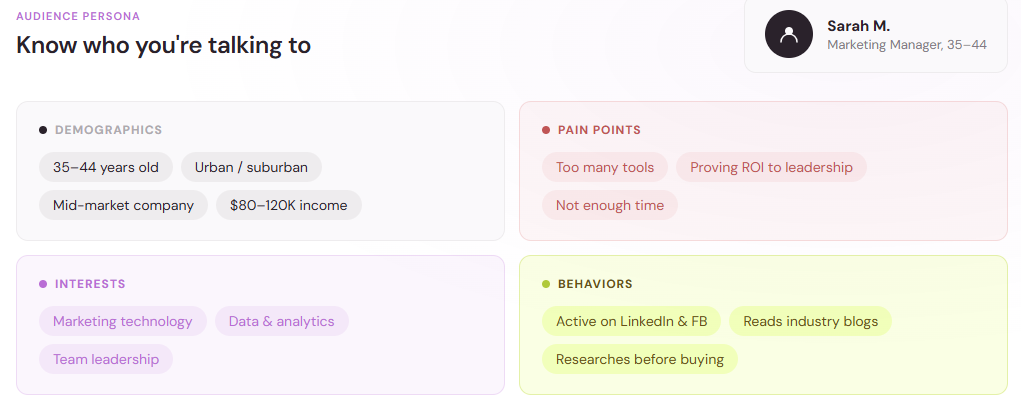
The more specific your understanding of your audience, the more targeted and effective your Facebook marketing becomes.
Step 3: Create content that people actually want to see
The core of Facebook marketing is content. Posts, images, videos, and stories compete for attention in a crowded feed.
Educational content teaches your audience something useful. How-to posts and tips that help them solve real problems perform well.
Visual content stops the scroll. Photos and videos need to be clear and relevant.
Storytelling shares stories about your customers, team, or brand. People connect with people, not products.
Interactive content like polls and quizzes invites participation and increases engagement.
User-generated content shares posts, photos, or testimonials from customers. It's authentic proof that real people value what you do.
Post consistently and align timing with when your audience is most active. B2B content marketing generates an average of $3 for every $1 invested. Companies publishing 16 or more blog posts per month see 4.5 times more leads.
Step 4: Run Facebook ads strategically
Organic reach on Facebook has declined. Paid ads are essential to reach a broad audience.
Image ads use a single photo with a headline and text for building awareness.
Video ads capture more attention than static images and work well for storytelling or product demos.
Carousel ads feature multiple images or videos that people swipe through, useful for showcasing product variety.
Collection ads feature a product or category with related items, designed to drive shopping.
Lead form ads capture information without sending people off Facebook.
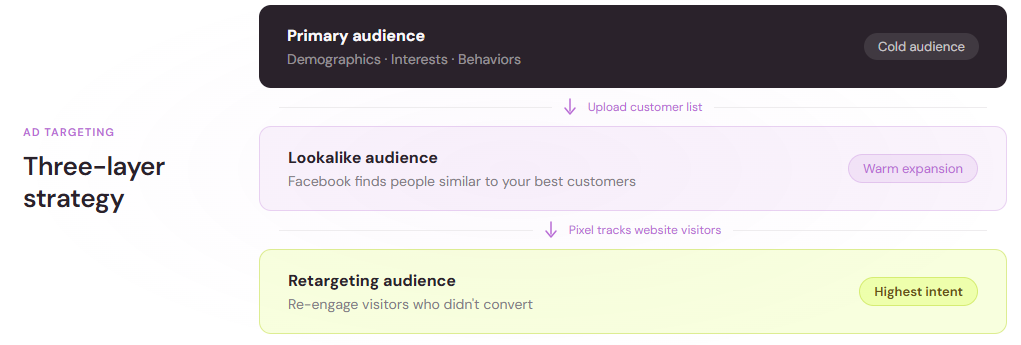
Start with image or video ads. Facebook's targeting is granular: you can target by demographics, interests, behaviors, lookalike audiences, and retargeting.
The best Facebook marketers test constantly. Small changes often yield big results:
- Different headlines or copy
- Different images or videos
- Different targeting parameters
- Different calls-to-action
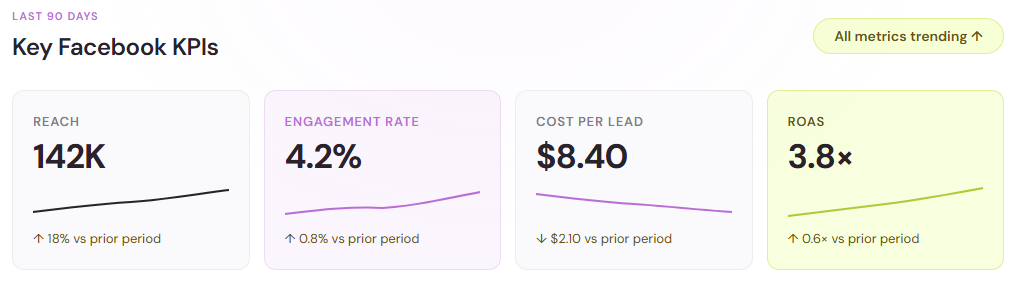
Run tests with small budgets first. If something works, increase the budget. Track metrics that matter to your goal: reach and impressions for awareness, cost per lead for leads, or return on ad spend (ROAS) for sales.
Step 5: Integrate email and owned channels
Facebook reaches people where they spend time, but you don't own the platform. Use Facebook to drive people to owned channels like email.
Email marketing generates the highest ROI among digital channels. Average email conversion rates across industries near 12%. In B2B tech, conversion rates average about 2%.
Use Facebook to build awareness and traffic. Capture email addresses through landing pages. Use email to nurture relationships and drive sales. This simple funnel works: Facebook ad drives traffic → landing page offers something valuable in exchange for an email → weekly newsletter keeps your audience engaged → periodic sales emails convert prospects into customers.
Step 6: Measure what matters
Focus on metrics tied to your goals:
- Awareness goal? Track reach and impressions.
- Traffic goal? Track clicks to your website and bounce rate.
- Lead goal? Track cost per lead and lead quality.
- Sales goal? Track conversion rate and return on ad spend (ROAS).
- Engagement goal? Track engagement rate and conversion.
Connect Facebook to your website using the Facebook pixel so you can track what happens after people click your ad. Set benchmarks for success before you launch.
Step 7: Refine based on data
Every month, review your data. Which content got the most engagement? Which audience segments converted best? Which time of day generated the best results? Which ad format outperformed others?
About 70% of companies report at least moderate adoption of AI across their go-to-market workflows. AI-powered tools can help you spot patterns faster and automate routine tasks.
Bringing it together
Facebook marketing works best when it's part of a larger strategy. Facebook drives awareness and traffic. Email converts that traffic. Your website or product delivers the value.
Start with a clear goal. Get to know your audience. Create content worth their attention. Run ads strategically. Measure what matters. Learn and adjust. Repeat.
This approach will help you build a sustainable Facebook marketing practice that drives real results.
Want to start promoting your business on social media, but not sure where to start? If you’re having trouble choosing channels, Facebook’s a safe bet for beginners.
The big blue F has become synonymous with the phrase ‘social media.’ And for the less tech-savvy, Facebook simply is social media. It’s not hard to see why:
- 500,000 new users sign up to Facebook every day. So if your mom isn’t on Facebook yet, she will be soon. And if she is, your grandma’s probably next.
- 79% of online US adults use Facebook. That’s 68% of all Americans, in case you thought we were trying to trick you with the ‘online’ part.
- 76% of Facebook users check it every day. By taking your business there, you’re not just listing it on a popular website—you know for sure that a large percentage of your audience is scanning it daily.
In other words, the people you want to reach are almost certainly using Facebook. And Facebook gives you the tools to find them.

Its targeting and advertising options are second to none. It offers a solid suite of analytics at no extra charge, and you can post pretty much any type of content. In other words, it’s a great all-rounder.
To improve the efficiency of your scrolling hand, here’s what we’ll be covering in this article:
- Knowing your objective
- Setting up your page for success
- Building a Facebook following
- Posting content that connects with your audience
- Running ads on Facebook
At the end, we’ll see if Brainbeats managed to conquer Facebook.
But before you tackle Mount Zuckerberg…
Using Facebook for marketing
You wouldn’t climb a real mountain without a plan to reach the top—and Facebook’s no different. So before you begin, think about how Facebook marketing can support your overall marketing objectives.
First, here’s a quick summary of what those Facebook numbers mean:
- Likes. This one’s easy—how many people have liked your page. As with many Facebook metrics, it’s often split into organic and paid.
- Reach. How many people your post has reached in total. This just means that it’s been on their newsfeed at some point, nothing more. Paid reach is directly related to your ad spend, organic is from people sharing it.
- Engagements. If people like, comment, share, or click on your posts, this is an engagement. You can view this per ad, and broken down into post clicks and interactions.
- Actions on page. This is about people interacting with the other stuff on your actual Facebook page, excluding posted content—CTA button and website clicks.
- Cost per click/like. Facebook determines how much you’ve paid per post interaction. Obviously lower is better. For more info, goes in depth on average cost per clicks for each industry.
- Page previews. When someone hovers over your profile picture or page name to see a preview of your Facebook page.
But what should you do with this information? It all depends on what you want to achieve with social media marketing overall.

To illustrate, let’s use our social media enterprise, Brainbeats. As the Alpha version of Brainbeats is a quiz, our Facebook marketing objectives were:
- Quiz completions via Facebook ads. The best way to know that Facebook got our quiz in front of the right people.
- Link clicks. This let us know if people were curious enough to try the quiz, even if they didn’t finish it.
- Page likes. Less important, but still good for Brainbeats’ ego. If we had longer-term objectives, a loyal following may have been useful.
- Emails. The quiz includes an option to leave your email address. This was a secondary objective, but a great indication that people dig Brainbeats.
Notice that not all of our objectives were Facebook metrics. That’s because our main aim with social media was to get people to try our product, something that comments or followers just don’t capture.
On the flip side, maybe you’re using Facebook marketing as a direct channel of communication between you and your customers. Then comments and followers may be exactly what you need.
Want more advice on setting goals before you dive into Facebook? Head over to our article on social media marketing strategy for some tips.
OK, ready to fire up your Facebook account?
Set up your page for success
Making a Facebook business page is pretty quick and straightforward. But there are a few things to watch out for.
After you click ‘Create page’ in the menu in the top right corner of Facebook, pick a page type. There’s now a huge drop-down menu of business types, and which one you choose will affect the info displayed on your page.
For example, we picked ‘Brand or Product’ for the Brainbeats Facebook page, which lacks the option to display a physical address. Which was fine, since we don’t have one—not yet anyway.
Then it’s picture time. Your profile pic should be your logo, simple as that. This will immediately identify you when you post and comment on Facebook.
Ideal Facebook profile picture size: 360 x 360 pixels. Here’s our brainy logo:

Your cover photo is a different story—there are tons of ways you can go about it. So many that we wrote a whole article on Facebook cover photos. Check it out for sizes, examples, and a splash of inspiration.
Next, be sure to play around with the big blue button just under your cover photo to the right. That’s the one call-to-action Facebook gives you on your page—so make it count. Decide where you want it to send people, then pick the preset action that matches.
We went with ‘Use app’ for the button, linking to the Brainbeats quiz:

When you’re done with the visual part, make sure to fill out the ‘Description’ and ‘About’ sections. These are the only places where you can explain what your business does in full, so be as clear and succinct as possible:

You also need to create a unique username, which is distinct from the main title of your page. This is important, as Facebook search looks for page usernames—not page titles.
We found this out the hard way when we couldn’t find ourselves by searching ‘Brainbeats.’
After a small panic, we noticed we’d made our username ‘@brainb3ats,’ because ‘@brainbeats’ was taken. No one would know to search with the number in the middle. So we changed it to ‘@brainbeatsapp’—problem solved.

If your business’ name is already taken as a username—and there’s a good chance it will be—don’t get too weird with your spelling, and be prepared to come up with some variations.
As for all the other details on your Facebook page?
Fill them out, but don’t spend too much time on it. Not that many people will click through beyond the main tab of your Facebook page anyway. And besides, you have bigger fish to fry.
Build a Facebook following
Since the early days of Facebook, the “Like” has been the most visible measure of a page’s success. And it’s still the first thing we check to see how strong a company’s social media game is.
For a detailed look at building a following, head over to our article on how to get more Facebook Likes. We took inspiration from social media queen Shakira, so these tips don’t lie. Here’s a few highlights:
- Promote your company on appropriate Facebook groups by embedding yourself in their communities.
- Run a competition to publicize your company—but don’t ask people to like your page directly.
- Put a Facebook Like button on your website, in your email signature, and anywhere else you can. Head to our article for more suggestions.
- Invite people who’ve liked your posts to like your page.
But before you start, here’s a pressing question worth asking yourself:
Do page likes matter?
The value of someone liking your Facebook page has changed a lot over the years.
Facebook used to think that someone liking your page meant they wanted to see your posts. That was before the great organic purge of 2014-2018. Now only 2-5% of people who like your page will see its content in their newsfeeds.
So if after three months you’ve managed to accumulate 500 Likes on Facebook, you’ll only appear in the newsfeeds of about 10 or 20 of those people. The justification from Zuckerberg and his cronies? There’s just too much content out there now.
But whichever way they want to slice it, it’s a kick in the teeth for marketers.
Of course, there’s a simple way around this—pay Facebook to promote your posts. That way anyone in your target audience may see your content, regardless of whether they “like” you.
The lesson?
Getting a heap of Likes without paying is difficult and not really worth the trouble. And if you do put some money into getting Facebook Likes, you’re still going to have to pay Facebook again for those people to see your content.
We saw this first-hand with Brainbeats on Facebook. We spent $20 to boost a post the day we created our page, and immediately got our quiz to thousands of people—even though at that point only ten people had liked our page:

That doesn’t mean page likes are completely irrelevant—it depends on your page’s objective.
But think hard about whether your effort—and money—is better spent accumulating more page likes, or targeting new users, leads, and customers.
Post content that connects with your audience
Ready to start posting? Let’s talk about your options.
Take your pic
Ever leafed through a magazine only stopping only to check out the pictures? People do the same thing with their Facebook feeds.
So whatever you post, make sure it includes an image.
1200 pixels by 630 pixels is the ideal size.
But as long as it’s about a 2:1 ratio, it’ll look great. And Facebook does a good job of resizing for you if you’re slightly off the mark.
Here’s one of Brainbeats’ early gems for inspiration:

People love a peek behind the scenes. It provides that touch of authenticity. Think about the little day-to-day things at your business that could delight people, then snap them for Facebook.
“Hey, you should check this out”
One way to keep your posting frequent is to link content that interests your target audience—or even better, your own blog posts.
Brainbeats recommends music based on psychology, so we posted a lot of similar-themed articles to attract like-minded people to our page:

Notice how the article’s URL is nowhere to be seen? That’s because once you’ve pasted it, Facebook automatically generates a card with an image from the page and a little preview. Once this pops up, you can—and should—delete the URL so it looks neat and tidy.
If you’re posting links for your own blog, you can customize how this card looks by changing the metadata at the source.
Pro tip: if you’ve changed the metadata and the card still looks the same, go to Facebook debugger, paste the link and click ‘Scrape.’ Facebook will now make a card based on the latest metadata.
It took me ages to figure this out the first time. You can thank me later.
Lights, camera, action
If you have the skills, resources, and time, make some video content. In fact, you should still do it even if you lack all those things.
Because video has emerged as the most engaging format on Facebook.
People just can’t resist watching movies. One of the main reasons for this is Facebook’s autoplay feature, which is switched on by default on all personal Facebook accounts.
The actual content of the video is up to you—but add too much text, and Facebook won’t approve it. This is to stop salesy video ads from clogging up our newsfeeds.
So inspire people with a striking aesthetic that’s an extension of your brand. Or maybe just film a bit of fun around the office.
But whatever you do, make sure it grabs people in the first five seconds to take advantage of that autoplay feature. Add subtitles too, because people have to flip on the sound manually—that’s why 85% of Facebook videos are watched on mute.
And when it comes to format: MOV or MP4 is ideal.
Need some inspiration? We pitched Brainbeats to our resident video editor and this is what she came back with:
It might not win a Grammy nomination, but it does a few things right. See the guy making eye contact with the camera in the first five seconds? People are more likely to engage when there’s another person looking back at them in their newsfeeds.
The video also fits with our other assets’ aesthetic, and the copy is intriguing without distracting from the images. Not bad for half a day’s work, right?
Another video option is Facebook Live, which lets you stream live video directly to people’s newsfeeds. This is a tricky one to get right, as you need to have a dedicated following on Facebook who are willing to tune in at a specific time.
But if you’re intrigued, check out this article for some detailed advice.
Promotional offers and discount codes
Want to use Facebook to drive sales? Then check out the option to create an “Offer/Discount” post. It lets you advertise a discount code and set it to expire at a time of your choice.
It’s in the drop down menu that appears when you post. Say what you’re offering, when it expires, and whether it’s redeemable in store or online. Easy, right?
We’d love to show you what a Brainbeats offer might look like. Maybe it would be 20% off the Beta version, or a free pair of headphones that translates your thoughts directly into music recs.
But pretending to sell stuff to people would probably be taking our Brainbeats experiment too far. So instead, here’s a delicious example from this comprehensive article on Facebook offers.

What can we learn from this?
- The picture is key. As with all Facebook posts, an image goes a long way. I really wish I was eating those pancakes right now.
- Be clear and simple. What’s being offered is immediately obvious. Don’t wrap it up in confusing terms and conditions. And make sure it’s clear how people can redeem the discount.
- Make an offer they can’t refuse. Is it me, or is $12 still kinda steep for two pancakes and a scoop of ice cream? Offer a big enough discount to grab people’s attention.
One last very important tip: once you’ve posted an offer, you can’t change it. So double check and make it count.
Run some Facebook ads
Hopefully you’ve got a few ideas for posts now—that’s the easy part. Because we’re about to tackle the crux of Facebook marketing: promoting your content.
As mentioned above, ads are pretty much essential for Facebook success. To illustrate how to create an effective ad, let’s walk through the steps Brainbeats took to announce itself on Facebook
To boost or not to boost?
There are two ways to get started:
- Create an ad from scratch by going to the ‘Promotions’ panel on your page and hitting ‘Create New Promotion’
- ‘Boost’ a post you’ve already published
Ads have strict limits on character counts and how much text can appear in the image, as they also appear in Facebook’s sidebar. Boosted posts lack these restrictions, but will only show up in newsfeeds.
We tried both of these approaches with Brainbeats.

Apart from this, the cost and targeting options are the same. So boosted posts are often the way to go—they give you more freedom to present your content how you want, which means they look less like adverts.
Set your goal
There’s a few options here—promoting your Facebook page, getting website visitors, spreading the word locally. And Facebook does a really good job of optimizing for the goal you pick.

This step is quick, but don’t underestimate its importance. What you pick won’t just sway the outcomes of your ad—it will fully determine your results.
We tried ads aimed at reeling in more page likes, and getting people to do the Brainbeats quiz. And with each, that’s almost exclusively what we got. So choose wisely.
Get creative with your content
Overall, the same tips outlined in the content section apply here. But the headline under the image needs extra thought.
Make it short, snappy, and clickable. We went for a direct question to promote the Brainbeats quiz, as it’s a tried and tested way to get noticed.
Need a tip? You can’t go wrong with the word “actually.” It actually works, trust me.

When it comes to pictures, people love people.
If your product isn’t as visually striking as those ice cream-topped pancakes above, you can always accompany your killer copy with a handsome human.
Basic? Yes. Effective? Sorry, I didn’t catch that question—I was too busy looking into that headphone guy’s eyes.
Not sure which copy-image combos to try first? A/B test them so people randomly see one or the other. You can do this with a program like AdEspresso, then shut off the ads that aren’t performing as well.
Line up your target audience
This is the most important part of making a Facebook ad, as it will live or die according to who sees it.
One of the most common mistakes is picking the wrong audience size. So internalize the following mantra:
Let’s say you spend $20 on reaching 3,000 people who are from a maximum audience of 10,000. You’ve targeted your ad at this relatively small group based on their age, job, and interests—so there’s a good chance they’re also interested in your product.
On the other hand, if those 3,000 people are from a broad target audience of 300,000, your ad could end up in front of pretty much anyone. You could be trying to sell tanning products to people in Alaska, or car accessories to subway commuters in Manhattan.
So if your business has customer demographic data, use it to whittle down your audience as much as possible. Specifying age, gender, job, and location are simple ways to slash your audience size.
But what if you don’t have detailed demographic data to draw on yet?
Excluding people by age or gender isn’t a good idea based solely on intuition. Your best bet is to target people by their interests, which is a powerful—but tricky—Facebook targeting option.
Team Brainbeats found this out the hard way.
We didn’t aim for any specific age or gender, as we like to think that Brainbeats has the potential for universal appeal. And we targeted the US, as the quiz is currently only available in English.
So we picked a combination of horoscopes, music apps, and quizzes from Facebook’s gigantic selection of interests—a portrait of the future Brainbeats mega-fan.

It took a couple of days of poor results for us to notice what we’d done wrong. See how potential reach is 150 million people, even with all those interests specified? That’s way, way too big.
Our mistake?
We listed all the interests in the first—and only—box that initially appears, which targeted anyone with at least one of those interests. But we wanted our target audience to have all of these interests in common.
To do this, you have to add your first target interest, then hit the ‘Narrow audience’ button. Then add the next interest, hit the button again, and so on:

That narrowed our audience down to 29,000—still quite large, but a big improvement. Facebook told us this was now too specific. But when you’re starting out, the general rule is to test the waters with a few thousand people at first.
All that’s left is to decide how much you want to spend per day, set an end date, and you’re done.
Remember: you can switch ads off or edit them whenever you want. So keep checking how they’re doing, and if you think they can do better—change them.
What should you be looking for? Let’s see what happened when our Brainbeats quiz ads hit the unsuspecting residents of Facebook.

Before we start dissecting our ads, here’s a couple of experimental conditions for context:
- We spent less than $20 on each ad, changing the copy, visuals, or objective each time.
- To figure out which ads were generating quiz completions, we set up our typeform to each time someone did the quiz—then we manually matched that to whichever ad was running.
- We set up Google Analytics to see which channel led people to the quiz. Follow to get it working for yourself—or head if you’re using a Typeform quiz.
Now onto the ads.
First up is our debut boosted post, aimed at getting people to click through to the quiz.

Not bad for our first attempt, right? Of the 49 clicks, this ad got 34 quiz completions. We had no idea what to expect, so we were pretty thrilled with this. A handful of quiz takers even left us their email address to receive updates—they must really love Brainbeats.
But then we realized we’d made a targeting mistake—as we mentioned above, our audience was too broad because we were aiming at people with any one of our target interests, not all of them. So we ran the same ad again, this time aimed at a smaller audience who shared all our target interests.
The results were clear:

It also racked up 43 quiz completions, 30 percent of which left their email address. This confirmed our hunch that Brainbeats’ target audience loves personality quizzes, Pandora Music, and horoscopes—the holy trinity of hobbies.
But even with better targeting, we struggled to hit the heights of this ad again. To figure out why, let’s compare it with another ad attempt:


These results weren’t near as good as the previous ones. But we had a problem: so many variables had changed, that we couldn’t pin down what was driving the different success rates.
But Brainbeats lacked the time and money to pinpoint exactly which elements worked and which didn’t. So there’s a few reasons that might explain the lower amount of link clicks here.
First, we created this ad from scratch, rather than boosting a post. Ads made from scratch have a strict character limit on copy, both above and below the image. As a result, it definitely looks more like an ad than the first one.
It also doesn’t display the quiz metacopy, which shows the description and the enticing question we used as the quiz title. ‘Try it here’ is more generic and less direct than ‘Is the music you like actually right for you?’
If you decide to make an ad anyway, here are some examples that deal with the character limit.
The other big change was the image. Eyes are proven to draw people’s gaze—and the headphones guy looks right into your eyes, as if he’s directly asking you the question. But the girl with hair over her face, while definitely cool, is less engaging because you can’t really see her.
One bonus takeaway that we didn’t see coming? Men responded more to the male image, women preferred the female image. So if your product has the unisex appeal of Brainbeats, make sure to vary your ad creatives between pics of men and women.
We also tried a video ad to promote the quiz:


Not the best click through rate, but even that number is deceiving—hardly anyone who clicked on the video ad completed the quiz. We did get a few Facebook page Likes out of it though.
There’s a simple reason for this. Quizzes aren’t usually advertised with videos, so it was probably jarring for people to arrive on a personality quiz after clicking the link.
That’s not to say videos aren’t the way to go for other Facebook marketing campaigns. Brand awareness and product demos are two obvious examples. But even a high budget production like the Brainbeats video just doesn’t sit right with a quiz ad.
Did Brainbeats conquer Facebook?
To be honest, we couldn’t believe how successful Brainbeats was on Facebook.
For quiz completions, it blew Brainbeats’ Twitter and Instagram efforts—which we’ll be writing about shortly—out of the water. 85 percent of social traffic to the Brainbeats quiz came from Facebook, with people spending an average time of 3:41 on the page.
And all this was achieved with a tiny page following. In fact, hardly anyone actually went to our page—it only had 33 Likes. We even tried running an ad to get more likes, but switched it off because it was having no impact on quiz completions.
Keep in mind that we did this as a bit of fun on the side of our day jobs, and only ran a handful of ads for a few days each. For like $3 a day.
So what have we learned from this?
- Quizzes are great for Facebook marketing. We ended up with more than 30 email addresses from over 100 quiz completions—nearly all from Facebook.
- Facebook page likes aren’t that important. Unless you’re trying to build a community around your product, a lack of followers doesn’t get in the way of reaching an audience.
- Facebook marketing costs money. But once you’ve nailed your and targeting, it’s a powerful and cost-effective way to achieve your marketing objectives.
Is there much more to Facebook marketing than we’ve shown here? Absolutely—it’s a full time job for many people, and we’ve barely scratched the surface.
But if Brainbeats can succeed, then you can too. No matter how much social media anxiety you suffer from.


Liked that? Check these out:
Opinions and Expertise
What’s actually slowing research teams down (Hint: it’s not the research)
From recruiting participants and scheduling interviews to building the actual surveys, the operational drag is taking researchers away from what they do best. See what's actually slowing them down and how Research Flow fixes it.
En savoir plus
.png)