Finishing strong: How to create post-event surveys with impact
Your event doesn’t end when the convention hall lights go out (or the Zoom turns off). Diana Kolesarova, Sr. Event Marketing Manager, sees post-event surveys as key to conversions.
5 MINS READ
.png)
What’s inside?

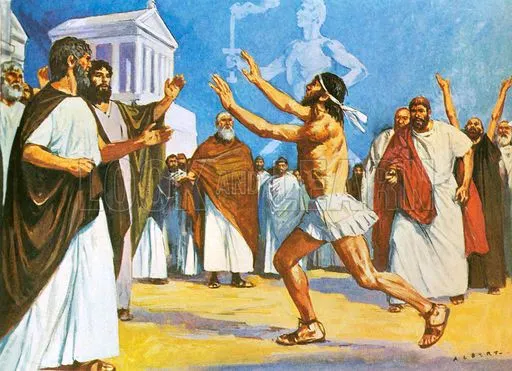
Ever run a marathon?
No, us neither.
But it’s a well-documented fact that around mile 25 of 26, runners start to lose steam. They’re more susceptible to pain, fatigue, and decreased motivation. Even if things have gone well for the prior twenty-plus miles, that last stretch can be the thing that does them in.
For Diana Kolesarova, preivously Sr. Event Marketing Manager at AI-powered creative service company Superside, the days and weeks after a successful event are a lot like that final mile. The event was a success. People attended, great insights were shared, heck, even the food was good.
Now, you’re exhausted.
For most companies: That’s where they leave it. Instead of creating surveys with the oomph and personalization to drive sales conversions, they throw together a few “how did we do” questions, cross their fingers and hope that a good time translates to new revenue.
It’s a little like taking a seat on the track, even when the finish line is in sight.
A straight line from ‘Yes, I attended’ to ‘Sign me up’
Diana understands something critical: The end of the event isn’t the finish line. The finish line is the moment an attendee converts to a customer.
That’s why she adds three key optimizations for post-event surveys, focusing on personalization, sales integration, and brand consistency. She asked simple questions with clear answers and was able to not only improve the quality of feedback, but bring in more revenue to boot.
By creating a seamless path from event attendance to sales conversion, Diana was able to turn attendees into advocates, and advocates into paying customers.
Here’s how she did it:
TL;DR: The three keys to turn post-event surveys into $$
1. Get personal at scale: Use logic branching to ask attendees only about sessions they actually attended
2. Connect the dots: Integrate survey responses directly with your CRM so sales teams can follow up with context
3. Stay on brand: Match your survey design to your event branding for better recall and response rates
Mile one: Get personal, even at scale
“How did you like our event?”
I didn’t attend your event. Unsubscribe.
There’s no quicker way to disqualify a lead than by asking them an irrelevant (read: wrong) question. But this happens a lot in event follow-up. Lists aren’t scrubbed. Attendance isn’t tracked. Lukewarm leads are treated like high-value prospects.
To avoid this blunder, Diana used Typeform’s logic capabilities to create personalized survey paths.
.png)
“When we’re gathering feedback,” says Diana, “We really wanna be asking people, ‘Did you attend?’ And if they say yes, then we ask, ‘How did you rate it?’ Or, ‘How would you rate the session? How can we improve?’ This way we don’t waste their time.”
By routing attendees to relevant questions only, you’ll see higher completion rates and more accurate feedback. Bonus: Attendees feel like you actually care about (and noticed) their specific experience.
To create your own dynamic survey:
- Identify all sessions/components that need specific feedback. Was there a Happy Hour? A Fireside Chat? A panel discussion only open to certain attendees?
- Create branching logic based on attendance confirmation. If they attended X session, they go in Y bucket.
- Design targeted question sets for each “bucket” or path
- Keep surveys concise so that people actually complete them
When you’re done, test all your logic flows to ensure a seamless experience for respondents. Last mile problems can occur in surveys, too, so look out for hiccups that could derail the experience ¾ of the way through.
.png)
Mile two: Make your data work hard(er)
Feedback shouldn’t exist in a bubble. (Unless it’s a cute little text bubble, we like those.)
To create visibility for her sales team, Diana implemented a direct connection between Typeform surveys and their CRM systems. “We connect with routing and mapping all of our surveys,” Diana explains. “So they're not having to go between tools."
With Diana’s approach, your sales team gets hot leads with context, not just contact info. They know exactly which sessions someone loved, what challenges they mentioned, and how ready they are for a demo conversation.
“As a last survey question we usually ask: ‘Would you like to learn more about Superside? Would you like to have a demo?’ And if they answer yes, it gets pulled into our CRM systems.”
.png)
If you’d like to follow suit, you’ll want to:
- Map out data flow requirements between systems. Identify which survey responses should trigger specific actions in your CRM. For example: attendee satisfaction scores of 4+ stars might automatically tag leads as 'hot prospects,' while specific session feedback could inform personalized follow-up messaging.
- Configure a Typeform integration with your CRM platform. Set up automated workflows so responses flow directly into contact records, eliminating manual data entry and ensuring your sales team has immediate access to fresh insights.
- Create follow-up protocols based on feedback data. If someone rates your event highly and indicates interest in a demo, they get fast-tracked to your sales team. If they mention specific challenges, they receive targeted content addressing those pain points.
Be sure to include “interested in learning more” questions at the end of your survey, and sit down with your sales team to make sure they have the visibility they need into relevant survey responses.
.png)
Mile 26.2: Brand consistency pays dividends
When branding is clear at events, attendees are more likely to remember their experience. They associate your brand with the event, and brand trust increases exponentially (as long as they had a good time.)
Diana uses brand elements to create a cohesive experience from Superside events to post-event surveys. “It really helps us get accurate information and answers,” she says. “If you’ve ever seen our events, chances are you’ll recognize it based on the branding. We translate this into every post-event action.”
.png)
When attendees immediately recognize your survey as part of the event experience, you’ll get higher response rates and more thoughtful feedback.
For your next event:
- Create consistent visual templates for event and survey materials, ensuring that typography, colors and imagery align across every touchpoint
- Customize your Typeform theme to match event aesthetics (there are 3,000+ templates available)
- Don’t just focus on visuals, maintain consistency in language and tone across every event material and survey
Good branding will make your surveys feel like a natural extension of the event experience.
.png)
4.8 out of 5 stars ain’t bad
What’s that, out in the distance?
It’s the finish line, you say?
Because of Diana’s three-step optimization process, the team at Superside hasn’t just finished the race. They’re winning it.
“This year alone we’ve generated over $3M in lifetime value from our event programs,” says Diana. They’ve also generated a thousand registrants per webinar—compared to the industry standard of 250—and brought in 10,000+ registrants with their virtual summits.
Of those 10,000 attendees, 22% are Superside ICPs.
With optimized post-event surveys through Typeform, Diana’s team has been able to keep attendees engaged and cater questions to their unique experience, creating a more effective opportunity for sales to follow up based on this tailored data.
“Thanks to Typeform, we know our satisfaction engagement scores. Attendees on average rate our events at 4.8 out of 5.” But for Diana, there’s still another few paces to go. “There’s always room for improvement.”
Congratulations to Superside on a race well run.
Ready to build surveys that actually convert? Start with Typeform's event survey templates and customize from there.
The takeaway



Ask me anything
Got a burning questions? Ask Diana directly in this typeform
Planning your next event survey?
Learn how Diana designs personalized survey paths, connects responses to CRM workflows, and turns attendee feedback into fast, meaningful follow-up.
Want insights you can actually use?
Ask the right questions at the right moment—and route answers to the right teams. Diana shows how to capture context, not just feedback.
Join almost 50,000 marketers staying informed (for free)
Every week, we’ll share free insights on topics like data collection, marketing, and much more. So, are you ready for a good read?