Usability testing tools comparison
Compare Maze, UserTesting, Lookback, Hotjar, and UserZoom, across testing type, participant access, and pricing, to find the right usability testing tools.
Usability testing is where good intentions meet real-world behavior. You can spend months designing what feels like the perfect experience, only to watch users get lost in your interface or abandon their task halfway through. That gap between what you think will work and what actually works—that’s what usability testing closes.
The global usability testing tools market was valued at $1.51 billion in 2024 and is projected to reach $10.41 billion by 2034, growing at a 21.3% CAGR from 2025 to 2034 (Market.us, 2024). Companies are investing heavily because the payoff is clear: a usability investment of $68,000 generated $6.8 million in benefit within the first year of implementation on a system used by over 100,000 people (UXPA, 2025). But with so many tools available, picking the right one for your research goals can feel overwhelming.
This guide breaks down the leading usability testing tools so you can match your needs to the right platform.
What makes a usability testing tool worth your time
Before comparing specific platforms, it helps to understand what separates one tool from another. Not every usability testing tool does the same thing, and not every project needs the same approach.
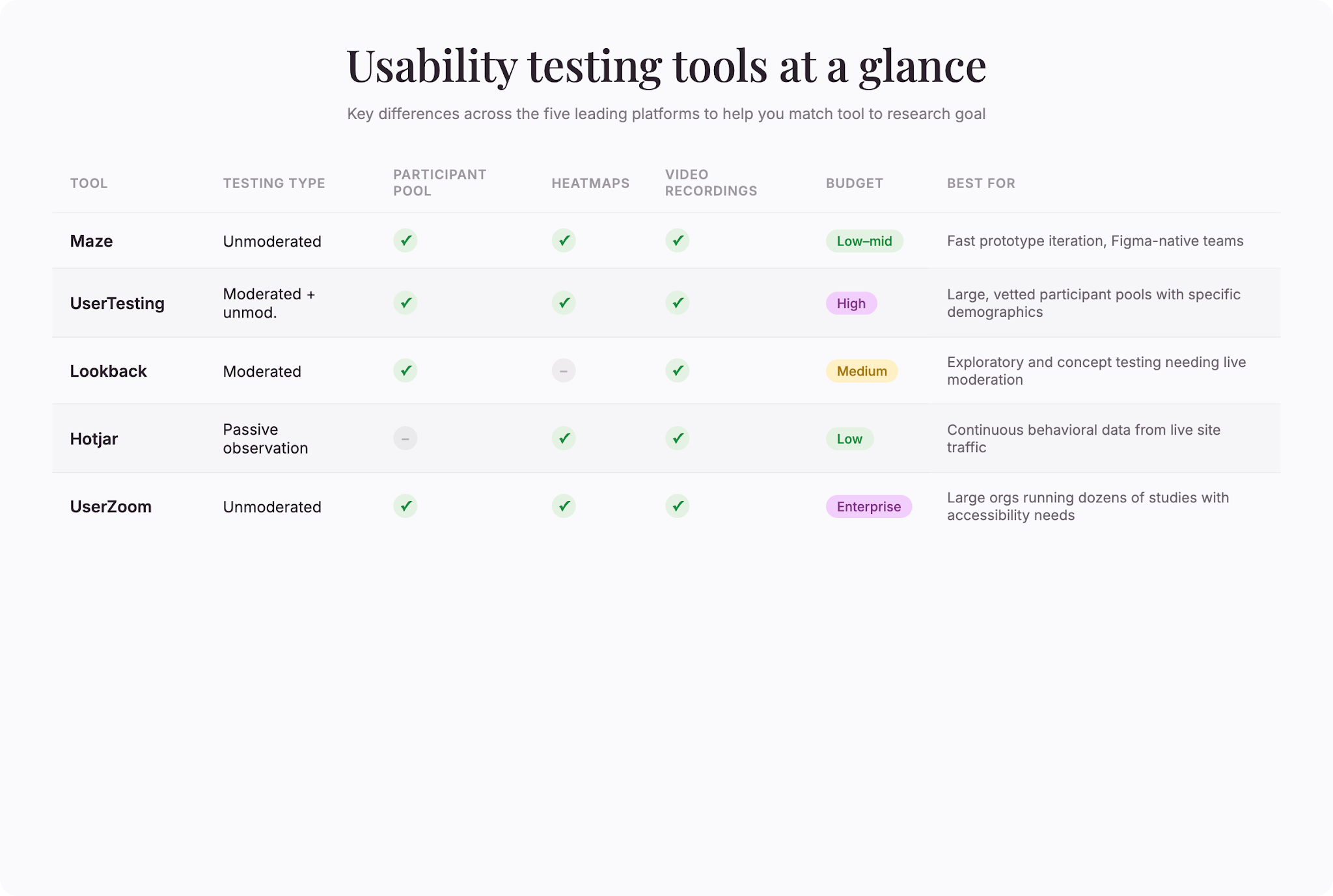
Some tools specialize in moderated testing, where a trained researcher guides participants through tasks and asks follow-up questions in real time. Others focus on unmoderated testing, where participants complete tasks on their own and you review recordings and data afterward. Some platforms bring their own participant pool; others let you recruit your own users or integrate with panel services.
Cost varies widely. Some charge per study, others per participant, and still others use subscription models. Setup time matters too. A tool that takes an hour to configure won’t work if you need feedback tomorrow. Consider whether you need video recordings, heat maps, click-stream data, or sentiment analysis. Think about the devices and platforms you’re testing on—web, mobile, desktop, native apps, or prototypes.
Large enterprises accounted for 69.15% of the global usability testing tools market in 2024, and cloud-based deployments held 61.35% of the market that same year (Market.us, 2024). That distribution reflects the reality: enterprise teams often need robust security, multiple user seats, and integration with their existing workflows. Smaller teams or those just starting out might prioritize ease of use and lower cost.
When evaluating usability testing tools, also consider the depth of analytics each platform provides. Some tools offer basic metrics like task completion and time-on-task, while others provide advanced capabilities such as sentiment analysis, facial coding, or AI-powered insight generation. The complexity of your research questions should guide your choice: simple validation studies may not require the same analytical depth as exploratory research aimed at uncovering unmet user needs.
The tools leading the space
Maze
Maze started as a platform for startups testing early-stage designs and has grown to serve more than 3,000 companies as of 2025 (Maze, 2025). It focuses on unmoderated, remote testing of prototypes, websites, and mobile apps. The platform integrates with design tools like Figma, making it easy to test your work directly from where you design it.
Maze shines when you need quick feedback on design iterations. You can set up a study in minutes, recruit participants from Maze’s own panel or bring your own, and get results within hours. Heat maps and session recordings show you exactly where people click, how far they scroll, and when they get confused. The downside: Maze is less suited for deeply exploratory research or testing that requires a trained moderator asking nuanced follow-up questions.
UserTesting
UserTesting operates one of the largest participant pools among usability testing platforms, a key differentiator for studies that need recruited test users (UserTesting, 2025). The platform supports both moderated and unmoderated testing, making it flexible for different research goals. You can recruit specific demographics, run studies on live websites or prototypes, and access professional video recordings of user sessions.
The strength here is access. If you need participants from a particular geographic region, income bracket, or job title, UserTesting can find them. The platform also offers live moderated sessions where you can ask follow-up questions in real time. The trade-off is cost: recruiting and moderating sessions through UserTesting typically runs higher than self-serve alternatives, though you’re paying for convenience and quality screening.
Lookback
Lookback is built for moderated, in-depth user research. You schedule a video session with a participant, guide them through your product, and ask questions as they work. The platform handles recruitment, video capture, and session management.
Lookback works best when you need to understand the “why” behind user behavior, not just the “what.” If a participant gets stuck, a trained moderator can ask, “What were you looking for when you clicked there?” or “What would you do next?” Those conversations reveal mental models, frustrations, and opportunities that metrics alone can’t capture. Because it’s moderated and requires scheduling, Lookback takes more time and money than unmoderated tools, but for exploratory or concept testing, that investment often pays off.
Hotjar
Hotjar takes a different approach. Instead of recruiting participants for formal tests, it lets you observe how real users interact with your live website. Heat maps show where people click, scroll, and hover. Session recordings let you watch individual users navigate your site. Feedback polls and surveys gather opinions directly on the page.
This tool is useful if you want continuous, passive data on how actual visitors use your product. You don’t recruit anyone—you analyze your existing traffic. That means lower cost and instant access to real-world behavior. The downside: you can’t ask participants to complete specific tasks or explore features they wouldn’t naturally encounter. Hotjar is better for understanding actual user behavior than for testing new designs or getting directed feedback.
UserZoom
UserZoom is an enterprise-grade platform that handles remote, unmoderated user testing across teams. It includes session recordings, heat maps, click tracking, and advanced reporting. UserZoom also supports accessibility testing, which is critical if your product serves users with disabilities.
UserZoom requires more setup and investment than some alternatives, but it’s built for teams that run dozens of studies a year and need detailed analytics, integrations with their tech stack, and role-based permissions. If you’re a large organization with dedicated research staff, the infrastructure is worth it. If you’re a small team running occasional tests, you might find it overly complex.
Key metrics in usability testing
Understanding what data these tools measure helps you pick the right one for your goals.
In usability studies, the average task success rate is around 78%, only roughly 10% of tasks are completed with zero errors, and users average about 0.7 errors per task (UXCam, 2025). Those benchmarks matter. If your task success rate is 55%, you know there’s a problem. If it’s 92%, you’re performing well. Most tools will show you success rates alongside session recordings and heat maps so you can see both the numbers and the behavior driving them.
Common metrics include:
- Task completion – Did the participant finish what you asked them to do?
- Time on task – How long did it take to complete the task? Longer times often signal confusion or friction.
- Error rate – How many mistakes did users make? Errors can mean unclear instructions, poor labeling, or confusing navigation.
- Single ease of use (SEU) – A one-question rating asking how easy the task was. Fast to collect and surprisingly predictive of user satisfaction.
- System Usability Scale (SUS) – A 10-question benchmark that gives you a standardized score (0–100) comparable across studies and tools.
- Sentiment – Some platforms use AI to analyze participants’ tone or facial expressions during video sessions, flagging moments of frustration.
The best tools let you segment results, comparing success rates across different user personas, devices, or regions, so you see where specific problems emerge. Beyond these core metrics, many usability testing tools now offer advanced features like heatmaps that highlight areas of high interaction density, scroll-depth analysis showing how far users travel through your interface, and attention tracking that reveals which elements capture user focus.
These additional layers of data help teams understand not just whether users succeed, but how efficiently they navigate and where their attention naturally gravitates.
How early testing saves time and money
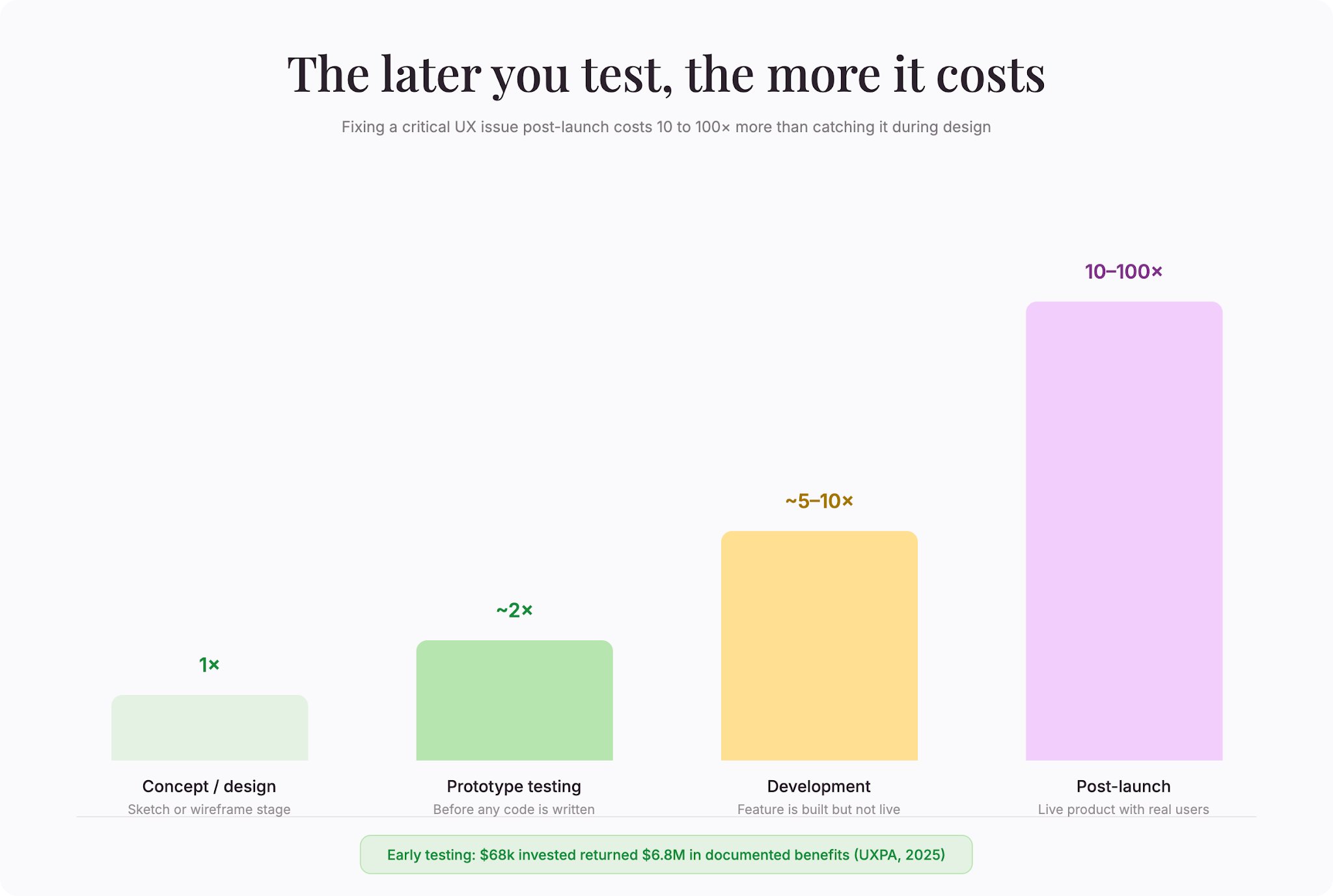
Fixing a critical UX issue after launch costs 10 to 100 times more than catching and fixing it during early usability testing (UXPA, 2025). That math is hard to ignore. Testing a prototype before you write a line of code is dramatically cheaper than redesigning a feature after thousands of users have already complained.
Most teams fall into one of two camps: those that test early and often, and those that test late or not at all. Early testers catch issues while the design is still flexible. Late testers learn the hard way—through support tickets, user churn, or angry reviews.
Integrating usability testing into your research workflow early means you can validate assumptions before investing heavily in development. That’s where platforms like ResearchFlow come in handy. By combining surveys, questionnaires, and testing workflows in one place, you can gather qualitative feedback, quantitative data, and behavioral insights without juggling multiple tools. The smoother your workflow, the more likely your team is to test consistently—and consistent testing is what drives better products.
Choosing the right tool for your research
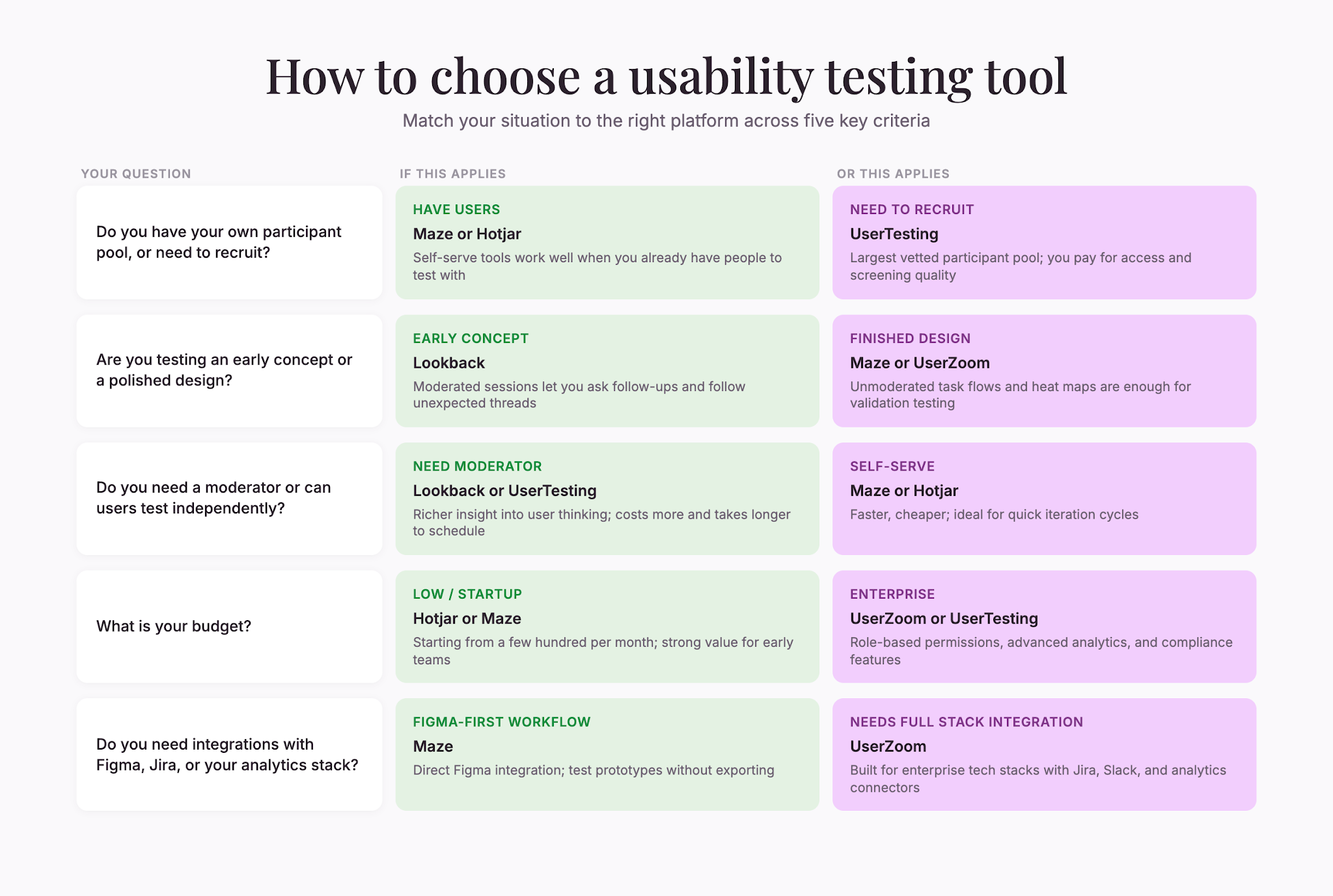
The “best” usability testing tool depends entirely on your situation. Here are the key questions to ask:
Do you have a participant pool, or do you need to recruit?
If you have a list of customers or users willing to test, you can skip the recruitment overhead and use a self-serve tool like Maze or Hotjar. If you need specific demographics or a large, vetted group, UserTesting’s participant access is hard to beat, but you’ll pay for it.
Are you testing early concepts or validating a finished design?
Early-stage concepts need exploratory, moderated testing where you can ask open-ended questions and follow hunches. Tools like Lookback excel here. If you’re validating a polished design and mainly need task success rates and heat maps, an unmoderated tool like Maze or Hotjar works well.
Do you need a trained moderator, or can users test independently?
Moderated testing costs more and takes longer to schedule, but you get richer insight into user thinking. Unmoderated testing is faster and cheaper, but gives you less context for why users act as they do. Many teams run both: unmoderated tests for quick iteration and moderated tests for deeper exploration.
What’s your budget?
Self-serve tools like Hotjar or Maze can cost as little as a few hundred dollars per month. UserTesting or Lookback with moderated sessions and professional recruitment can cost thousands. Enterprise platforms like UserZoom sit at the high end. Match your tool to what you can spend.
Do you need integrations with your existing stack?
If you use Figma, Jira, Slack, or analytics platforms, check whether your tool integrates with them. A tool that plays nicely with the software your team already uses will save setup time and keep data flowing without manual handoffs.
Next steps: Building a testing rhythm
Picking a tool is just the beginning. The real power comes from making usability testing a habit, not a one-off event. Teams that test frequently—weekly or biweekly—catch problems early, iterate faster, and ship better products.
Start small. Run a quick unmoderated test with your current tool. Watch three or four sessions. Note where people get stuck. Fix the biggest issue and test again. As you build confidence and see the payoff, you can expand to moderated studies, larger participant groups, or more specialized platforms.
Whether you’re using simple usability testing tools for quick design validation or investing in comprehensive platforms for large-scale research initiatives, the key is establishing a testing cadence that fits your team’s capacity and research goals. Even modest investments in usability testing tools pay dividends over time by preventing costly redesigns and improving user satisfaction metrics that drive retention and growth.
The investment in usability testing is worth it. A few thousand dollars spent on testing early can save you hundreds of thousands in rework, customer support, or lost revenue down the line.
The tools are there. The question is whether you’ll use them.

Liked that? Check these out:
.webp)

Product
Typeform vs. Google Forms: which should you choose in 2026?
Debating which form builder is better suited to your needs? This article provides a detailed comparison to help you compare Typeform with Google Forms, giving you an in-depth view of how Typeform stacks up against Google Forms so you can decide for yourself.
Read more