Average survey response rate: Benchmarks and how to improve
Struggling to get survey responses? Learn how to maximize response rates (and collect better data) with data-driven strategies and design best practices.

Contents
Struggling to get survey responses? Learn how to maximize response rates (and collect better data) with data-driven strategies and design best practices.
According to survey response rate benchmarks, average response rates can vary widely, but 33% is a common benchmark. Surveys can be one of the most influential tools in your marketing toolbox, giving you a direct line of communication with your audience and valuable zero-party data.
But a survey is only as powerful as the responses it collects. Even the most well-intentioned survey can fall flat if it doesn’t keep people engaged from start to finish.
The good news? With the right approach and survey design, you can boost survey response rates and collect richer, more actionable insights. To uncover what works, our team dug into the data to understand what drives people to complete surveys or drop off.
In this guide, we’re breaking down what impacts survey response rates, how to create surveys people want to complete, and small changes that can lead to big results.
What's a survey response rate?
A survey response rate is the percentage of people who completed your survey compared to how many received it. It can help indicate whether you’re reaching the right audience and providing an engaging survey experience.
When it comes to maximizing your survey response rate, sample size matters—but it’s not just about getting your survey in front of large groups of people. It’s also about optimizing the survey experience so people want to complete it.
The result? More data and higher-quality responses.
To calculate your survey response rate, divide the total number of people who completed your survey by the number of people who received it.
For example, imagine you share a survey with 100 people and only 45 people complete it. Your survey response rate would be 45% (or 45/100).
What's a good survey response rate?

A "good" survey response rate heavily depends on the audience and context of the survey. According to Kantar, response rates between 5% and 30% are generally considered acceptable, while anything above 30% is considered excellent.
With Typeform, that number is even higher—Typeform surveys have an average response rate of 47%.
Average response rate by survey type
- Customer surveys: 10–30%
- Employee surveys: 65–85%
- Typeform surveys: 47%
*Sources: Skeepers andCustomInsight
Factors impacting survey response rates
When it comes to building effective surveys, experience is everything. People are more likely to complete surveys that feel relevant, intuitive, and engaging.
Many factors can impact your survey response rate, including:
- Sample size. Typeform generally recommends gathering at least 400 responses for market research, though the right number depends on your audience and survey goals.
- Survey topic. Niche survey topics may limit your sample size or response rate when compared to broader topics. For example, you might receive fewer responses on a survey about how solopreneurs use AI assistants than one on how people use AI assistants in general.
- Survey design. Design can impact user experience and help (or hurt) your ability to gather more data.
- Survey length. Our research shows that surveys with more than six questions have less than a 50% completion rate. If your survey is too long, people may start to drop off—lowering your response rate and the amount of data you gather.
- Seasonality. Survey-takers might be less engaged depending on the time of year, which can affect response rates.
- Mobile responsiveness. How responsive your survey design is can impact its response rate. People frequently access surveys from mobile devices or tablets, so it’s crucial to optimize for the formats your target audience is likely to use.
- Data privacy. Some survey-takers might be reluctant to share their data. Be transparent about how you plan to use their data to build trust and boost response rates.
Get higher-value insights with zero-party data
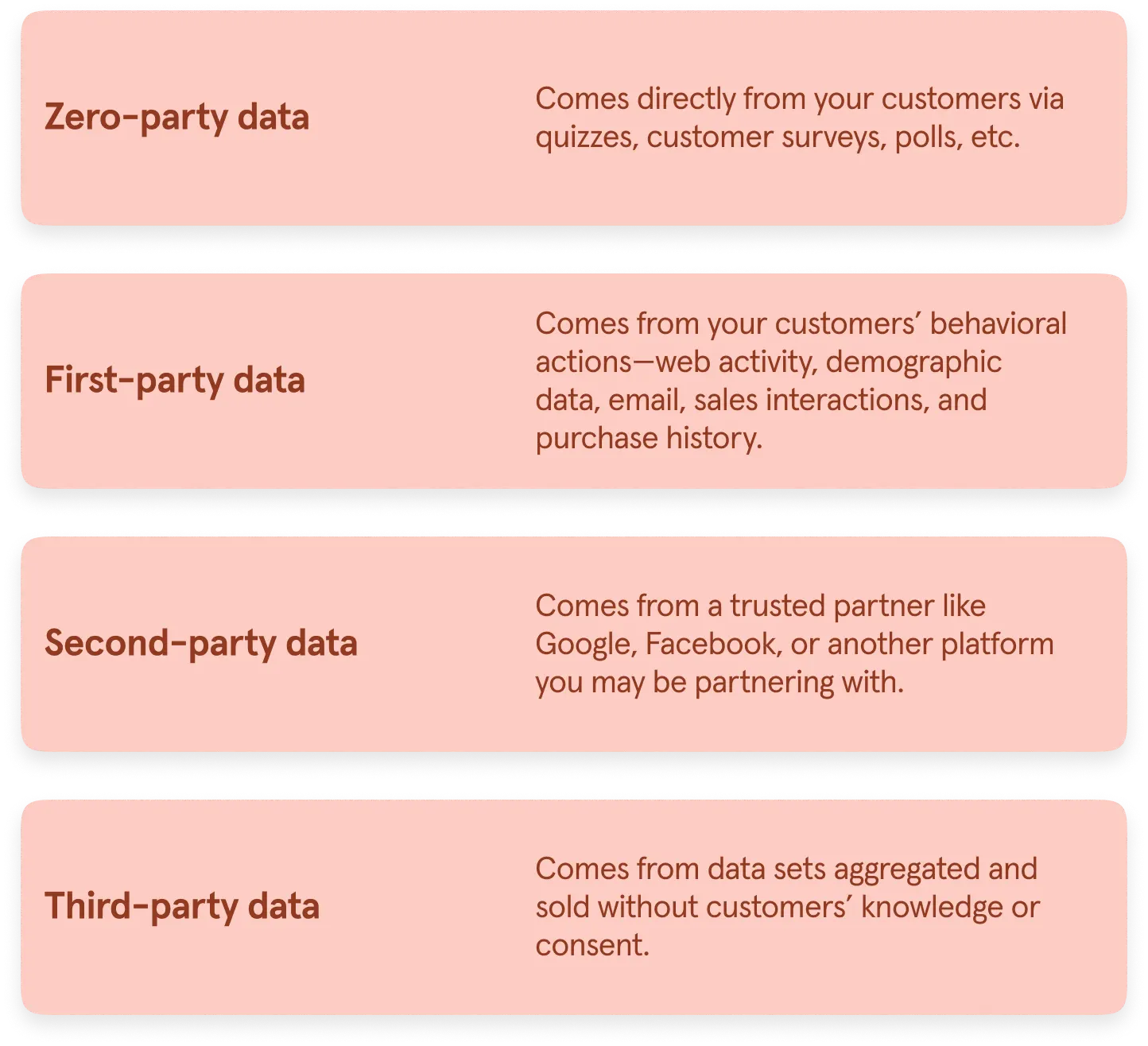
An effective survey helps you collect zero-party data (ZPD). ZPD is the data someone gives you directly and voluntarily—instead of data you collect from website cookies or purchase from a third-party source.
Zero-party data has always been immensely useful to marketers—it's your direct route to understanding your customers' wants, needs, and pain points. And today, it's more essential than ever because:
- Browser restrictions, privacy regulations, and shifting consumer expectations have made third-party data increasingly unreliable and complicated to use
- Growing privacy concerns and regulatory shifts, like GDPR and CCPA, require businesses to prioritize user consent and transparency in data collection
- There’s never been a greater demand for authentic engagement and personalization—drawn from direct insights rather than assumptions from interactions
The zero-party data you gather from survey responses can be invaluable for your marketing strategy, delivering better customer experiences, and more. It's a powerful tool for helping you build a competitive edge and:
- Creating more detailed and nuanced buyer personas
- Increasing trust and building a connection with leads and customers
- Improving your messaging and positioning
- Increasing your product-market fit
11 ways to optimize your survey response rate
There's an art and a science to asking questions that people are willing—even eager—to answer. Here's what we've found boosts survey response rates.
1. Lead with a welcome screen
Make a great first impression with a well-designed welcome screen. A welcome screen can introduce the purpose of your survey, explain who you are, and help entice people to get started.
The welcome screen should entice your audience enough that they open the survey and get started. Incentivizing responses is usually a safe bet, but you can also follow these tips to get survey-takers to complete your survey:
- Start with a question—just like you would in a real-life conversation
- Be clear about what you're asking for, like customer feedback
- Brand your form so it's instantly recognizable to your audience
2. Highlight survey progress and purpose
Help survey-takers stay informed of their progress by adding a progress bar. This lets them see how many questions are left, giving them a clearer sense of how much of the survey remains.

You can also encourage them by highlighting the purpose of the survey and sharing an estimate of how long the survey should take to complete on the welcome screen. Written cues throughout, like, "Just a few more questions!" are also helpful.
3. Provide an incentive
No surprise—people are more likely to complete surveys that offer an incentive in exchange for filling them out. You can get more survey responses by offering something of value—like a coupon, freebie, or chance to win a prize.
Or you can offer something less tangible, like exclusivity, by using language such as:
- Be the first to know
- Exclusive
- Never-before-seen
- Members-only/Subscribers-only
4. Be transparent with data
Today’s consumers are increasingly wary about handing over their data. Being transparent about what you plan to do with the information you collect can help build trust with survey-takers.
You can give them the transparency they crave by:
- Telling your audience exactly how you plan to use their data when distributing the survey
- Adding some information and context to your survey's welcome screen
- Including a legal question field within your survey, which allows you to outline the terms under which you’ll use data, so survey-takers can accept or refuse them
5. Consider readability
Nobody will bother filling out a survey they can barely read. Start by making sure your surveys are accessible to everyone.

Typeform provides accessibility features and tools to help you create forms that align with WCAG 2.1 Level AA standards. You can also use Typeform’s accessibility checker to review elements like color contrast and image alt text before publishing.
Here are a few accessibility principles to keep in mind when creating your surveys:
- Use alt text to describe all the images in your survey
- Explain where your hyperlinks go in the main body of the text
- Add closed captions to any videos you include
- Make sure your questions, answers, buttons, and background meet appropriate color contrast requirements
6. Capture emails upfront

Typeform research found that asking for an email first is associated with a 9% higher completion rate.
Why? Asking for an email upfront can encourage people to invest in the interaction early, but it’s best to avoid assuming why they choose to continue.
7. Ask one question at a time
To create a truly conversational experience, avoid bombarding survey-takers with a bunch of questions all at once. By asking questions one at a time, you can create a more engaging and less overwhelming experience.

Unsure of how many questions to ask? Typeform’s research found that forms with six or fewer questions had the highest completion rates. Forms that took less than a minute to complete also had a 15% higher completion rate than longer forms.
8. Ask intentional questions
How you ask your questions matters just as much as which questions you ask. Asking better questions can help you gather more useful insights, minimize bias, and create a positive experience.
When writing survey questions, make sure you:
- Use direct and transparent language
- Are empathetic and reassuring
- Ask unbiased and easy-to-understand questions
You should also vary the types of questions you use throughout your survey. Mix it up with multiple-choice, picture choice, and Likert scale questions to keep respondents engaged.
9. Personalize the individual survey experience
.png)
Today’s customers don’t just enjoy personalized brand experiences—they expect them. 71% of customers expect brands to deliver personalized interactions, and 76% get frustrated when this doesn't happen.
Dynamic surveys can help you deliver on those expectations by tailoring the experience to each individual and showing them more relevant questions.
96% of Typeform customers agree they have a better brand experience with Typeform.
Typeform offers numerous personalization features:
- Logic can automatically adapt the survey path based on each individual's prior responses. For example, if your first question asks someone for their age, you can route them to a series of questions based on their age group.
- Clarify with AI to capture more detailed responses and richer insights from each response. When survey-takers answer open-ended questions with vague responses like “bad,” AI can automatically ask a personalized follow-up question for clarification.
- URL parameters so you can track information about survey-takers, segment your audience, and make your forms more personal. You can use information you’ve already captured about a person, like their name or traffic source, to personalize the experience.
- Recall lets you reference information someone provided earlier in the survey, like their first name, later in the form.
- Logic can also create custom survey paths based on each person’s answers, helping the experience feel more relevant and conversational.
10. Prioritize design
In an era of fleeting attention spans, it’s essential to make your user experience as engaging as possible to collect quality data and maximize survey responses. Focus on designing a survey that's beautiful, unique, and genuinely enjoyable to fill out.

With Typeform, you can create customizable surveys without needing to code.
Our drag-and-drop builder lets you effortlessly add and rearrange questions while customizing nearly every aspect of your surveys with:
- Editable background images, layouts, and links
- Customizable thank you pages and welcome screens
- Mobile-friendly forms
- A library full of integrated photos, videos, and icons
- 3,000+ customizable form templates
- Brand kits that let you apply logos, color palettes, fonts, and themes across your forms
11. Make it unique with custom branding

If you want to build a strong brand—the kind that’s instantly recognizable and memorable—consistency is key. Consistent branding fosters trust, shapes brand perceptions, and reassures your audience that they’re engaging with a familiar brand.
You should use consistent brand colors, fonts, logos, and style across all of your marketing touchpoints—including your surveys.
With Typeform, staying on-brand is ridiculously easy. You can create your own brand kits to seamlessly apply your branding to everything you create. Add your custom fonts, colors, images, and logos, and brand every survey in just a few clicks.
Want more survey optimization strategies and inspiration? Subscribe to Informed—a monthly newsletter where our team shares expert tips, industry trends, and practical advice to help you boost engagement and make smarter marketing decisions.
From better surveys to better answers with Typeform
You can use multiple different tactics to improve your survey response rate—from your welcome screen to the way you ask questions—but ultimately, it all comes down to creating surveys worth filling out.
By tailoring your survey to each individual, prioritizing its design and flow, and incentivizing survey-takers to complete it, you’ll do more than improve your survey response rate. You’ll collect better data and spark conversations with your audience.
Typeform gives you tools to create engaging, customizable surveys with features for personalization, design, and analysis.
With better surveys, you’ll get better answers—so you can make better decisions. Ready to see the difference Typeform can make in your business? Try Typeform for free.