Best Product Feedback Tools for 2026
Compare the best product feedback tools for 2026: survey platforms, in-app feedback, usability testing, and feature request boards in one guide.

Key takeaways
- Four categories, four jobs: Survey platforms, in-app behavioral tools, usability testing platforms, and feature request boards each answer a different kind of product question.
- Feedback tooling earns its budget: Documented returns on usability investment are outsized, and analysts expect the tooling market to keep growing fast through 2034.
- Behavior beats memory: Surveys capture what users say; heatmaps, session recordings, and in-product studies capture what they actually do.
- Start small to win the budget: Wire one tool to one upcoming decision and let the result argue for the next purchase.
Every product team claims to listen to its users. Far fewer can point to the system that actually does the listening. That's what product feedback tools are for: they collect what users say and do, sort the noise into patterns, and route the findings to people who can act on them. This guide walks through the strongest options for 2026 across four categories—survey platforms, in-app feedback, usability testing, and feature request management—so you can match the tool to the way your team works.
Why feedback tooling is worth the budget
A product feedback tool is any platform that helps you gather, organize, or act on input about your product, whether that input is a survey answer, a session recording, a support ticket, or an upvote on a feature request. Spreadsheets and shared inboxes can be part of the feedback workflow, but they don’t tend to support high volume. Purpose-built tools exist because raw feedback is messy, repetitive, and scattered across channels, and someone has to turn it into a decision.
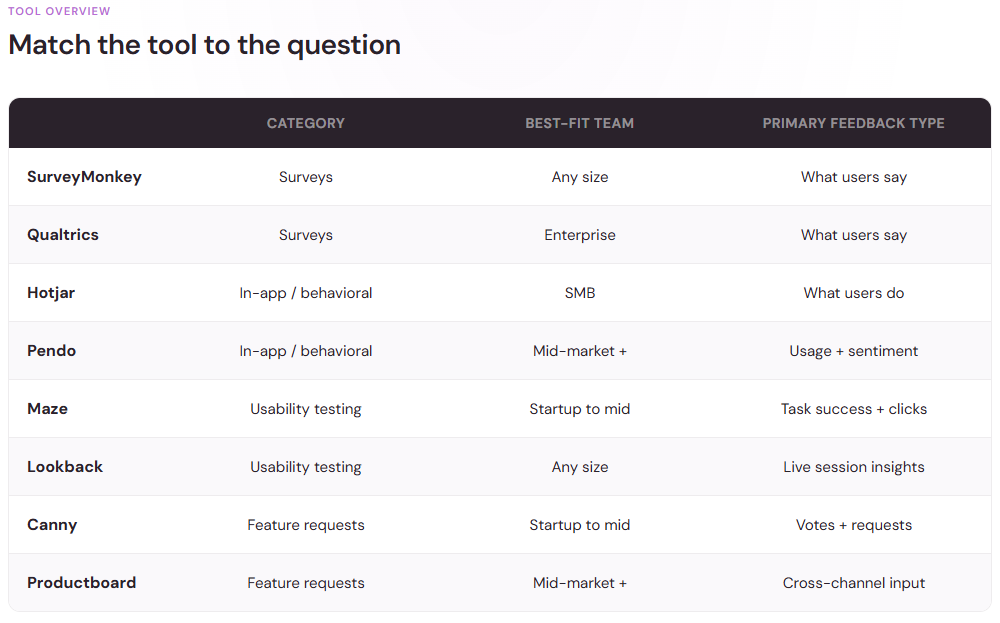
The market has already voted. The global usability testing tools market was valued at $1.51 billion in 2024 and is projected to reach $10.41 billion by 2034, growing 21.3% a year. That growth reflects a simple reality: teams that test with real users ship better products, and teams that don't eventually pay for the difference.
The returns can be dramatic. On one system used by over 100,000 people, a $68,000 usability investment generated $6.8 million in benefit within the first year. Broader analyses put the return at roughly $100 for every $1 invested in user experience (UX). Yet only 55% of companies conduct UX testing. If you're in the other 45%, the tools below are your starting lineup.
Survey and multi-channel feedback platforms
Modern feedback platforms in 2026 combine AI-powered analytics, collection across surveys, reviews, support tickets, chats, and in-app prompts, and automated case management. A few names stand out.
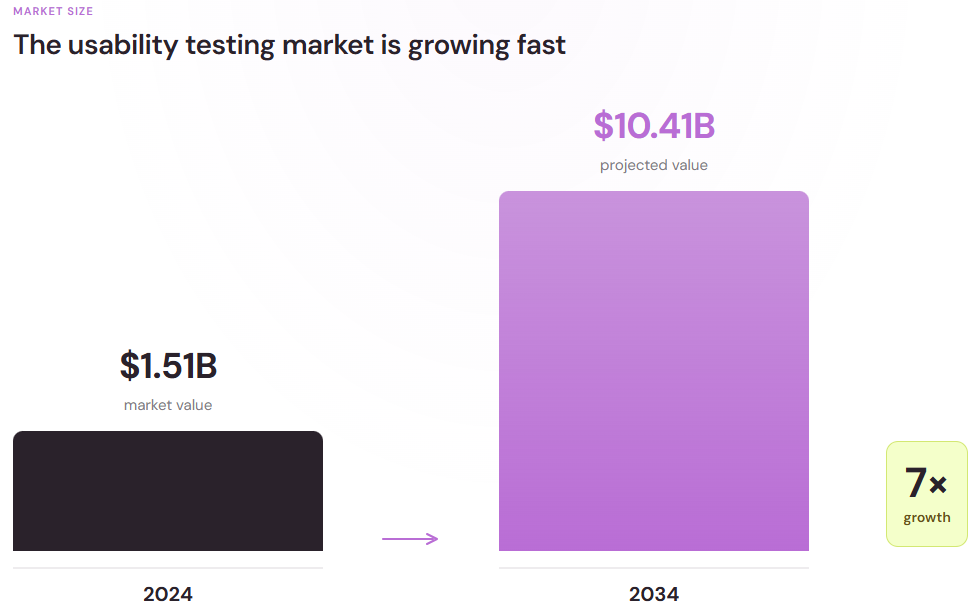
SurveyMonkey
The familiar choice, and familiarity counts when you need responses from a broad audience. SurveyMonkey offers a large template library, a question bank refined over decades of survey research, and reporting that non-researchers can read without training. It's a strong fit for product teams that want quick pulse checks or concept tests without a dedicated research function. Having a wide range of integration also makes it easy to share results with CRM tools and collaboration, ultimately reducing the manual work involved in acting on customer feedback.
Qualtrics
This is the most enterprise-friendly solution, because it handles complex study designs, advanced statistical analysis, and strict compliance requirements, making it common in large organizations with formal research teams. The tradeoff is weight: pricing and setup are heavier than most small teams need. Choose it when rigor and governance matter more than speed. Organizations that regularly conduct large-scale customer or employee research appreciate its advanced segmentation, analytics, and customizable reporting capabilities.
Mopinion and InMoment
Both focus on feedback across channels rather than standalone surveys. Mopinion specializes in feedback collection for websites and apps, with dashboards built for digital teams. InMoment leans into voice-of-customer programs, pulling survey results, reviews, and support conversations into one view of how customers feel. Consider either one when feedback arrives from many directions and your real problem is consolidation, not collection.
Wherever you land, the delivery channel shapes what you'll hear. In-app and SMS surveys consistently draw higher response rates than email, which is easy to ignore in a crowded inbox. Meet users where they already spend their time, and keep the task short once you get there.
In-app and behavioral feedback tools
Surveys capture what users say. Behavioral tools capture what they do, which is often a different story. People report the problems they remember, phrased the way they understand them, but they rarely mention the button they never noticed or the step they abandoned without thinking. This category matters especially in building mobile-first digital products: users are five times more likely to abandon a task when a site isn't optimized for mobile. Very few of them will ever write in to report the problem. They simply leave.
Hotjar
Hotjar pairs lightweight feedback widgets with heatmaps and session recordings. You can watch where users click, scroll, and stall, then drop a one-question poll on the exact page where users get confused. For small and mid-sized teams, it's one of the fastest ways to connect what users do with and why they do it. The visual nature of its reports make it easy to share findings with designers, stakeholders, and marketers who may not have a research background.
Pendo
Pendo combines product analytics, in-app guides, and feedback collection into one platform. Because it tracks feature usage alongside sentiment, it can tell you whether the users requesting a change actually use the feature in question. That context helps teams accurately build their roadmaps. Built-in onboarding guides and announcements also lets teams respond to feedback by educating users about any current features as opposed to building new ones.
Sprig
Sprig focuses on targeted in-product studies like short surveys and concept tests triggered by specific user behavior. Ask a question the moment someone abandons a flow, and you'll learn more than a quarterly survey ever tells you. It's built for product teams that want research woven into the product itself. Since these studies are tied to specific actions, teams are able to validate design changes continuously instead of waiting for scheduled research cycles.
Usability testing platforms
User interviews and usability testing are the two most widely used research methods, practiced by 88% and 80% of researchers respectively. The platforms below make these more practical for teams without a lab or a full-time researcher.
One distinction worth understanding before you compare them: moderated studies put a facilitator in the session to ask follow-up questions, while unmoderated studies let participants complete tasks on their own time. Moderated sessions go deeper but cost more hours. Unmoderated tests trade nuance for volume and speed. Most teams eventually want both, but your first purchase should match the questions you're asking right now.
Maze
Maze made its name with unmoderated testing that founders and designers could run themselves: prototype tests, card sorts, and five-second tests with no facilitator required. Its appeal is speed. Results often arrive within hours, and decisions can be validated quickly. It can also integrate well with popular design tools so teams can test prototypes before writing a single line of code.
Lookback
Lookback supports both moderated and unmoderated usability studies, with real-time collaboration so teammates can observe sessions live, plus an AI assistant called Eureka that surfaces insights from session recordings. It suits teams who want to watch users think out loud rather than read aggregated charts. Highlights, timestamps, and shared notes all make it easier to turn observations into actionable recommendations after having a session.
UserTesting
UserTesting's strength is its participant network. When you need feedback from people outside your own user base—new markets, specific demographics, or your competitors' customers—it can recruit participants and deliver recorded sessions quickly. Expect enterprise pricing to match the enterprise panel. This platform also provides standardized testing templates to make it easy to compare results across multiple studies over time.
Feature request and roadmap tools
Feedback only pays off when it changes what you build next. That handoff is where most feedback programs fall short: insights pile up in one tool while the roadmap gets decided in another, and the two never meet. These two platforms exist to close that gap.
Canny
Canny gives users a public board where they can submit and vote on feature requests. Duplicates are merged, votes accumulate, and when you ship something, everyone who asked for it is automatically notified. It turns a chaotic request inbox into a ranked, transparent list. With Canny, product teams can also collect feedback from internal stakeholders, which is useful for balancing customer requests with support input and sales.
Productboard
Productboard aggregates input from support tickets, sales calls, and surveys, then links each piece of feedback to specific roadmap items. Product managers use it to defend priorities with evidence instead of deferring to the loudest voice in the room. Having a prioritization frameworks and roadmaps helps communicate product strategy clearly to customer-facing teams, executives, and engineering.
How to choose: four questions before you buy
The best product feedback tools are the ones your team will actually use every week. Before comparing feature lists, answer these questions:
- What decision will this feedback inform – A tool that gathers everything informs nothing
- Where are your users most reachable – Email, in-app, and SMS response rates differ widely
- Who reads the results – Trained researchers can handle Qualtrics, while most teams need simpler reporting
- What does a good score look like – Set a benchmark before you start measuring
When it comes to scoring, check your benchmark against the rest of the market. On the American Customer Satisfaction Index's 100-point scale, full-service restaurants average 82 while non-fiber internet service providers average 71. A spread this wide reminds us that a "good" score only means something in the context of your industry.
There's a workflow dimension too: check how each tool fits with the systems you already run. A platform that pushes findings into your team's project tracker, support desk, or analytics stack will be more readily adopted. One that requires a separate login and a weekly export might be abandoned by the second month, no matter how capable it looked in the demo. Ask vendors to show the integration in action.
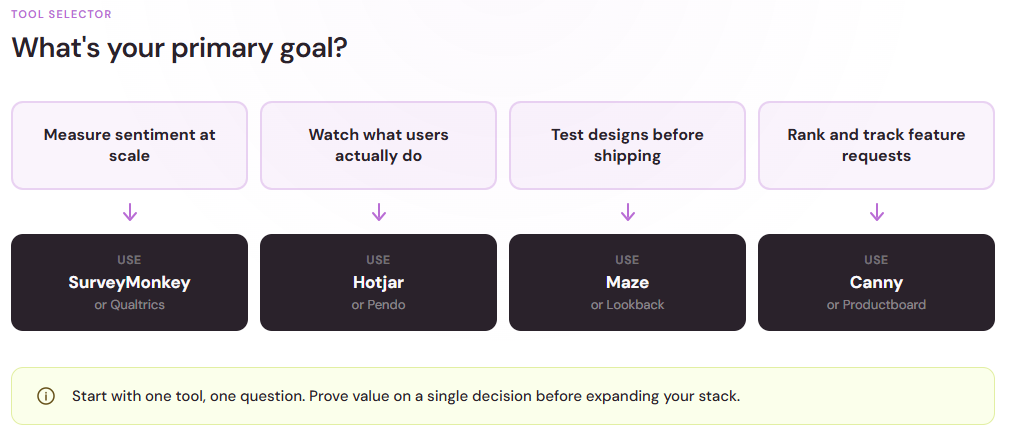
Start with one tool and one question
It's tempting to buy the platform that promises everything. Not so fast. Teams that get real value from feedback usually start with a single tool aimed at a single decision: a usability test before a redesign, an in-app survey after onboarding, a request board before roadmap planning. Prove the positive impact of feedback on one key decision, and the budget conversation for the next tool is a lot easier to have.