12 customer onboarding tools that reduce time to value
Customer onboarding software that reduces churn. Compare 12 platforms for data capture, guided workflows, video walkthroughs, and feedback loops.
Key Takeaways
- Onboarding isn't one moment: It's a journey—it spans signup, first product use, and the weeks after, and each of the 12 tools here covers a different stretch of it.
- Start with data, personalize from there: Interactive forms and CDPs capture what each customer needs upfront, so the rest of their experience feels tailored, not generic.
- Catch friction before it costs you: Usability testing and feedback tools surface where customers get stuck, and fixing issues early is far cheaper than fixing them after launch.
- The best results come from stacking tools: Combine data capture, personalized guidance, timely outreach, and feedback loops, then feed it all into a customer success platform for one clear view of who's thriving and who needs help.
Customer onboarding sets the tone for the entire relationship. When new customers get up and running quickly, they see value fast. When they struggle through a clunky process, they're already thinking about switching.
In other words, the stakes are high. Acquiring new customers costs five times more than retaining existing ones, so every onboarding experience matters. A seamless handoff from sales to product to support can mean the difference between a customer who sticks around and one who churns within the first month.
This guide walks you through 12 tools designed to reduce friction during customer onboarding, from capturing the right information upfront to guiding users through their first wins. Each tool tackles a different piece of the puzzle.
What to look for in a customer onboarding tool
Before diving into specific platforms, it helps to know what separates effective onboarding tools from the rest.
Data capture and qualification. The best tools let you ask the right questions early, so you understand what each customer needs and can personalize their experience from day one. Conditional logic, where answers determine which questions come next, keeps forms short and relevant rather than overwhelming.
Integration with your stack. Your onboarding tool won't live in isolation. It needs to talk to your CRM, product, analytics, and support tools so data flows smoothly and teams stay aligned.
Mobile-first design. Many customers will start their onboarding journey on a phone. Tools that work beautifully on small screens reduce friction and improve completion rates.
Automation and workflows. Manual handoffs slow things down. Look for tools that trigger actions automatically: sending welcome emails, assigning accounts to the right team, or logging data to your systems without human intervention.
Feedback collection. Onboarding doesn't end once a customer gets access. Asking for feedback early and often helps you spot where people get stuck and fix those bottlenecks.
The 12 tools
1. Interactive form builders
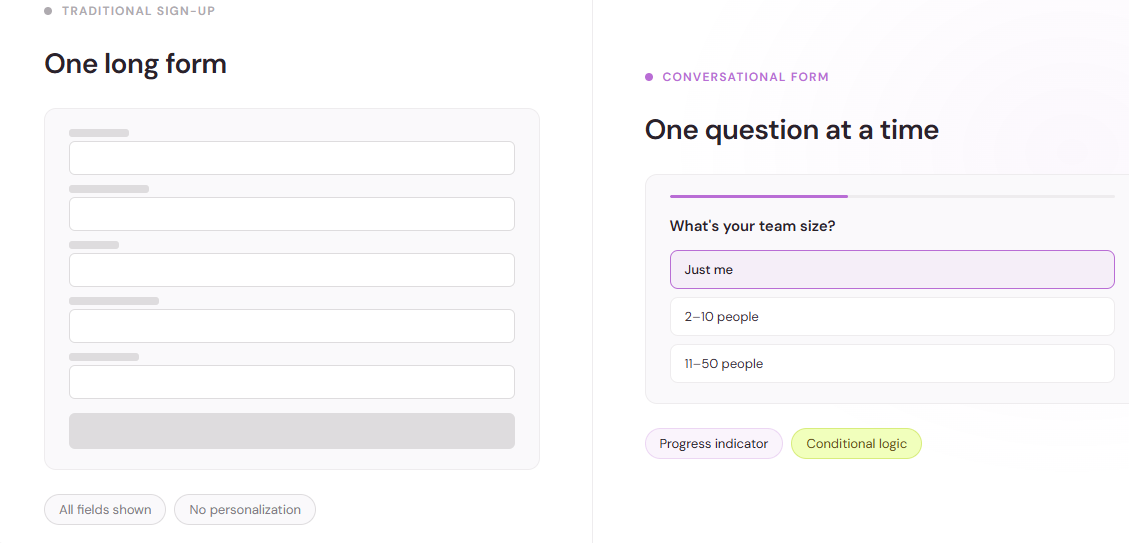
Interactive form builders let you replace static, tedious sign-up flows with conversational experiences that feel more like a dialogue than a questionnaire.
These tools excel at capturing information upfront—names, email, company, use case, team size—without making the process feel like a chore. Conditional logic means each customer sees only questions relevant to them, which keeps form length down and completion rates up.
Many also integrate directly with your onboarding platform or CRM, so responses automatically populate customer profiles and trigger the next steps in your workflow. This reduces manual data entry and gets people into your product faster.
2. In-app guidance platforms
Once customers land in your product, in-app guidance tools take over. These platforms overlay tutorials, tooltips, checklists, and walkthroughs directly on your interface without requiring code changes.
The best ones let you segment audiences, so new users get a different onboarding flow than power users, and track which prompts customers engage with and which they skip. That data tells you where your interface confuses people and where your messaging clicks.
They integrate with your analytics tools so you can connect engagement with in-app guidance to downstream behaviors like feature adoption and retention.
3. Knowledge base and documentation platforms
A great knowledge base is your silent onboarding assistant. It answers the questions customers ask themselves while using your product: "How do I add a team member?" "What happens if I exceed my monthly limit?" "Why isn't this button working the way I expected?"
The best platforms let customers search naturally, offer contextual help based on what page they're viewing, and integrate with in-app guidance so tutorials link directly to detailed docs. Many also track which articles get read most often, signaling where customers get confused or where your product design could be clearer.
4. Video onboarding and walkthrough tools
Some customers prefer watching a video to reading. Video walkthroughs let you show, not tell, how to get from signup to first success in your product.
These tools automate video creation—capturing your screen and your voice—and let you segment by customer type or use case. Track completion rates and drop-off points to see which segments stick with your videos and which ones tune out.
The best ones integrate with your CRM so you can trigger videos based on who a customer is and what they signed up to do.
5. Customer data platforms (CDPs)
A customer data platform unifies data about each customer from every touchpoint—signup forms, in-app behavior, support interactions, email engagement—into a single profile.
During onboarding, a CDP helps you know who each customer is and what they care about from the moment they land in your product. Use that to personalize their experience: show different features, suggest relevant use cases, or route them to the right team members.
CDPs also help you spot customers who are at risk of churning early, so you can intervene with additional support before they leave.
6. Survey and feedback tools
Lightweight surveys during and after onboarding give you direct feedback on what's working and what's slowing people down.
The best tools let you deliver surveys at the right moment—after a customer completes their first action, creates their first project, or hits a specific milestone. Use that timing to catch issues early and collect feedback when the experience is fresh.
Modern customer feedback platforms integrate AI-powered analytics, multi-channel collection (surveys, reviews, support tickets, chats, in-app), and case management automation. This means you're not just collecting feedback in isolation; you're connecting it to everything else you know about that customer.
7. Marketing automation and email platforms
Email remains your most direct line to new customers during their first weeks. Marketing automation platforms let you design a sequence of welcome emails, tips, and check-ins that guide customers through onboarding without requiring manual sends.
The best ones trigger emails based on specific actions: "customer created their first project," "customer invited a team member," "customer hasn't logged in for three days." This way, messages feel timely and relevant, not generic.
They also integrate with your CRM and product analytics so you can track which email sequences actually move the needle on adoption and retention.
8. Usability testing tools
Before launching onboarding flows to thousands of customers, test them with a small group of real users. Usability testing tools let you watch (or read recordings of) customers moving through your signup process, so you see where they hesitate, what confuses them, and where they abandon the flow.
Large enterprises accounted for 69.15% of the global usability testing tools market in 2024, and cloud-based deployments held 61.35% of the market that same year. This reflects how critical testing has become for companies serious about onboarding.
The ROI is stark: on a system used by over 100,000 people, a usability investment of $68,000 generated $6.8 million in benefit within the first year of implementation. Catching onboarding issues early saves money compared to fixing them after launch, when fixing a critical UX issue costs 10 to 100 times more than catching it during early testing.
9. Onboarding workflow automation platforms
These tools let you orchestrate the entire customer onboarding sequence across systems. Define a workflow: when a customer signs up, create an account in your product, send a welcome email, assign them to a success manager, log their info to your CRM, and trigger an in-app welcome message, all automatically.
Workflow automation reduces handoff errors, speeds up time-to-value, and frees your team to focus on customers who need human attention rather than on manual data entry.
10. Learning management systems (LMS)
For products with a steep learning curve or large teams being onboarded, an LMS lets you structure product education into modules, track completion, and offer certifications.
The best ones integrate with your product so users can jump directly from learning content into your app to practice what they've learned. Track which modules people complete, which they skip, and where they get stuck. That data guides your product education roadmap.
11. Community and peer support platforms
New customers often learn best from each other. Community platforms—whether Slack groups, discussion forums, or dedicated community sites—let customers ask questions, share wins, and see how others are using your product.
During onboarding, a thriving community reduces your support load and shortens time-to-value because customers find real-world examples and workarounds from peers faster than they'd find them in knowledge docs.
12. Customer success platforms
A customer success platform brings together all the data and tools your team needs to shepherd customers through onboarding and beyond. These platforms often combine task management, communication, and analytics in one place.
The best ones highlight which customers are progressing smoothly through onboarding and which are stuck or at risk. Use that visibility to proactively reach out, offer help, or adjust your playbook based on what you're seeing.
How these tools work together
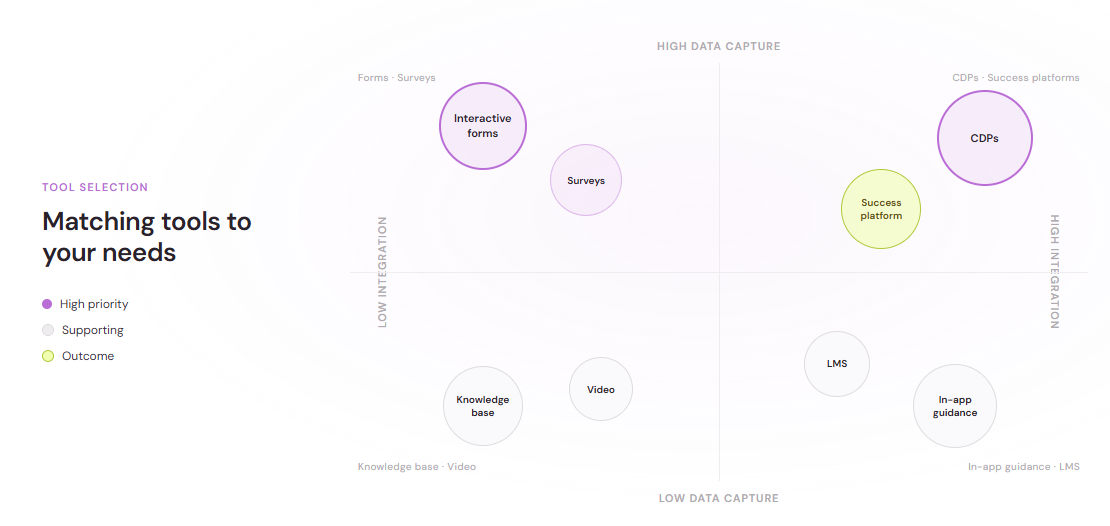
No single tool solves onboarding alone. The platforms that deliver the best results combine several of these approaches:
Start with interactive forms to capture the right information and qualify customers upfront. Feed that data to your CRM and product so each customer sees a personalized onboarding experience. Use in-app guidance and video walkthroughs to show them how to get their first win. Send timely emails to keep them moving forward. Collect feedback early and often to spot friction points. Use usability testing before launch to avoid shipping problems your entire customer base will encounter.
Finally, feed all of that data—form responses, behavior, feedback, support tickets—back into your customer success platform so your team has one clear view of which customers are thriving and which ones need help.
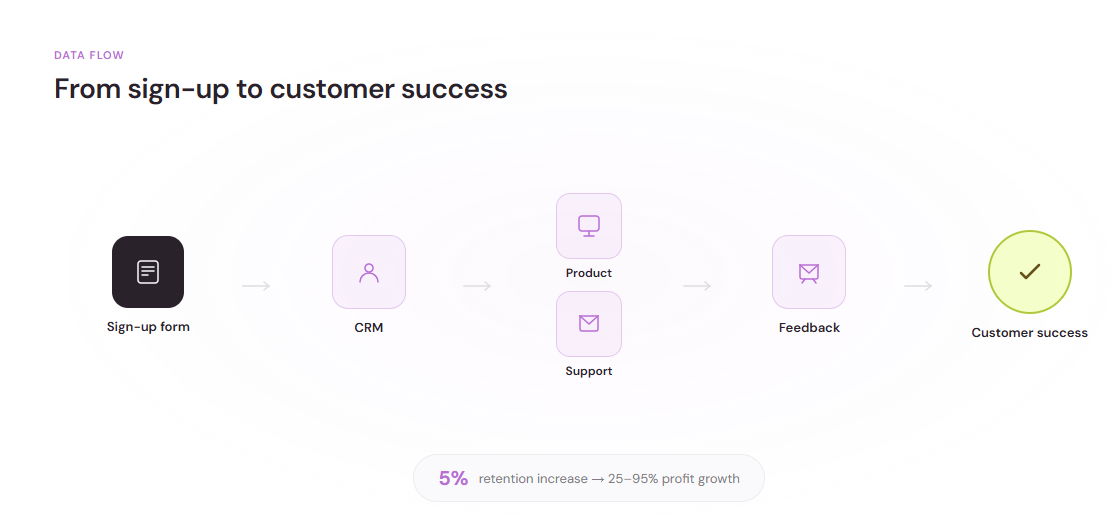
The math on onboarding is straightforward: reducing time-to-value means customers get to the moment where they see real benefit faster. That moment often determines whether they stay or leave. A five percent increase in retention leads to 25–95% increase in profits, so even small improvements in onboarding have outsized financial impact.
Key takeaway
Customer onboarding isn't a single moment. It's a continuous experience that spans signup, product access, first actions, and the weeks beyond. Each of the 12 tools above addresses a different part of that journey. The most effective onboarding stacks combine several of them, starting with clear data capture, moving into personalized product experiences, and finishing with ongoing support and feedback loops that help customers succeed and help you improve.