Best AI Interview Tools for User Research
Compare the best AI interview tools for user research: automated transcription, theme-spotting, and insight extraction to speed up analysis.
Key takeaways
- AI removes the grunt work from interviews: Transcription, tagging, and theme-spotting that once took days now take minutes, freeing researchers to focus on analysis and judgment.
- Match the tool to your research mix: Moderated depth, unmoderated speed, collaboration modes, transcription accuracy, recruitment, and security are the dimensions that separate platforms.
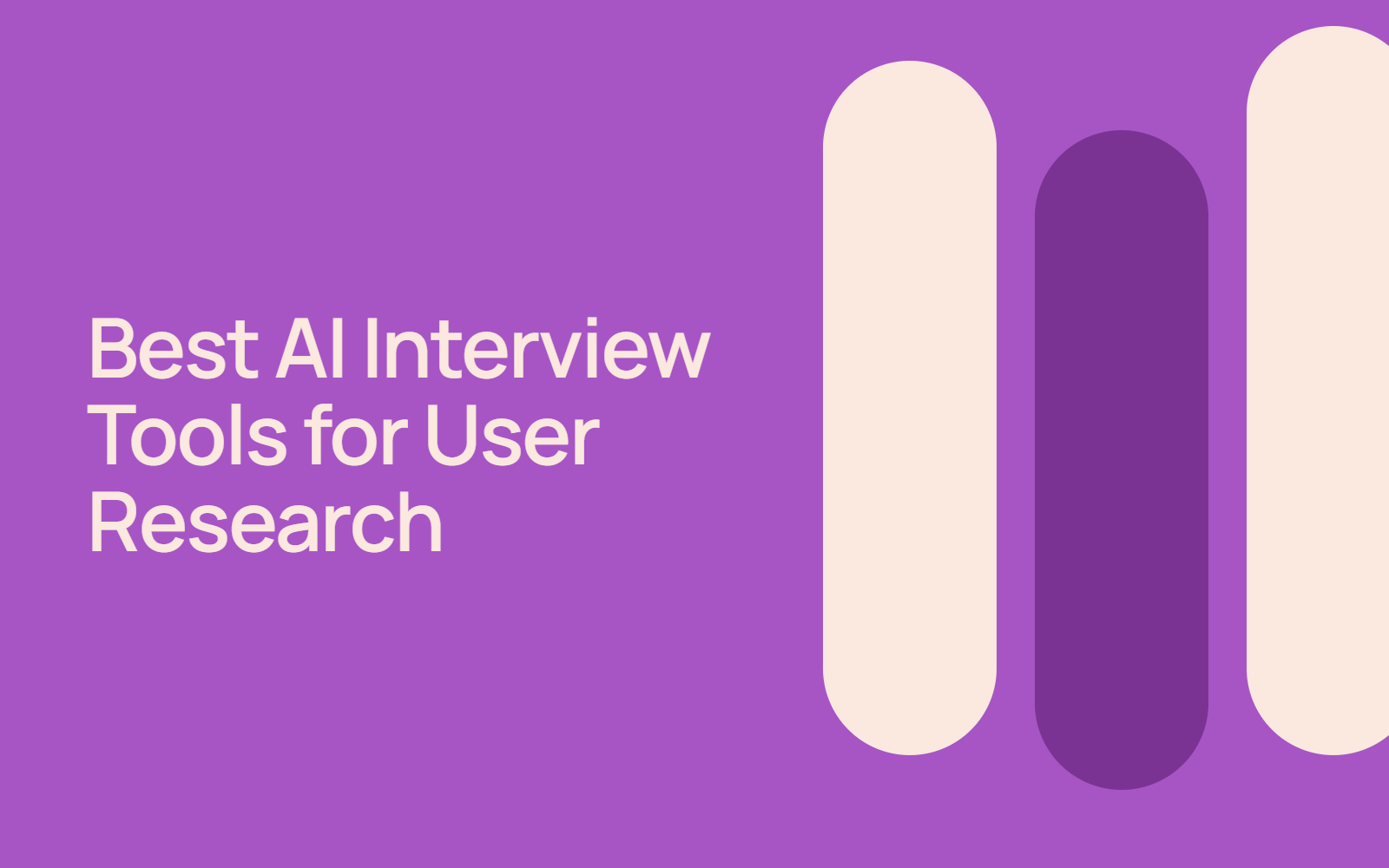
- Keep humans in the loop: AI can flag patterns, but only a researcher can judge whether a pattern matters by watching raw sessions, spot-checking auto-generated codes, and pairing interviews with other methods.
- Watch for AI on both sides of the table: A meaningful share of panel respondents now use LLMs to answer open-ended questions. Consider how this layer of filtration might impact the authenticity of your data.
Interviews are one of the most powerful ways to understand your users. When you sit down with someone, whether virtually or in person, you uncover nuanced insights that surveys alone can't capture. You hear not just what people think, but why they think it. You see hesitation, enthusiasm, and the real stories behind the numbers.
But conducting, transcribing, and analyzing interviews is time-consuming. You need to recruit participants, schedule sessions, take notes, review recordings, and synthesize findings. That's where AI interview tools come in. They automate the heavy lifting—transcription, initial coding, insight extraction—so you can focus on what matters: understanding your users deeply and acting on what you learn.
This guide covers the landscape of AI-powered interview tools designed for user research, how they work, and what to look for when choosing one.
What are AI interview tools for user research?
AI interview tools combine human-centered research methodology with machine learning to make interviews more efficient and insightful. They typically offer features like:
- Live transcription and recording – Capture every word automatically, with real-time transcripts that sync to video playback
- Automated insight extraction – AI scans recordings and transcripts to flag key themes, sentiment shifts, and quotable moments without you having to watch hours of tape
- Participant recruitment and scheduling – Built-in panels or integrations with research communities help you find and book participants faster
- Team collaboration – Let researchers, stakeholders, and designers watch sessions live or asynchronously, leave timestamped comments, and share findings in a communal workspace
- Analysis and coding – Semi-automated tagging and thematic analysis can structure qualitative data for faster synthesis
The goal is simple: get richer insights, faster, with less manual transcription and note-taking.
Beyond these core capabilities, modern AI interview tools often include advanced features like emotion detection, multi-language support, and predictive participant matching. These additions help research teams go deeper without proportionally increasing the time investment. Some platforms even offer built-in reporting templates that turn raw findings into stakeholder-ready dashboards, reducing the gap between raw data collection and actionable recommendations.
Why AI matters for interview research right now
Research, like many industries, is shifting toward AI adoption. Around 47% of researchers worldwide use AI regularly in their market research activities. That adoption spans survey design, data analysis, and increasingly, the interview process itself.
For interview research specifically, AI handles the parts that slow you down:
Transcription burden. Manually transcribing a one-hour interview can swallow the better part of a workday. AI does it in minutes, and with clear audio, the transcript usually needs only a light review pass rather than a full rewrite. The time savings compound quickly: across a project with 15-20 interviews, that's weeks of tedious work reclaimed. It's time your team can redirect toward deeper analysis, stakeholder alignment, or recruiting additional participants to strengthen your findings.
Insight synthesis. After 10 or 20 interviews, patterns emerge, but spotting them requires re-watching sessions or rereading transcripts. AI can flag recurring themes, emotional moments, and contradictions across sessions so you don't miss the signal in the noise. The tool can also highlight outliers and minority perspectives that might otherwise get buried in majority themes, ensuring you capture the full spectrum of user experience.
Data homogenization risk. There's a catch: 34% of participants on a popular online research platform reported using LLMs to help answer open-ended survey questions, which raises concerns about AI-generated responses skewing real user perspectives. This makes live interviews that much more valuable. In a moderated conversation, you're watching and listening to a real person react in the moment, which makes it far harder for canned, AI-generated answers to pass unnoticed, as they would in a text survey box. Where live interviews have previously been more labor-intensive, AI transcription helps balance the score and ensure you’re capturing genuine perspectives.
Collaboration gaps. When interviews are siloed in one researcher's notes, stakeholders miss context and teams duplicate analysis effort. AI tools with shared workspaces let your whole team watch, annotate, and draw conclusions together. This distributed approach also reduces single points of failure and ensures that key insights aren't lost when a researcher leaves or transitions to another project.
Key features to compare
When evaluating AI interview tools, focus on these dimensions:
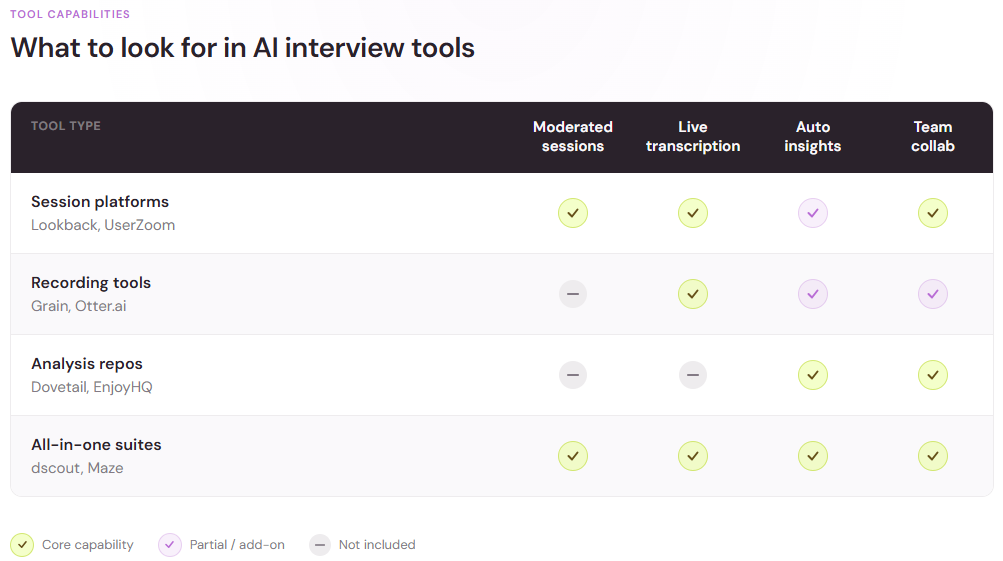
Moderated vs. unmoderated capabilities
Some tools specialize in moderated interviews: live sessions where you ask follow-up questions and probe deeper. Others support unmoderated research: often online surveys where participants answer questions on their own time. The best options can do both, giving you flexibility depending on your research question.
The current crop of tools spreads across that spectrum. Lookback, for instance, covers both modes—live moderated sessions your team can observe in real time, plus self-guided unmoderated studies—with an AI assistant that surfaces insights from session recordings. Recording-focused tools like Grain concentrate on capturing and clipping live conversations, while analysis platforms like Dovetail sit downstream, turning transcripts into a searchable, taggable research repository. The right mix depends on where your bottleneck is: running sessions, capturing them, or making sense of them afterward.
Think about your typical project mix before you commit. If most of your studies are exploratory—early discovery, new market segments, unfamiliar user groups—moderated depth will matter more. If you mostly validate designs and copy, unmoderated speed wins.
Real-time vs. asynchronous collaboration
Real-time collaboration matters when stakeholders need to watch live and react in the moment. Asynchronous replay and annotation matter when teams are distributed or when stakeholders can't join live but still need to feel ownership of the findings. A tool that supports both modes gives your organization maximum flexibility and ensures decision-makers can engage with research on their own schedule.
Transcription and translation accuracy
If your research spans languages or includes accents or technical jargon, transcription quality can vary widely. Test the tool with your actual audio before committing. Some platforms handle domain-specific terminology better than others, so ensure the tool you choose can accurately transcribe language relevant to your industry.
Insight extraction
This is where AI interview tools differ most. Some flag sentiment or emotion. Others extract themes or identify moments where users struggled. Others surface verbatim quotes linked to timestamps. Clarify what "insights" mean for your use case: are you looking for user emotions, friction points, feature requests, or all of the above?
Participant recruitment and incentive management
Do you need to recruit participants, or will you bring your own? If you need recruitment, does the tool integrate with a panel, or does it provide one? Who manages screening, scheduling, and incentive payments? Clear answers to these questions prevent friction later in your research cycle.
Security and data handling
If you're interviewing for healthcare, financial services, or other regulated industries, audit the tool's data security, encryption, and compliance certifications. User research data is sensitive and should be treated as such.
Ask vendors directly how interview recordings are stored, who can access them, whether your data is used to train their models, and how deletion requests are handled. A vendor that answers quickly and specifically is giving you a lot to go on.
How to use AI in interviews without losing the human element
AI is a powerful amplifier, but it works best when you stay in the driver's seat. Here's how to use these tools responsibly:
Start with clear research goals
Before you book a single interview, define what you need to learn. Are you validating a feature idea? Understanding user pain points? Exploring an underserved segment? The clearer your goal, the more precise your AI prompts and filtering can be, and the less likely you are to let the algorithm skew your findings.
Use AI to augment, not replace, your thinking
AI can spot patterns, but it can't judge whether a pattern matters for your business. It can flag an emotional moment, but it can't explain why that moment signals a product opportunity. Watch the interviews yourself, especially the first few. Form your own hunches. Then use AI to scale your analysis, to apply your framework to the remaining sessions faster.
Review AI-generated codes and tags
If the tool auto-codes your transcripts or generates theme labels, spot-check them. AI sometimes misses context or creates categories that don't match your research question. Refine the taxonomy so it reflects what you actually care about. A quick calibration session—where two researchers review the same auto-coded transcript and compare notes—catches most taxonomy drift before it spreads across your whole project.
Combine with other methods
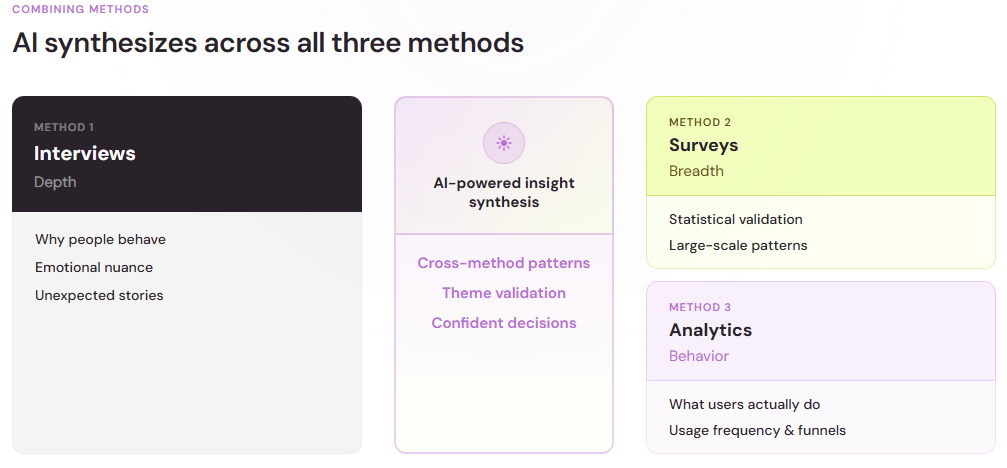
Interviews alone are incomplete. Pair them with AI-powered surveys to validate findings across a larger sample, or with analytics data to triangulate user intent. The combination of deep interviews and broad surveys gives you both richness and statistical grounding.
Common pitfalls and how to avoid them
Assuming the transcript is gospel. Transcripts have errors, especially with background noise, accents, or overlapping speech. Always spot-check quotes before using them in reports or presentations.
Over-relying on sentiment analysis. A user might sound frustrated but actually be excited. Context and tone-of-voice nuance matter. Use AI sentiment flags as a starting point, not a conclusion.
Skipping the recruiting step. Garbage in, garbage out. If you recruit the wrong participants, AI won't save you. Invest in clear screeners and recruiting practices upfront.
Forgetting the raw data. It's tempting to live only in the AI's summary and skip rewatching sessions. But the gold is often in moments the algorithm missed. Schedule time to review raw recordings, especially for surprising findings.
Treating interviews as surveys. An interview is a conversation, not a questionnaire. Use follow-up questions, explore unexpected tangents, and let participants tell you what matters to them, rather than forcing all sessions into the same rigid structure.
The future of AI in interview research
AI in user research is still evolving. Expect to see better:
- Multimodal analysis. Tools that analyze video, tone, facial expression, and transcript together to surface richer emotional and cognitive signals.
- Cross-language insights. AI that transcribes, translates, and surfaces themes across language barriers so global teams can work together more easily.
- Bias detection. AI that flags potentially biased questions or interviewer prompts so you can correct them before they skew your data.
- Real-time guidance. AI assistants that suggest follow-up questions mid-interview, helping less experienced researchers ask better probes.
The human researcher isn't going away. If anything, AI makes skilled researchers more valuable. The bottleneck shifts from transcription and tagging to judgment: choosing the right research approach, recruiting the right people, asking the right follow-up questions, and knowing which insights actually drive decisions. The combination of AI efficiency and human judgment is where the real insight lives.