Best AI Tools for UX Research [2026 Guide]
Compare the leading AI tools for UX research in 2026, including Lookback, Maze, Dovetail, and UserTesting, matched to your research bottleneck.
![Best AI Tools for UX Research [2026 Guide]](https://cdn.prod.website-files.com/6718da5ecf694c9af0e8d5d7/6a70a7eeea21580d826d7fcf_best-ai-tools-for-ux-research-2026-guide.png)
Key takeaways
- AI handles the mechanical work: Transcription, first-pass coding, and highlight reels now run automatically, freeing researchers to focus on interpretation and strategy.
- Four platforms lead the field: Lookback, Maze, Dovetail, and UserTesting each solve a different bottleneck—live collaboration, fast unmoderated testing, institutional memory, and participant recruitment.
- Match the tool to your bottleneck: Choose based on your research method and where your team's time actually disappears, not on the longest feature list.
- Humans stay in charge: Review AI-generated summaries before they reach stakeholders, and trace surprising insights back to the source material.
User experience research is more of an essential than a luxury these days. Every dollar spent on UX returns $100 in value, yet only 55% of companies actually conduct UX testing. The gap between those who invest in understanding their users and those who don't keeps widening.
AI tools are reshaping how researchers gather insights, analyze findings, and spot patterns that would take humans weeks to surface. Around 47% of researchers worldwide now use AI regularly in their market research activities, and that number is climbing. If you're still relying on manual analysis and spreadsheets, you're burning time you could spend on strategy.
This guide covers the AI tools making the biggest impact in UX research right now: what they do, who they're built for, and how to pick the right one for your team. Whether you're just starting to explore the best AI tools for UX research or you've already built a research practice, understanding which platform aligns with your needs is critical. The right choice can cut analysis time in half while improving the quality of insights your team surfaces.
Why AI matters in UX research
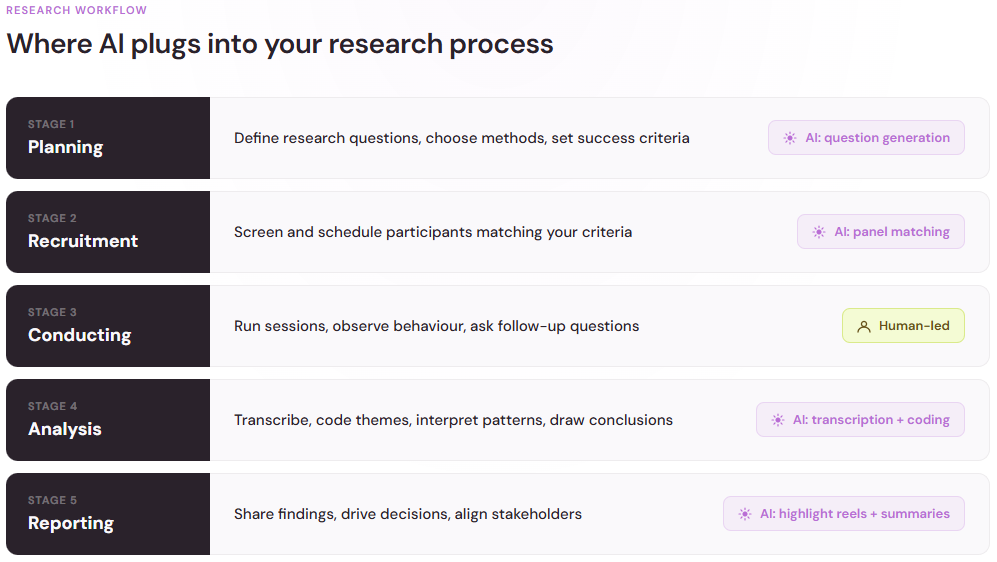
UX research is labor-intensive. You conduct interviews, moderate sessions, transcribe recordings, code feedback, spot themes, and write reports. Each step eats time. With AI handling the repetitive, pattern-spotting work, researchers can focus on asking better questions and acting on insights faster.
The most popular UX research methods remain unchanged: user interviews, usability testing, and surveys. Based on the UXPA's salary survey of UX practitioners, 72% of respondents planned to make one or two new UX hires in 2025. The top skills they planned to hire for were usability testing at 75% and user research/interviews/surveys at 77%.
The importance of UX research is clearly recognized, but how you conduct it is evolving. AI assistants can auto-transcribe sessions, flag emotional shifts, surface recurring themes from open-ended responses, and even suggest follow-up questions. Some tools now handle real-time moderation support and multimodal analysis, like watching video, reading chat, and listening to audio all at once.
The human element doesn't disappear. AI is a collaborator, not a replacement. Researchers still set the research question, interpret findings in context, and make judgment calls. But the cognitive load shrinks, and time-to-insight accelerates. Many teams report that introducing AI tools into their workflow unlocks time previously spent on transcription and manual coding—work that's necessary but doesn't require the strategic thinking that researchers bring to the table. That freed-up time is redirected toward deeper interpretation of why users behave the way they do, not just documenting what they do.
What to look for in an AI-powered UX research tool
Before diving into specific platforms, know what features matter for your workflow. The market has matured considerably, and today's AI tools for UX research come with varying levels of sophistication depending on your research methodology and team size.
Session recording and transcription. Automatic transcription saves hours. Look for tools that capture video, audio, and on-screen activity, then convert speech to text in real time or within minutes of the session ending. Accuracy matters. Poor transcription creates noise in the analysis. The best tools use machine learning to improve accuracy over time, learning your industry's terminology and context. Some even support multiple languages, which is valuable if you're conducting international research. Pay attention to whether the tool stores transcripts securely and offers controls around data retention, especially if you're working in regulated industries.
Insight surfacing and coding. The best AI tools help you find important patterns. Some flag emotional tone shifts, topic clustering, or frequently mentioned pain points. Others let you tag and code responses manually, then surface themes automatically. Choose based on how much guidance you need versus how much control you want. Advanced platforms use natural language processing to identify sentiment, emotion, and urgency, then group similar statements together. This is particularly powerful when you're analyzing dozens of interview transcripts and want the system to highlight what users care most about without missing nuances.
Real-time collaboration. Some tools let multiple researchers annotate sessions simultaneously, creating a shared reference point that's invaluable for alignment meetings later. This feature reduces the risk that insights get lost in translation when one researcher writes the final report for the team to read weeks later.
Integration with your stack. A great tool is useless if it can't talk to your design platform, project management system, or documentation hub. Decide what integrations matter to your workflow. Many modern platforms support API connections that let you push research findings directly into Figma, Jira, or Notion. This workflow integration reduces the friction of sharing insights and makes it harder for research to sit in a silo.
Bias and data-quality safeguards. AI can amplify bias. 34% of online research panel respondents have reported using large language models to help answer open-ended survey questions, raising concerns about data homogenization. Look for tools that flag potentially unreliable responses, allow you to review AI-generated summaries before acting on them, and give you transparency into how insights were generated. The best platforms include audit trails showing which responses contributed to which themes, so you can trace conclusions back to source material and spot potential errors or biases.
Leading AI tools for UX research
Lookback
What it does: Lookback handles both moderated and unmoderated usability studies, with real-time team collaboration and an AI assistant called Eureka that surfaces insights from session recordings. The platform combines video hosting, transcription, and automated analysis into a single workflow.
Best for: Teams running rapid usability testing that need to coordinate across distributed groups. The live annotation features keep everyone on the same page during sessions. Organizations that prioritize speed and collaboration benefit most from Lookback's focus on team alignment.
Key strength: Eureka automatically analyzes video and transcripts to pull out themes, emotional shifts, and task completion bottlenecks. It saves researchers hours of manual review. The system learns from your team's previous annotations, becoming more attuned to what matters to your specific research goals. Multi-modal analysis means the AI watches facial expressions, hears tone, and reads transcripts simultaneously.
Consider: Pricing scales with session volume, so it's most cost-effective for teams doing frequent testing. New users report a learning curve with the annotation interface, though training is available. The free tier is limited to unmoderated testing, which constrains what smaller teams can explore before committing.
Maze
What it does: Maze runs unmoderated usability tests, prototype tests, surveys, and card sorts, with AI features that summarize results and flag usability issues automatically. Originally a startup-focused platform, Maze had already grown to 40,000 companies using it by 2021, and its customer base has kept expanding since.
Best for: Product teams that want fast, self-serve testing tied directly to their design workflow. Maze connects with popular design tools, so you can test prototypes without rebuilding them. It also suits teams without a dedicated researcher, since guided templates simplify test setup.
Key strength: Speed from question to answer. You can launch a test in the morning and review AI-generated summaries of the results by the afternoon. Automated reports make it easy to share findings with stakeholders who'd never open a raw transcript.
Consider: Unmoderated testing means you can't probe unexpected behavior in the moment. Teams that need deep qualitative interviews will want to pair Maze with a moderated research tool.
Dovetail
What it does: Dovetail is a research repository with AI-assisted analysis. You upload transcripts, recordings, and notes, and the platform helps you tag, cluster, and summarize them into themes your whole team can browse.
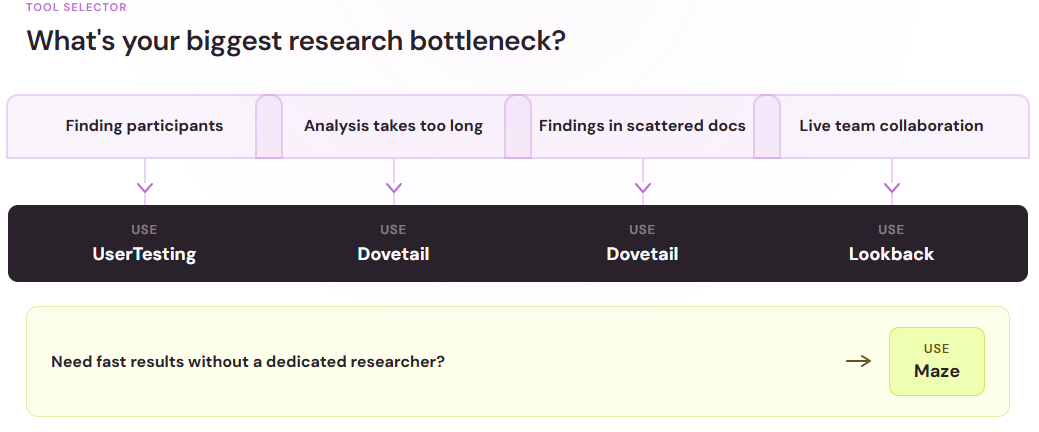
Best for: Teams drowning in scattered research data. If your findings live in slide decks, docs, and folders no one opens, a repository turns them into a searchable knowledge base.
Key strength: Institutional memory. Its AI can summarize months of studies and answer questions about past research, which keeps teams from re-running studies they've already done.
Consider: A repository is only as good as what you feed it. Dovetail rewards teams with consistent research habits, and it can feel like overhead for teams running occasional one-off studies. Plan a light tagging routine before you roll it out to the whole team.
UserTesting
What it does: UserTesting recruits participants from its panel, runs moderated and unmoderated sessions, and applies AI to generate summaries, sentiment analysis, and highlight reels from session videos.
Best for: Teams that need participants fast. If recruitment is your bottleneck, a built-in panel changes the equation. It's also a fit for organizations running research on a recurring cadence rather than one-off projects.
Key strength: AI-generated highlight reels. Instead of asking stakeholders to watch hours of video, you can share a short clip of the exact moment users hit friction, with the AI finding moments for you to then review and circulate.
Consider: Panel-based recruitment can skew toward experienced test-takers. For niche audiences, you may still need custom recruitment on top of the panel.

How to choose the right tool
The longest feature list might not give you the best tool for your research style. Consider the constraints you’re working within.
- Start with your method – Teams using mostly moderated research need live collaboration and strong transcription, while teams using unmoderated methods need automated analysis
- Audit your analysis time – If coding transcripts eats more hours than talking to users, AI-assisted analysis pays for itself quickly
- Check your data practices – Ask how vendors handle participant data, whether your data trains their models, and what retention controls you get
- Pilot before you commit – One real study on a trial plan tells you more than any demo
Budget matters too, but waiting has costs of its own. The global usability testing tools market was valued at $1.51 billion in 2024 and is projected to reach $10.41 billion by 2034. Companies are racing to adopt advanced usability tools, and the gap between AI-assisted and manual research continues to widen.
Keep the researcher in the loop
The teams getting the most from AI tools for UX research treat them as assistants, not replacements. Let the AI handle transcription, first-pass coding, and highlight reels. Keep humans in charge of research questions, interpretation, and the judgment calls that separate a finding from a hunch. Review AI-generated summaries before they reach stakeholders, and trace surprising insights back to the source material.
With all that, the math works in your favor: less time on mechanical work, more time understanding the people you're building for. Start small: pick one tool, run one real study, and measure how much time you save. The results will tell you whether to go deeper. That's the entire point of UX research; AI just gets you there faster.