Closed-ended questionnaire examples: design better surveys
Learn how to design better closed-ended survey questions with examples, question types, common mistakes to avoid, and pre-launch testing tips.
.webp)
A survey is only as good as its questions. Ask the wrong way and you get data that looks complete but leads you nowhere. Ask the right way—with clear, well-structured closed-ended questions—and you get responses you can actually act on.
Closed-ended questions give respondents a fixed set of answers to choose from. Think multiple choice, rating scales, yes/no, and ranked lists. They're the backbone of most surveys because they're quick to answer, straightforward to analyze, and easy to compare across groups.
But easy to analyze doesn't mean easy to write well. A poorly designed closed-ended question can mislead respondents, introduce bias, and produce numbers that feel precise but aren't actually meaningful. This guide covers how to design closed-ended questions that get you reliable, useful data—with real examples you can adapt.
Why closed-ended questions work
Closed-ended questions dominate survey design for practical reasons. They reduce the cognitive load on respondents, who can scan options and select rather than compose an answer from scratch. They produce standardized data that's simple to tabulate, visualize, and compare. And they keep completion times short, which directly improves response rates.
For quantitative research—where the goal is to measure, count, or compare—closed-ended questions are the natural fit. They let you say "62% of respondents prefer option A over option B" with confidence, because everyone was choosing from the same set of options under the same conditions.
The trade-off is depth. Closed-ended questions tell you what people chose but not necessarily why. That's where pairing them with a well-placed open-ended follow-up can fill in the story.
Types of closed-ended questions
Each closed-ended format serves a different purpose. Choosing the right type for each question is half the battle.
Multiple choice
Multiple choice is the most versatile format. Respondents select one option (or sometimes several) from a list. Use multiple choice when you want to categorize respondents into distinct groups or when the possible answers are well-defined.
Example:
"What is your primary reason for using project management software?"
- To track deadlines and milestones
- To collaborate with team members
- To manage budgets and resources
- To report progress to stakeholders
- Other (please specify)
The "other" option is worth including when you're not 100% certain your list is exhaustive. It acts as a safety valve, catching responses you didn't anticipate without forcing people into categories that don't fit.
Rating scales
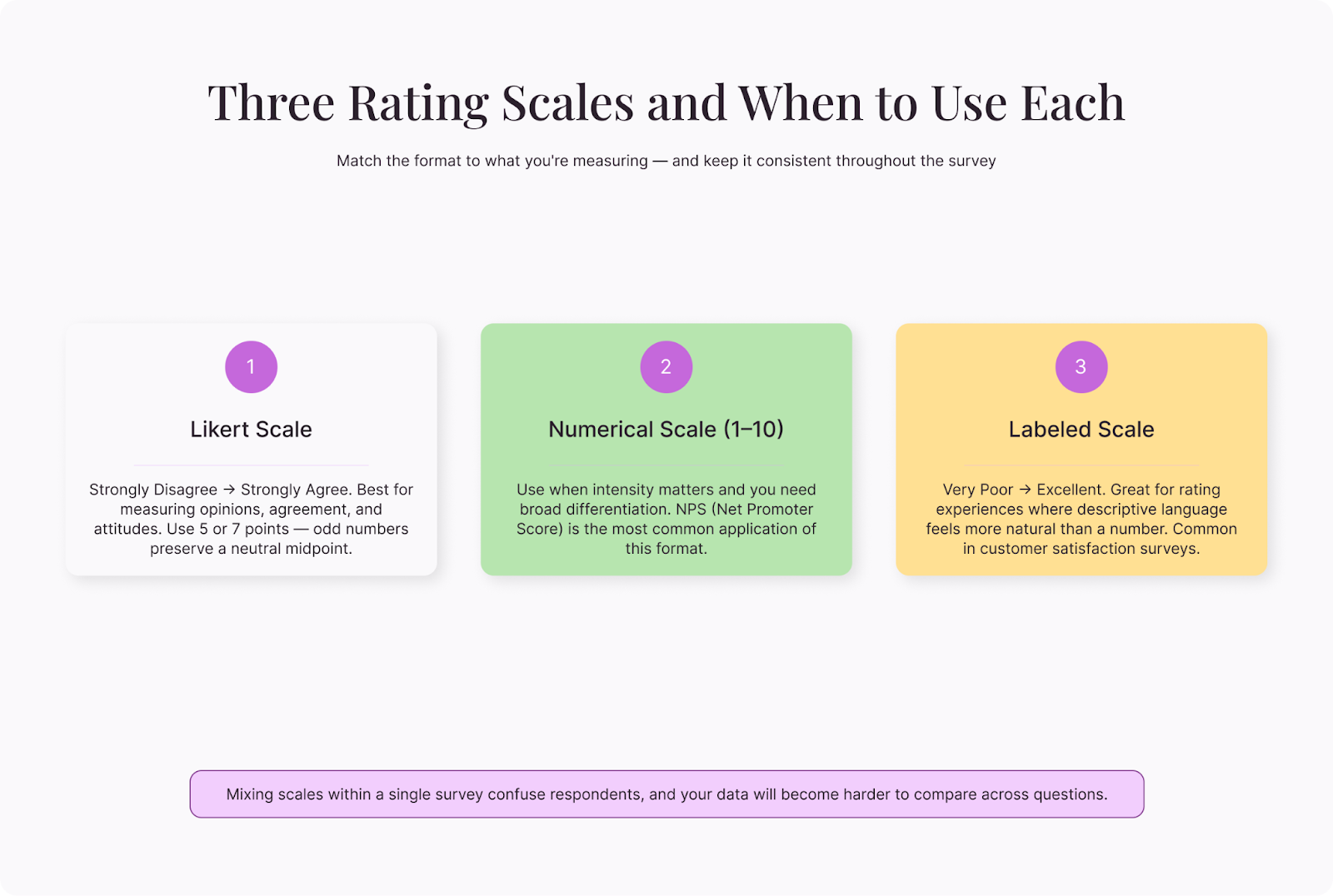
Rating scales measure intensity—how much someone agrees, how satisfied they are, how likely they are to recommend something. The Likert scale (typically five or seven points from "strongly disagree" to "strongly agree") is the most familiar, but numerical scales (1-10) and labeled scales ("very poor" to "excellent") work too.
Example:
"How easy was it to complete the registration process?"
- Very easy
- Somewhat easy
- Neither easy nor difficult
- Somewhat difficult
- Very difficult
Consistency matters here. If one question uses a five-point scale and the next uses a seven-point scale, respondents get confused and your data becomes harder to compare. Pick one format and stick with it throughout the survey.
Yes/no and dichotomous
This is the simplest format, offering two options—yes or no, true or false, agree or disagree. Use these when a binary answer genuinely captures the distinction you need.
Example:
"Have you used a customer feedback survey in the past 12 months?"
- Yes
- No
These types of questions are fast and frictionless, but they sacrifice nuance. "Have you exercised this week?" forces someone who ran once and someone who trained five times into the same "yes" bucket. Use them for screening questions or factual filters, not for measuring opinions or experiences.
Ranking
Ranking questions ask respondents to order items by preference, importance, or priority. They reveal relative value—not just whether something matters, but how much it matters compared to alternatives.
Example:
"Rank the following factors in order of importance when choosing a survey platform (1 = most important):"
- Ease of use
- Price
- Customization options
- Integration with other tools
- Customer support
Keep ranking lists short—five to seven items maximum. Beyond that, respondents may struggle to make meaningful distinctions between middle-ranked options, and the data in those positions becomes unreliable.
Common mistakes and how to fix them
Even experienced survey designers make these errors. Catching them before launch saves your data.
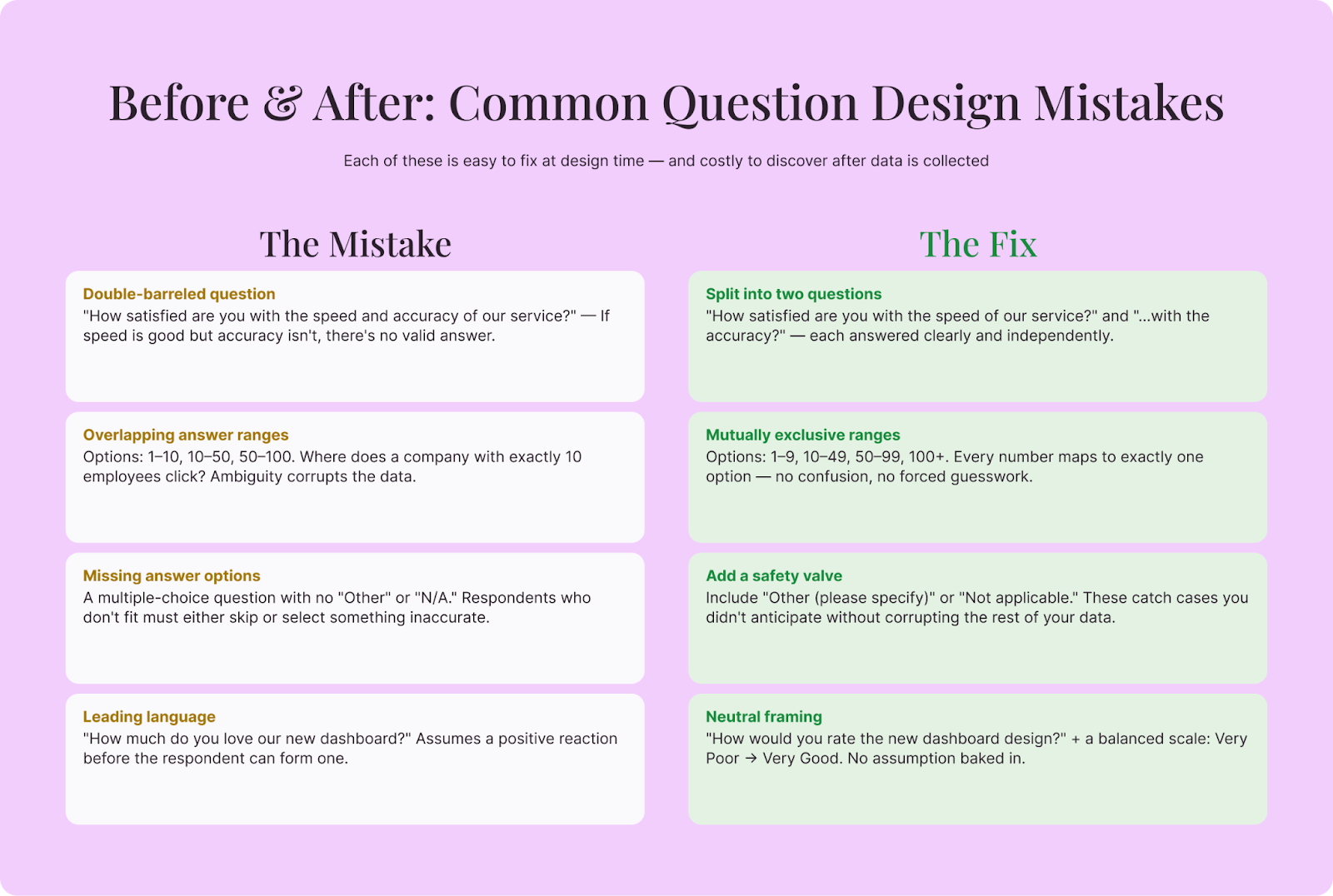
Double-barreled questions
A double-barreled question asks about two things at once, making it impossible to know which one the respondent is answering.
Bad: "How satisfied are you with the speed and accuracy of our service?"
What if the service is fast but inaccurate? Or accurate but slow?
Better: Split it into two separate questions—one about speed, one about accuracy.
Overlapping answer ranges
Bad: "How many employees does your company have?"
- 1-10
- 10-50
- 50-100
Where does someone with exactly 10 employees click? Overlapping ranges create confusion and corrupt your data.
Better: Use mutually exclusive ranges: 1-9, 10-49, 50-99, 100+.
Missing answer options
If respondents can't find an option that fits, they'll either skip the question or pick something inaccurate. Both outcomes damage your data.
Review every multiple-choice question and ask: "Is there a reasonable answer that isn't represented here?" If you're unsure, add "Other (please specify)" or "Not applicable" where appropriate.
Leading or loaded language
Bad: "How much do you love our new dashboard design?"
This assumes the respondent loves it.
Better: "How would you rate the new dashboard design?" followed by a neutral scale.
Unbalanced scales
A scale with three positive options and one negative option ("excellent, very good, good, poor") nudges respondents toward favorable answers. Balanced scales give equal weight to both directions:
Balanced: Very satisfied, somewhat satisfied, neutral, somewhat dissatisfied, very dissatisfied.
A closed-ended questionnaire example
Here's a complete short survey for measuring customer satisfaction with an onboarding process. Notice how each question uses the format best suited to what it's measuring:
Question 1 (screening — dichotomous):
"Did you complete the onboarding process in the last 30 days?"
- Yes
- No (skip to end)
Question 2 (overall rating — Likert):
"Overall, how satisfied were you with the onboarding experience?"
- Very satisfied / Somewhat satisfied / Neutral / Somewhat dissatisfied / Very dissatisfied
Question 3 (specific rating — Likert, same scale):
"How clear were the instructions during onboarding?"
- Very clear / Somewhat clear / Neutral / Somewhat unclear / Very unclear
Question 4 (categorization — multiple choice):
"Which part of onboarding was most helpful?"
- Step-by-step setup guide
- Welcome video
- Live chat support
- Email tips and tutorials
- Other (please specify)
Question 5 (ranking):
"Rank these potential improvements in order of priority (1 = most needed):"
- Shorter setup process
- More video tutorials
- Better progress indicators
- Dedicated onboarding specialist
Question 6 (open-ended follow-up):
"Is there anything else you'd like to share about your onboarding experience?"
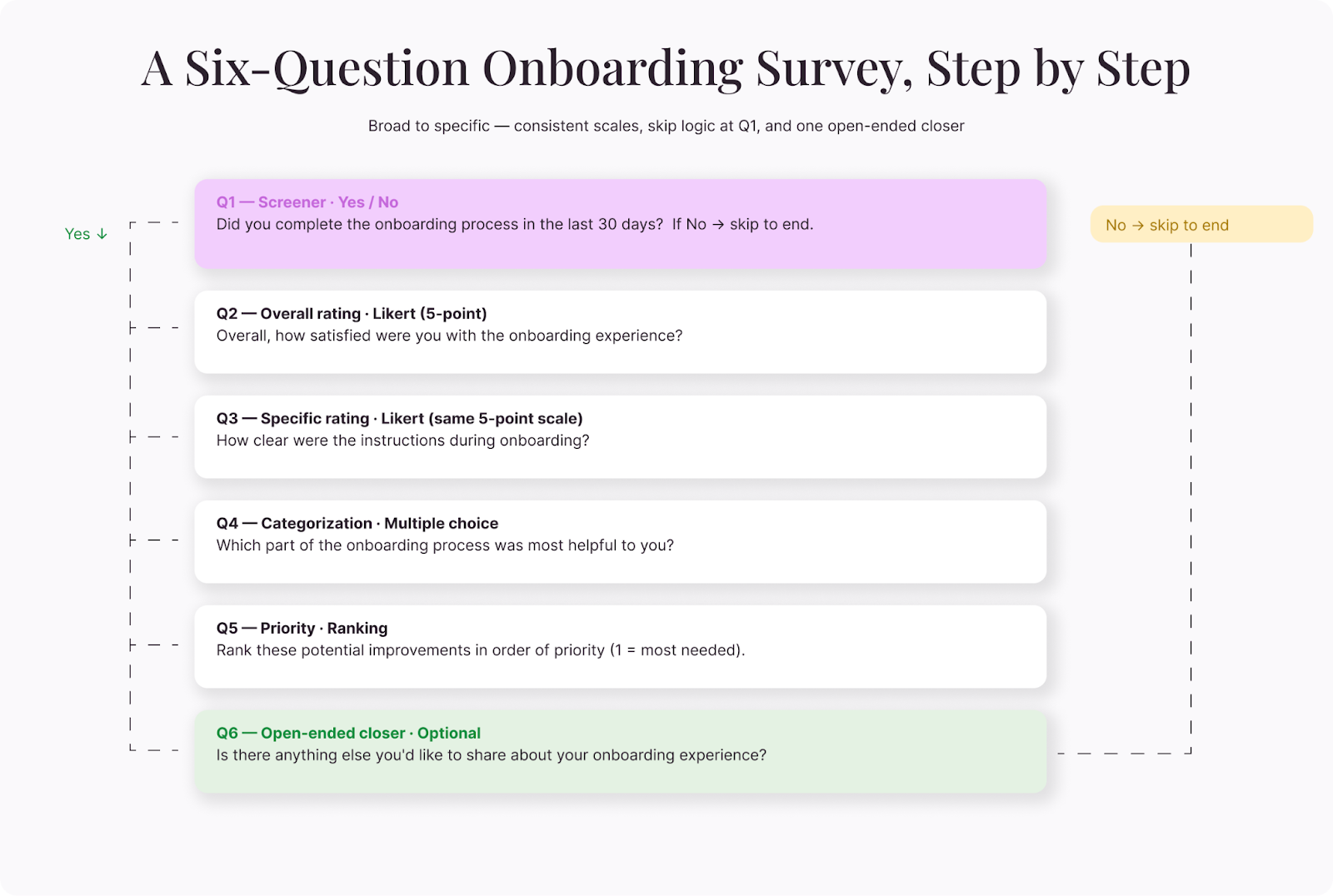
This structure moves from broad to specific, uses consistent scales, and closes with one open-ended question for context the numbers might miss.
Tips for testing before you launch
Every survey benefits from a test run. Here are a few steps you can take to catch problems before they reach your audience:
Complete it yourself—slowly. Read every question as if you're seeing it for the first time. Time yourself. If it takes more than five to seven minutes for a short survey, trim it. If you hesitate on any question, your respondents will too.
Have someone outside the project take it. Fresh eyes spot ambiguity that the survey designer can't see. Ask your tester to flag any question where they weren't sure what was being asked or where none of the options felt right.
Check the mobile experience. A significant portion of your respondents will open the survey on a phone. Grid-style questions that look fine on a laptop can become impossible to navigate on a small screen. Scroll through the entire survey on a mobile device before you hit send.
Review the data output. Complete a few test submissions and look at the raw data. Are the responses recording the way you expect? Are skip-logic paths working correctly? A question that displays perfectly but stores data incorrectly is worse than one with a typo because you won't notice the problem until you're analyzing the results.
Making your closed-ended questions count
Good closed-ended questions are invisible. Respondents move through them without friction, choose answers that genuinely reflect their experience, and finish the survey without feeling drained. That frictionless experience produces the clean, reliable data you need.
Before you launch, read every question from the respondent's perspective. Is the meaning clear? Are the options exhaustive? Is the scale balanced? Could this question be split into two?
A few minutes of scrutiny at the design stage saves hours of wrestling with ambiguous data on the other end.