Matrix questions in surveys: When and how to use them
Matrix questions condense related survey items into one grid, cutting fatigue, but only when used correctly. Get the rules for scale, row limits, and bias.

Matrix questions pack multiple items into a single question block, saving space and respondent time. They present a grid where rows represent different items or statements and columns represent answer options, usually a consistent scale like “Strongly agree,” “Somewhat agree,” “Neutral,” “Disagree,” or “Strongly disagree.”
If you’ve taken a survey that asks you to rate five attributes on the same scale, you’ve seen a matrix question. They’re everywhere in market research because they work. But they work best in specific situations, and they can backfire if you use them carelessly.
This guide covers when matrix questions belong in your survey, how to build them properly, and the common mistakes that tank their reliability.
What is a matrix question?
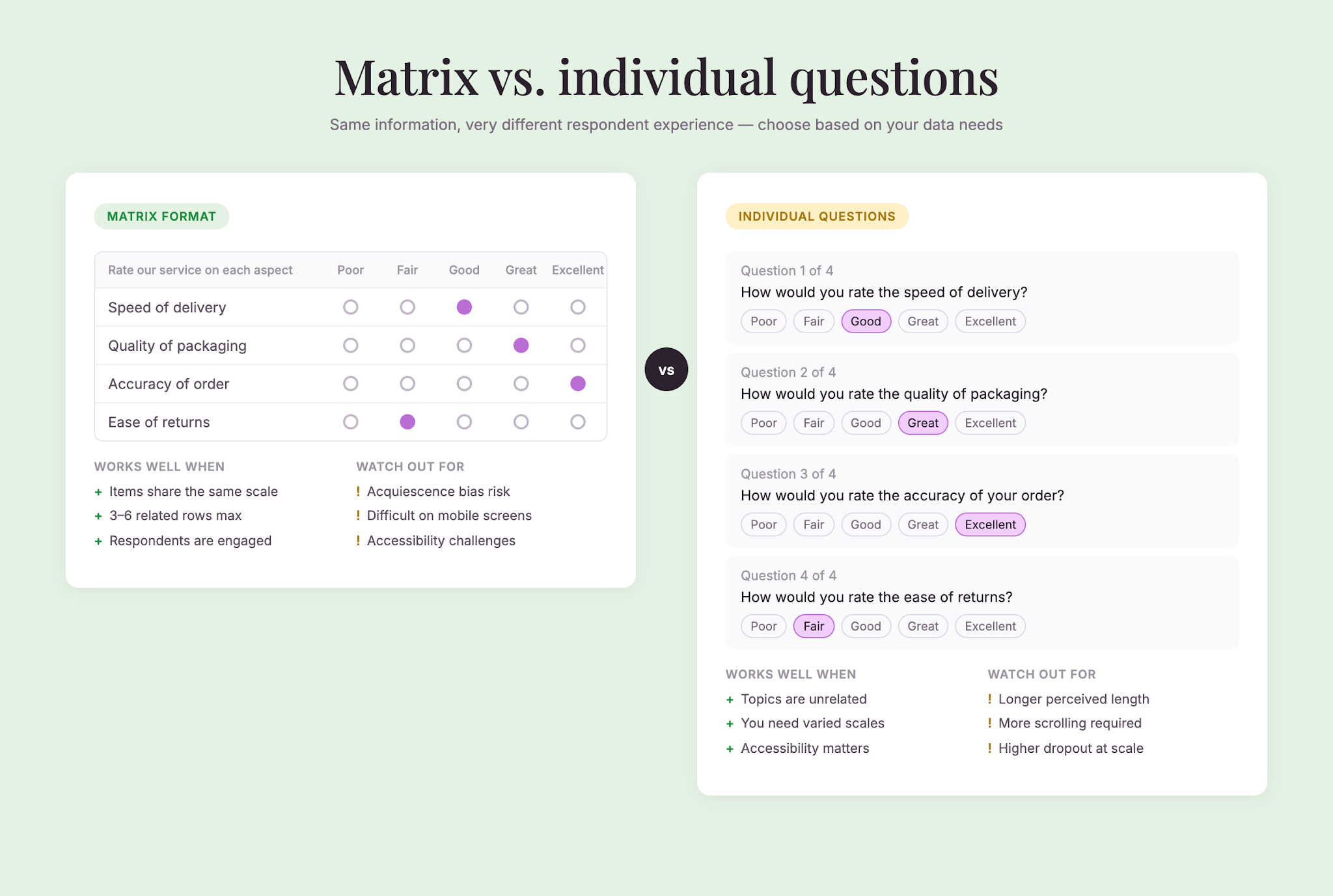
A matrix question is a closed-ended question that requires one response per row. It groups related items under a single question and asks respondents to rate, rank, or respond to each item using the same set of answer options.
The structure is straightforward: rows on the left (the items being rated), columns across the top (the response scale), and cells where respondents select their answer.
The result is a single question that replaces what could have been four separate questions, condensing the survey and lowering the cognitive load on respondents.
When matrix questions work best
You’re measuring consistent attributes on the same scale
Matrix questions shine when you’re asking respondents to evaluate multiple items using an identical rating scale. A Likert scale (agreement or satisfaction levels) is the classic match. If every item uses the same response options, a matrix makes sense.
Mixing scales—asking respondents to rate one thing on satisfaction, another on importance, and another on frequency—defeats the purpose. Stick to one consistent scale per matrix.
You want to reduce survey fatigue
Short surveys get completed. Research shows that surveys with 1–3 questions have a completion rate of 83.34%, while longer surveys see sharp drops in engagement and response quality (SurveySparrow Survey Response Rate Benchmarks, 2025).
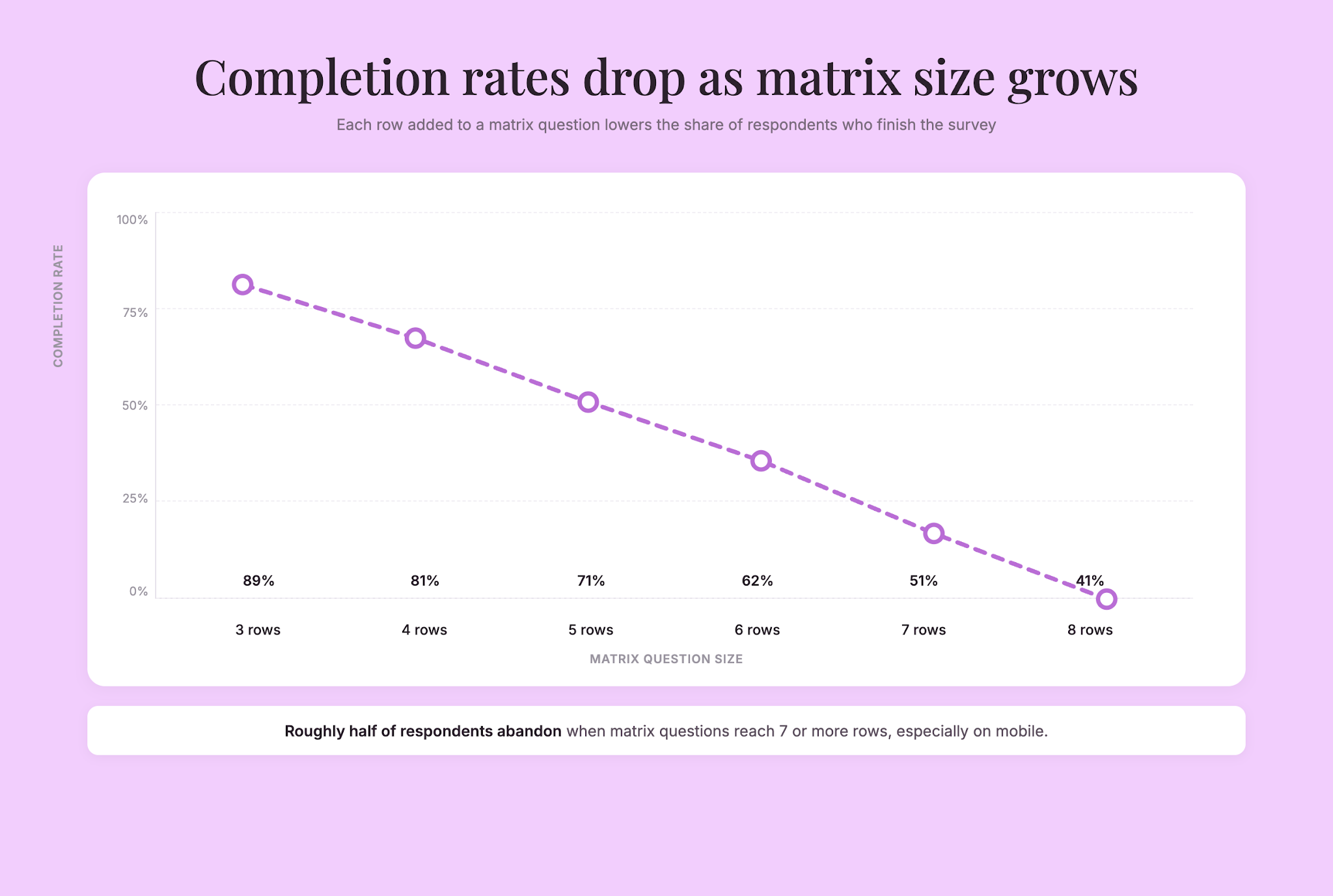
A matrix question condenses related items into a single block, which feels cleaner to respondents. Instead of scrolling through four separate “How do you feel about X?” questions, they see one organized grid. That efficiency matters, especially on mobile devices where screen real estate is limited and respondents are more likely to abandon lengthy surveys.
The items are genuinely related
Group items that belong together conceptually. If you’re measuring satisfaction with different service aspects, a matrix works. If you’re mixing unrelated topics—satisfaction, product knowledge, purchase intent—split them into separate questions. Respondents should understand why items live together.
Your audience can handle the cognitive load
Matrix questions require respondents to hold the scale in their head and apply it consistently across multiple rows. Some audiences handle this well. Others don’t. If you’re surveying busy professionals or highly engaged customers, a matrix is fine. If your audience is fatigued, distracted, or less familiar with surveys, individual questions might perform better.
When matrix questions backfire
They oversimplify complex topics
Binary or heavily constrained scales paired with matrix layouts can miss important nuance. Respondents may rush through rows, especially if there are many, selecting answers without careful thought. Reliability suffers when respondents aren’t paying close attention.
Researchers often pair matrix questions with open-ended follow-ups or a mix of question types to capture richer detail alongside fast quantitative data (Zonka Feedback, 2024).
Response bias becomes harder to spot
When respondents fill out a matrix, acquiescence bias (the tendency to agree with statements regardless of content) and social desirability bias (overreporting good behavior, underreporting bad behavior on sensitive topics) can ripple across all rows at once. A respondent might select “Agree” for every statement in the matrix without reading carefully, inflating agreement rates (Qualtrics, 2025).
With individual questions spaced apart, you can at least vary question phrasing to reduce that bias. In a matrix, the phrasing is locked—all rows use the same wording structure, making it easier for biased patterns to emerge uniformly across the entire response set. A telltale sign in your data: a respondent who selected the same column for every row. Flag those for review.
They increase item nonresponse
Some respondents will skip rows or leave cells blank rather than complete every item in a matrix. The bigger the matrix (more rows), the higher the risk. This forces you to decide whether to discard incomplete responses or handle missing data in analysis.
They can disadvantage screen reader users
Matrix questions are notoriously hard to navigate with assistive technology. If accessibility matters to your study (and it should), test your survey with a screen reader or, better, redesign as a series of individual questions for any audience that includes people who rely on assistive tech.
Best practices for matrix questions
Keep matrices small
More rows mean more cognitive effort and higher dropout risk. Aim for 3–6 rows maximum. If you need to rate more than 6 items, split them into two smaller matrices or use individual questions instead.
Use a consistent, intuitive scale
Likert scales (Strongly agree to Strongly disagree, or Very satisfied to Very dissatisfied) are standard because respondents understand them immediately. If you’re using a numerical scale (1–5), make sure the anchor points are clear: does 1 mean “poor” or “excellent”?
Avoid scales that contradict each other row to row. If one row asks about satisfaction (positive to negative) and another asks about dissatisfaction (negative to positive), respondents will stumble.
Make row headers crystal clear
Each item in the matrix should be self-contained and understandable on its own. Don’t use vague labels like “Thing 1,” “Thing 2,” etc. Write full, specific descriptions so respondents know exactly what they’re rating.
Poor: “Aspect A,” “Aspect B”
Better: “Speed of delivery,” “Quality of packaging”
Highlight the introductory question
The text above the matrix (the matrix stem) sets the tone for how respondents should interpret every row. Make it prominent and unambiguous. “Rate your agreement with each statement” is clearer than “How do you feel about these things?”
Consider single-response constraints
Depending on your platform, you can set a rule so that this question requires one response per row, meaning respondents can’t advance until every cell is completed. This eliminates missing data within the matrix, but it can feel punitive if you don’t communicate why it’s mandatory.
Use this constraint only when every row is truly essential to your analysis. If some rows are optional, don’t force completion.
Randomize row order when appropriate
Fixed row order invites primacy effects—respondents pay more attention to items at the top and less to items at the bottom. Randomizing the row order across respondents spreads any positional bias evenly and gives every item a fair shot at the top slot.
Test on mobile
Matrix questions can be awkward on small screens. Some platforms scroll horizontally, others stack rows vertically. Always preview your survey on a phone and tablet before launch. If the matrix becomes unreadable, break it into smaller chunks or use individual questions instead.
Pair with open-ended follow-ups sparingly
If you want to ask an open-ended follow-up question about one of the matrix items, put it on a separate page or screen. Research shows that open-ended probes on the same page as the source question raise survey dropout by 0.6 percentage points and item nonresponse by more than 25 percentage points (Hadler, 2025). Paging them separately minimizes the damage, though break-off still climbs by 1.4 percentage points, so use follow-ups strategically and only when the additional context is truly necessary.
Matrix questions vs. alternatives
Individual questions
Asking each item as a separate question takes more space and respondent time, but it forces attention to each topic independently. Individual questions work best when items are unrelated, when you’re worried about response bias, or when you want to vary the scale per item.
Ranking questions
If you need respondents to order items by priority rather than rate them on a scale, a ranking or drag-and-drop format is more appropriate than a matrix. Use ranking when the sequence matters—“Put these features in order of importance”—not when you’re measuring agreement or satisfaction.
Nets/Topline scales
Some platforms offer simplified grid formats where respondents see fewer options, often just “Yes” and “No,” or “Important” and “Not important.” These are faster to complete but lose nuance. They work well for quick screening or binary decisions.
Common mistakes to avoid
Mixing too many scales. Stick to one scale per matrix. Don’t ask respondents to rate some items on satisfaction and others on importance.
Including unrelated items. Grouping items together signals that they belong together. If they don’t, respondents get confused about why they’re paired.
Creating oversized matrices. A matrix with 12 rows and 7 columns overwhelms respondents. Split it up.
Using vague row headers. “Product,” “Service,” “Support”—these are too general. Write specific, descriptive labels.
Forgetting about mobile. A perfect matrix on a desktop can be unusable on a phone. Always test both.
Ignoring response bias. Watch for patterns where respondents select the same answer across all rows. This suggests they’re not reading carefully. If you see it, your matrix is probably too long, or your scale is confusing.
Stacking multiple matrices in a row. Two matrices on the same page double the perceived effort. Break them up with a different question type or a page break.
When to use matrix questions: A quick checklist
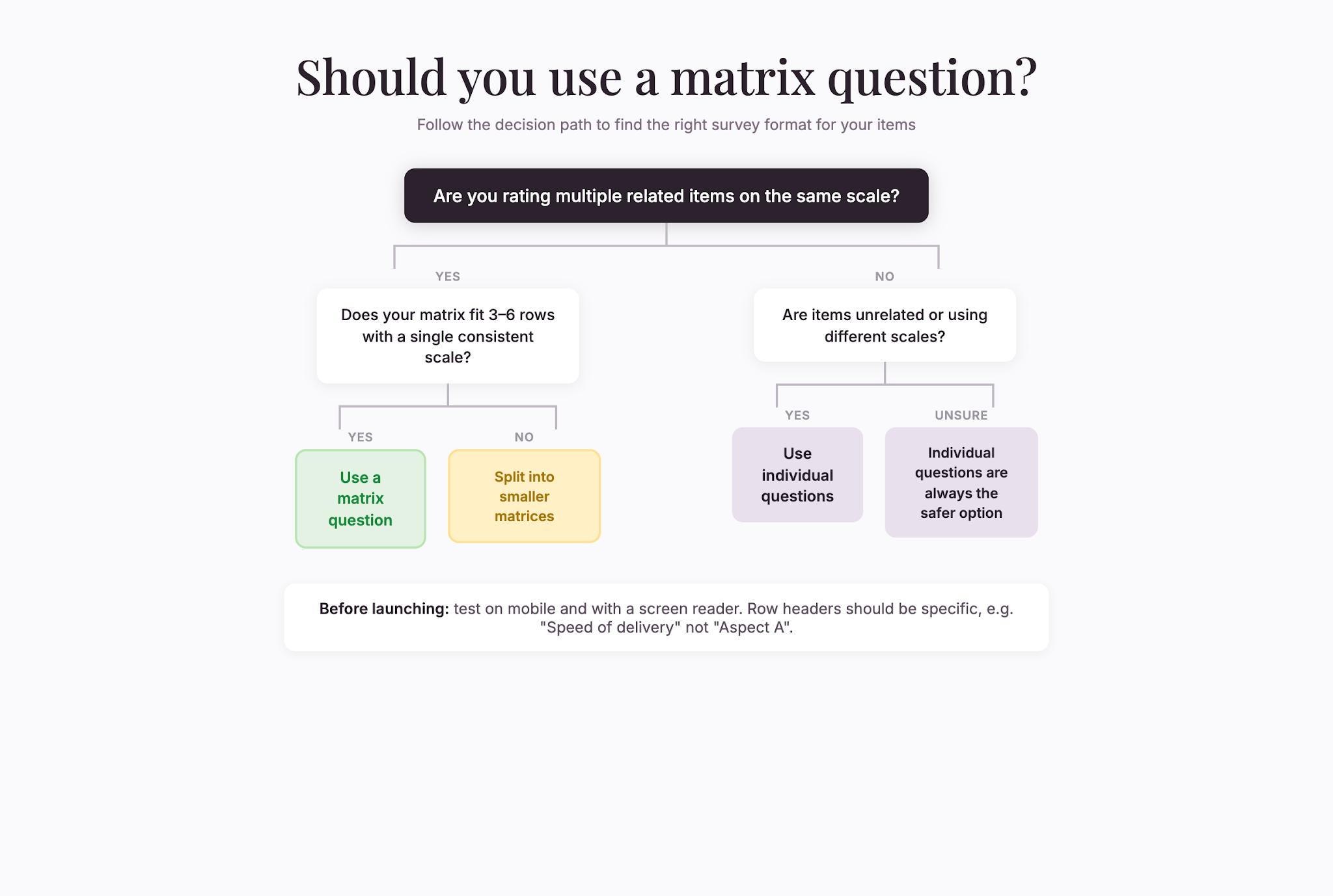
Ask yourself these questions before building a matrix:
- Are all items measuring the same construct using the same scale?
- Is my matrix small enough (3–6 rows) that respondents can complete it without fatigue?
- Do the items belong together conceptually?
- Are my row headers clear and specific?
- Have I tested this on mobile and with assistive tech?
- Am I willing to accept slightly lower engagement for the sake of survey brevity?
If you answered yes to most of these, a matrix question is probably the right choice. If you’re unsure, individual questions are always the safer option.
Summary
Matrix questions are efficient tools for capturing multiple ratings on a consistent scale without overwhelming your respondents. They work best when items are related, when you’re using a single scale, and when your matrix stays small.
But efficiency isn’t everything. If you force respondents through a poorly designed matrix, you’ll get unreliable data and higher dropout rates. The key is using matrix questions intentionally—not just because they save space, but because the layout genuinely serves both you and your respondents.
Pay attention to row clarity, scale consistency, and matrix size. Pair matrices with individual questions or open-ended follow-ups when you need richer insight. And always test on mobile before launch.
Done well, a matrix question streamlines your survey and respects respondent time. Done poorly, it becomes a barrier to honest, reliable feedback.