User research tools and platforms: how to choose
Not all user research platforms are built the same. Compare by participant access, question types, analysis tools, and workflow fit to pick the right one.
Choosing the right user research platform can feel overwhelming. There are dozens of options, each claiming to unlock customer insights. But the truth is simpler: the best platform is the one that fits your goals, budget, and the way your team actually works.
This guide walks you through what user research platforms do, the key features that matter, and how to pick one that won’t sit unused in three months.
What user research platforms do
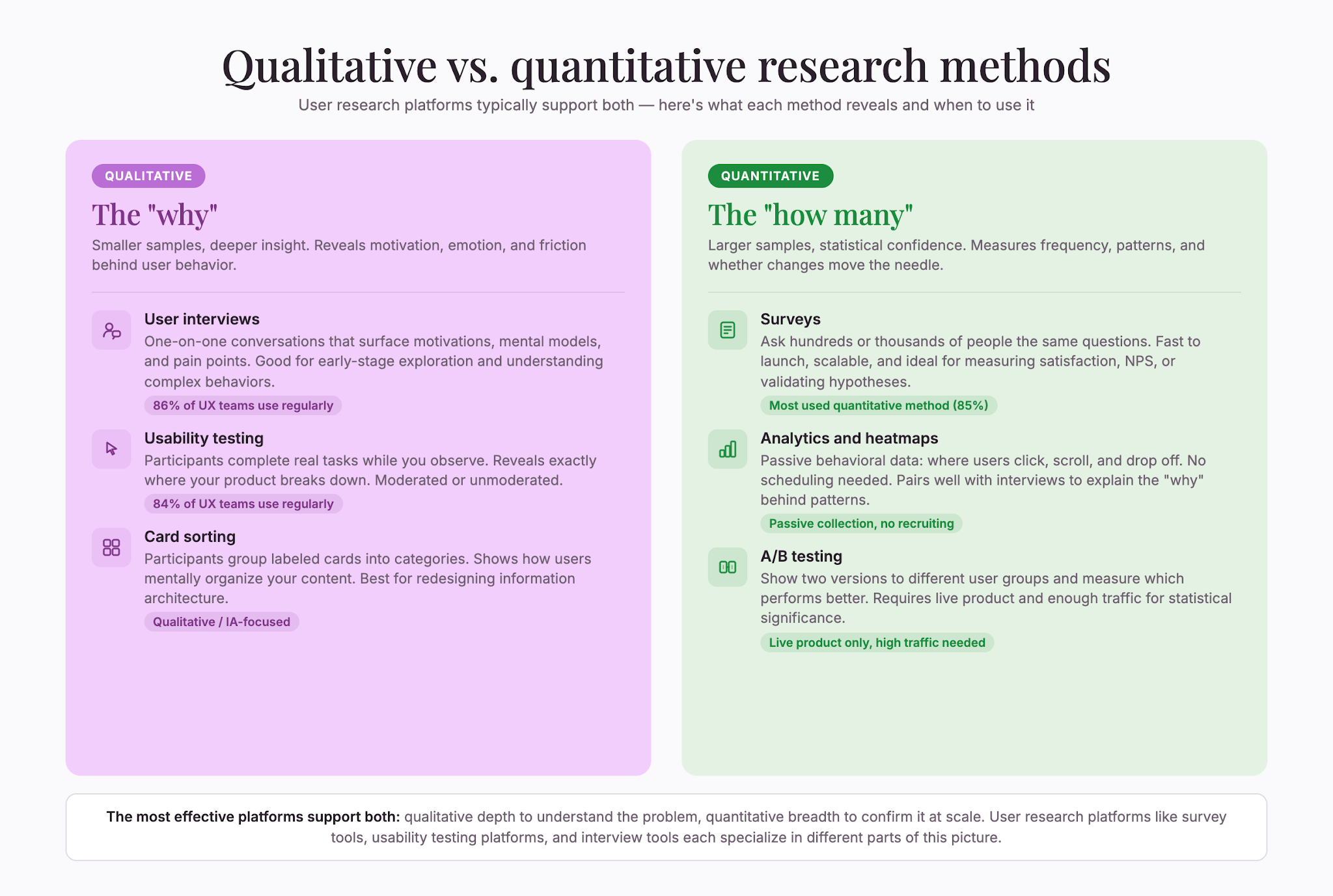
User research platforms let you gather qualitative and quantitative feedback directly from real people. They help you understand what customers think, feel, and do—whether you’re testing a new product feature, validating an idea, or improving an existing experience.
The best platforms combine ease of use (so non-researchers can run studies) with enough depth and flexibility (so experts can go deep). They typically include tools for interviews, surveys, usability testing, and card sorting. Many also offer access to participant panels, so you don’t have to recruit from scratch.
User research platforms serve as the backbone of modern customer discovery, allowing organizations to move beyond surface-level assumptions and ground their decisions in evidence. Whether you’re a startup validating a new market fit or an established enterprise optimizing a customer journey, these platforms democratize research by removing technical barriers. They let product managers, designers, and researchers collaborate in the same space, ensuring that insights reach the people who need them most.
The market for usability testing tools alone is booming. The global usability testing tools market was valued at $1.51 billion in 2024 and is projected to reach $10.41 billion by 2034, growing at a 21.3% CAGR from 2025 to 2034 (Market.us, 2024).
That growth reflects something real: companies are finally waking up to the ROI of understanding users. On a system used by over 100,000 people, a usability investment of $68,000 generated $6.8 million in benefits within the first year of implementation (UXPA, 2025). Those numbers speak for themselves. When you consider the cost of building the wrong feature, shipping a confusing experience, or iterating based on guesswork, the investment in proper research becomes not just justified but essential.
Why user research matters
Here’s the thing: most companies skip user research or do it badly. Only 55% of companies conduct UX testing at all (TrueList, 2025). That’s a missed opportunity.
When teams do invest in research, they see real results. User interviews (86%), usability testing (84%), and user surveys (77%) are the most popular UX research methods (TrueList, 2025). And the payoff is huge: every $1 in UX returns $100 (TrueList, 2025).
Yet many teams still rely on guesswork, assumptions, or just copying what competitors do. They launch features they think people want. Users abandon them. Budgets get wasted. Everyone’s frustrated. This pattern repeats across industries: mobile apps that no one uses, enterprise software with confusing workflows, consumer products that miss the mark.
The cost of skipping research extends beyond wasted features. It compounds. Each decision made without user input increases the odds of misalignment. Teams find themselves building the wrong thing faster, only to discover the disconnect months later when adoption metrics disappoint stakeholders or churn ticks up.
A solid user research platform changes that. It gives you a way to ask real people real questions before you commit to big decisions. It surfaces the gaps between what you think and what’s actually true. More importantly, it creates a shared understanding across your organization about who your customers actually are and what they need.
Key features to look for
Not all user research platforms are built the same. Here’s what separates the good ones from the rest.
Participant access
Some platforms let you recruit from their own panel. Others require you to bring your own participants. Some let you do both.
If you need speed and don’t have a user base to tap into yet, a built-in participant network is a huge time saver. If you already have engaged customers or a newsletter, you might not need it. Know which bucket you fall into. Consider also whether the platform’s participant pool matches your target demographic. A panel strong in US-based tech workers might not help if you’re researching retirees in Southeast Asia.
Flexibility in question types
Look for platforms that let you mix question formats: open-ended, multiple choice, ranking, matrix, rating scales. The more flexible, the more study types you can run without switching tools.
Some platforms are built specifically for one thing—say, unmoderated testing—and do that one thing well. Others are generalists. Neither is wrong; it depends on whether you want a specialist or a Swiss Army knife. Flexibility also matters for iteration: as your research questions evolve, you want a platform that can adapt without forcing you to learn a new tool.
Video and screen recording
If you plan to watch how people interact with a product, video recording (and ideally screen recording) is essential. This shows you not just what they click, but where they hesitate, what confuses them, and what delights them. Video also captures emotion and frustration in ways that click data never can.
Data analysis tools
Raw data is useless. You need a platform that helps you spot patterns, tag themes, and export findings in a way your team can actually use. Some platforms offer basic dashboards; others include AI-powered insights that surface key themes automatically. The difference between manual tagging and AI-assisted analysis can be hours—or days—depending on how much data you collect.
Integration with your workflow
Does it talk to Slack? Can you send the results to a spreadsheet? Does it connect to your design or product management tools? The more seamlessly a platform fits into how your team already works, the more likely it gets used. Integration friction is a silent killer of research adoption: when sharing findings requires exporting, reformatting, and manually posting to multiple tools, teams do it less often.
Ease of use for non-researchers
If only one person on your team can operate the platform, you’ve created a bottleneck. Look for platforms with intuitive interfaces, good templates, and clear workflows. Non-researchers should be able to launch a study without documentation. This democratization of research is what separates platforms that get used consistently from those that sit idle.
Types of user research platforms
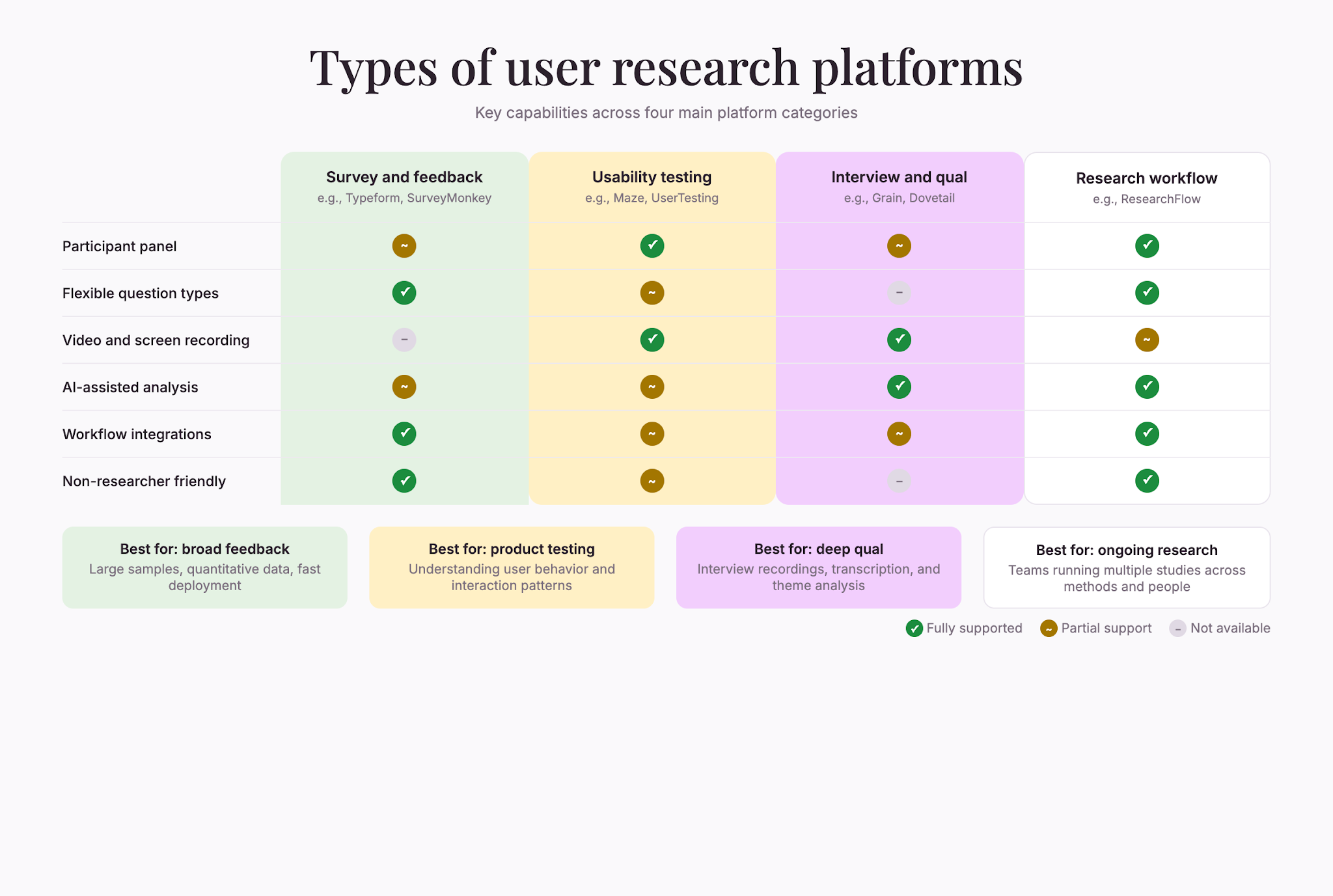
Different platforms focus on different research methods. Understanding the distinctions helps you narrow your search.
General survey and feedback platforms
These are broad tools designed for surveys, polls, and feedback collection. They’re good if you need to gather opinions from large groups quickly. They typically excel at quantitative data but offer less depth for qualitative research. Many also support logic branching and conditional questions, allowing you to tailor surveys to respondent answers in real time.
Online surveys rank as the most used quantitative method among market research professionals, with 85% using them regularly (Backlinko, 2026). Online and mobile quantitative research accounts for 35% of worldwide market research revenues (Backlinko, 2026). This dominance reflects the efficiency of surveys across teams: when you need feedback from hundreds or thousands of people, surveys are fast and cost-effective.
Usability testing platforms
These are built to watch people interact with your product or prototype in real time (moderated) or asynchronously (unmoderated). They usually include video recording, task flows, and tools to prompt participants mid-test. Maze, originally a startup-focused usability testing platform, now serves more than 3,000 companies as of 2025 (Maze, 2025).
If you’re testing a website, app, or new feature before launch, a dedicated usability testing platform often beats a general survey tool. The difference is deliberate: usability testing platforms are optimized to help you understand the why behind user behavior, not just the what.
Interview and qualitative research platforms
Some platforms are optimized for 1-on-1 interviews, focus groups, or open-ended feedback. They focus on recording, transcription, and theme-spotting across multiple interviews. These are great if you want depth and nuance over statistical power. Many include automatic transcription, making it easier to analyze conversations without spending hours on manual transcription.
Research workflow platforms
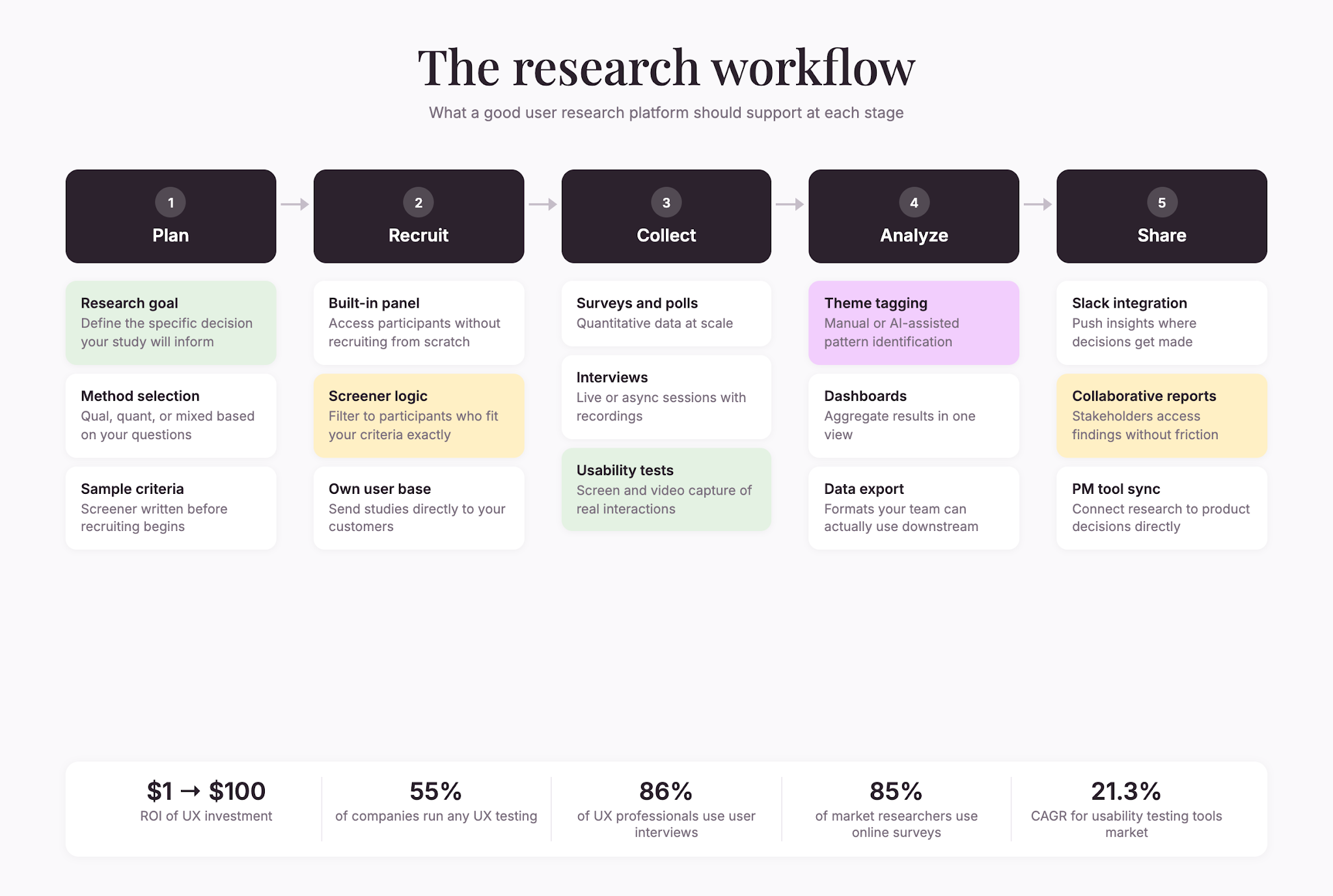
A newer category of platforms takes a step back and helps teams organize the entire research process—from planning and recruiting, through data collection, analysis, and sharing findings with stakeholders. These are especially useful if multiple people on your team need to run studies or if you’re doing research regularly. They often include templates, best-practice guides, and built-in collaboration features.
How to evaluate platforms
Once you’ve narrowed your search to a few options, test them properly. Don’t just watch a demo. Actually use them.
Run a test study
Most platforms offer free trials. Use yours to set up a real (or realistic) study. Do it the way you’d actually run research: recruit a handful of participants, ask real questions, collect data.
Pay attention to friction points. Where did you get stuck? Where did the platform feel clunky? Where was it delightful? How long did the whole process take? Time yourself from start to finish: setup, sharing, waiting for responses, analyzing results. This end-to-end experience matters more than any individual feature.
Check the participant quality
If the platform includes a participant panel, test it. Run a small pilot study, review the responses, and ask yourself: Are these real people giving thoughtful answers? Or are they rushing through for a reward? Poor participant quality can make any platform feel useless—you get junk data out if you put junk participants in.
Assess the analysis tools
Collect 10–15 responses and see how easy it is to extract insights. Can you spot themes? Can you export data in a format you actually use? Does the platform offer AI-powered tagging, or do you have to do it manually? Try exporting your findings in multiple formats to test flexibility.
Talk to customer support
Send a question and see how fast they respond. Check their documentation. Look at their community forum. A platform is only as good as its support when things go wrong. Support quality also signals how much the vendor cares about customer success versus just collecting subscription fees.
Consider total cost of ownership
Factor in participant costs, subscription fees, integrations, and the time your team spends learning and managing the platform. The cheapest option isn’t always the best value. Sometimes paying more upfront for a platform that requires less manual effort saves money long-term.
Building research into your workflow
Choosing the right platform is one thing. Actually using it is another.
Teams that get the most from user research treat it as ongoing, not a one-time event. They run small studies regularly, not elaborate, expensive ones every few months. They involve designers, product managers, and even non-researchers in the process. This consistency is what builds a culture of evidence-based decision-making across an organization.
This requires a platform that’s easy enough for anyone to use, flexible enough to support different study types, and integrated enough to fit seamlessly into how you already work. Platforms designed specifically for research workflows—ones that guide teams through planning, recruiting, data collection, and analysis—tend to get used more consistently. When research is built into standard operating procedures rather than treated as an optional add-on, the results compound: better decisions, faster iteration, happier customers.
User research platforms can support this by offering templates for common research questions, automated workflows that reduce friction, and built-in collaboration tools that make sharing findings effortless. The best user research platforms don’t just collect data; they enable teams to act on that data quickly.
ResearchFlow is an example of a platform built to streamline this entire process, helping teams move from research questions to actionable insights without context-switching or complexity.
Making the decision
The best user research platform is the one your team will actually use. That means it needs to be:
- Simple enough that barriers to entry are low
- Powerful enough that it scales with your ambitions
- Integrated enough that it fits your workflow, not the other way around
- Affordable enough that the ROI is clear and the cost doesn’t become a political issue every renewal
Start with your most pressing research question. What do you most need to know right now? Pick the platform that makes answering that question easiest. If it works, great. If not, most offer free trials—move on and try the next one.
The goal isn’t to find the perfect platform. It’s to find one good enough that your team stops overthinking research and starts doing it.

Liked that? Check these out:

Opinions and Expertise
What’s actually slowing research teams down (Hint: it’s not the research)
From recruiting participants and scheduling interviews to building the actual surveys, the operational drag is taking researchers away from what they do best. See what's actually slowing them down and how Research Flow fixes it.
Read more