AI survey builder: create smart surveys in minutes
10 min read
Last published
September 3, 2026
AI survey builder: create smart surveys in minutes
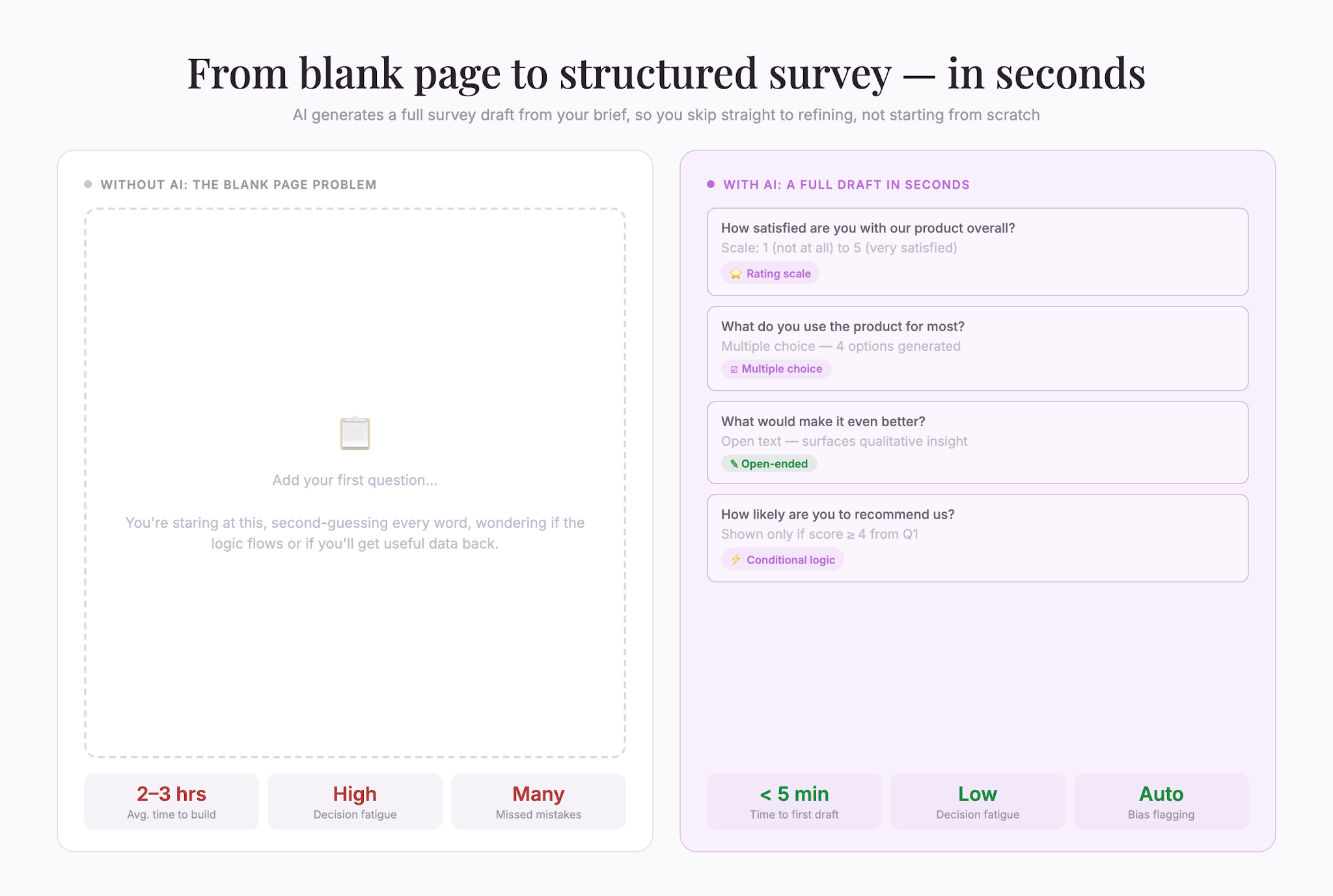
Creating effective survey questions is easier said than done. You need to ask the right things, in the right order, to the right people—and do it in a way that actually makes people want to answer. Most survey builders make this harder, not easier. You’re staring at a blank form, second-guessing every word, wondering if your logic flows or if you’ll get useful data back
Share
Latest posts on
Free online trivia maker: custom trivia quizzes in minutes
|
September 4, 2026
Read more
How to make a test online: tips and tricks
Typeform
|
September 4, 2026
Read more
How to build a landing page that converts
Typeform
|
September 4, 2026
Read more
How to make an online form: the ultimate guide
Typeform
|
September 4, 2026
Read more
Share
Creating effective survey questions is easier said than done. You need to ask the right things, in the right order, to the right people—and do it in a way that actually makes people want to answer. Most survey builders make this harder, not easier. You’re staring at a blank form, second-guessing every word, wondering if your logic flows or if you’ll get useful data back.
Typeform AI changes that. It handles the heavy lifting—writing questions, structuring logic, even suggesting follow-ups—so you can build surveys that work in minutes, not hours. You ask the AI what you want to know. It generates thoughtful questions. You review, tweak, and launch. The result is a stronger survey that gets you better data from the start.
Here’s what an AI survey builder actually does and why it matters for anyone collecting feedback.
What an AI survey builder does
An AI survey builder is a form tool that uses artificial intelligence to help you write questions, organize flows, and suggest improvements to your survey. Instead of starting from a blank page, you describe what information you need—your goals, your audience, your industry—and the AI generates a full survey draft.
This isn’t about replacing your judgment. It’s about getting a strong first draft in seconds so you can focus on refining, not starting from scratch. The AI learns what makes questions clear, unbiased, and engaging based on millions of surveys. It spots common mistakes—like leading questions or unclear wording—before they cost you data quality.
The best AI survey builders also let you customize everything. You can edit questions, reorder them, add your own, remove what doesn’t fit, and set up logic so respondents only see questions relevant to their answers. The AI is a starting point, not the final word.
Why AI matters for survey building
Building surveys the old way takes time. You brainstorm questions, write them, read them again, wonder if they’re biased, shuffle them around, add logic, test them, and realize halfway through that you missed something important. By then, you’ve lost an hour or more.
An AI survey builder cuts that down dramatically because:
It reduces decision fatigue. Survey building involves hundreds of micro-decisions: How do I phrase this? Should I ask this before that? What if someone says no—what should I ask next? An AI handles the initial drafting, so your brain isn’t exhausted before you even launch.
It catches common mistakes. Leading questions, double-barreled questions (asking two things at once), unclear scales, and poor logic flows are easy to miss when you’re the one who wrote them. AI trained on thousands of good surveys spots these problems and flags them.
It speeds up iteration. If your first survey isn’t quite right, regenerating a new version takes seconds. You can test different approaches, different question orders, or different wording without starting over manually each time.
It makes surveys more engaging. Questions written by AI tend to feel less corporate and more conversational because they’re trained on real language patterns. When surveys feel less like interrogations, response rates go up.
How to use an AI survey builder effectively
Having an AI generate your survey is only half the battle. The other half is knowing how to use it well. Here’s how to get the most out of an AI survey builder.
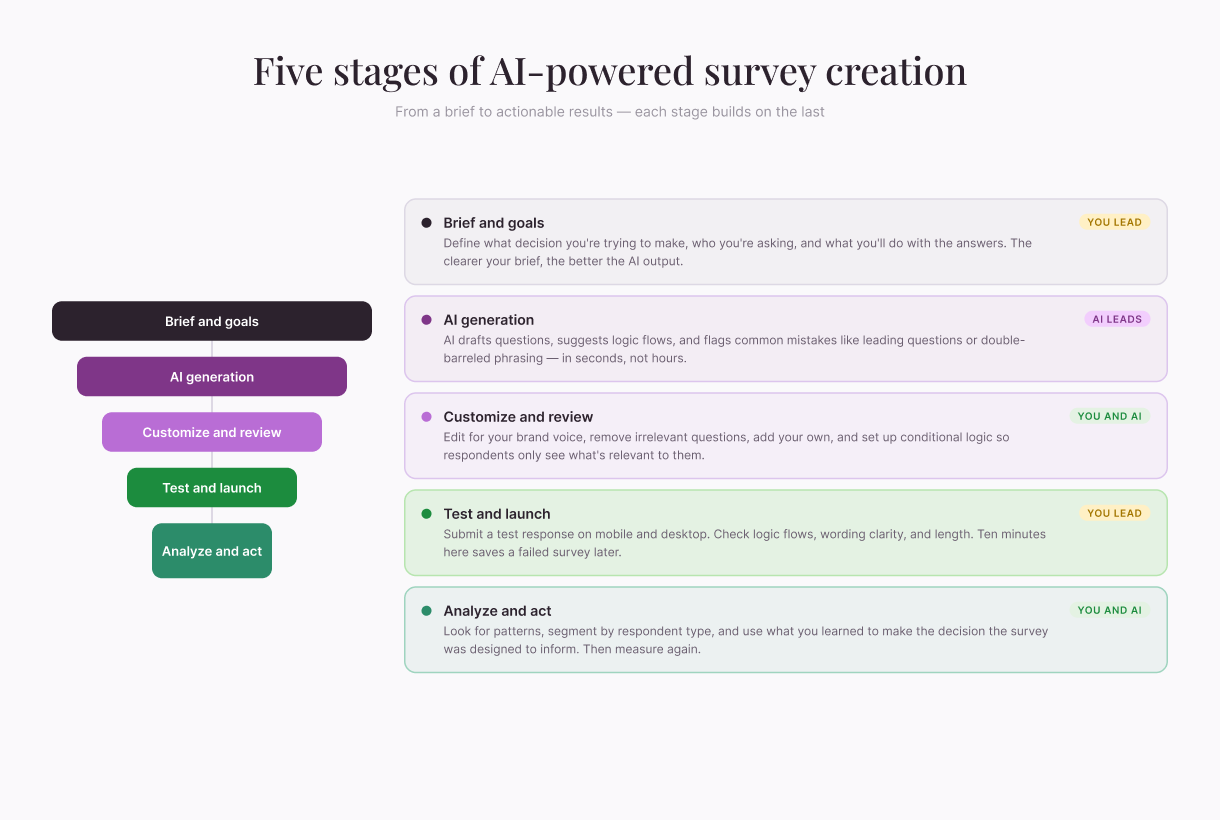
Start with a clear brief
The better you describe what you want to know, the better the AI output will be. Don’t just say “customer feedback survey.” Instead, tell the AI:
What decision you’re trying to make (e.g., “We’re deciding whether to launch a new product feature and need to know if customers want it”)
Who you’re asking (e.g., “Current paying customers who’ve used the product for at least 3 months”)
What you’ll do with the data (e.g., “Present findings to the product team to inform roadmap decisions”)
Any topics that are off-limits or sensitive for your audience
The more context you give, the more relevant the questions will be.
Review the generated survey for bias
AI learns from data, and data reflects the world—including biases baked into existing surveys. An AI survey builder might generate questions that subtly assume something about your respondents or lead them toward a certain answer.
Read through the questions carefully and ask yourself:
Does this question assume something that might not be true?
Would two different people read this question and interpret it the same way?
Are the answer options balanced, or do they favor one choice?
Is the question neutral, or does the wording suggest what I want the answer to be?
If something feels off, edit it or regenerate that section.
Customize for your brand and audience
A generated survey is a starting point. Your job is to make it fit your actual needs. That might mean:
Removing questions that don’t matter to your decision
Rewording questions to match how your audience actually talks
Adding follow-ups that dig deeper into specific responses
Changing the order so related topics flow together
Swapping out rating scales or multiple-choice options to match your context
The survey is yours. The AI just got you 80% of the way there.
Test before you send
Always review your survey on mobile and desktop. Always submit a test response and go through the entire experience as a respondent would. You’ll spot wording issues, broken logic flows, and confusing instructions that you’d miss otherwise.
Check:
Do questions load clearly on mobile?
If you select a certain answer, do the follow-up questions appear correctly?
Does the survey feel too long or repetitive?
Are there any typos or formatting issues?
Does it make sense to someone seeing it for the first time?
Testing takes 10 minutes and saves you from launching a flawed survey.
Types of surveys an AI builder can help with
AI survey builders work well for nearly any survey type. Here are some common ones where AI really shines.
Net Promoter Score (NPS) surveys
An NPS survey asks one simple question: “How likely are you to recommend us to a friend or colleague?” followed by follow-ups that segment respondents into promoters, passives, and detractors. An AI can generate the initial questions and set up the conditional logic to branch based on responses—all in seconds.
Customer satisfaction surveys
These measure how happy customers are with your product, service, or experience. An AI can generate questions across multiple dimensions (ease of use, support quality, value for money) and organize them logically so the survey flows naturally.
Product feedback surveys
When you launch a new feature or product, you want to know what users think. An AI can draft questions about usability, value, and likelihood to use, then suggest follow-ups that dig deeper based on responses.
Employee engagement surveys
HR teams use surveys to gauge morale, culture fit, and satisfaction. An AI can help structure sensitive questions carefully and suggest branching logic so employees only see relevant follow-ups (e.g., managers might see different questions than individual contributors).
Market research surveys
If you’re testing a new idea, messaging, or positioning, you need to hear from your target audience. An AI can help you draft questions that test assumptions without leading respondents toward a particular answer.
Lead qualification surveys
Sales teams often use surveys to qualify inbound leads. An AI can generate questions that uncover budget, timeline, and fit, and set up logic so your team gets the most promising leads first.
Best practices for AI-generated surveys
Even with AI doing the heavy lifting, a few principles will make your surveys more effective.
Keep it short. A survey that takes 5 minutes gets better completion rates than one that takes 15. Use AI to generate a first draft, then prune mercilessly. Every question should answer a specific decision you’re trying to make. If it doesn’t, cut it.
Use conditional logic deliberately. AI can set up branching so respondents only see questions relevant to them. This makes surveys feel shorter and more personalized. If someone says they’ve never used your product, don’t ask them detailed feature questions—ask them why instead.
Balance open-ended and closed questions. AI tends to favor multiple-choice questions because they’re easier to analyze. But open-ended questions (“What could we improve?”) often yield surprising insights. Include some of each.
Test your assumptions. Before launching a big survey, test it with a small group. See if questions are confusing, if response rates are healthy, and if the data you get actually answers your questions. Small adjustments early save headaches later.
Analyze and act. The point of a survey is to learn something that changes a decision. After launch, spend time understanding your results. Look for patterns, segment the data by respondent type, and ask follow-up questions. Then actually use what you learned.
Common mistakes to avoid
Even with an AI generating your survey, it’s easy to go wrong. Here are the common mistakes to watch out for.
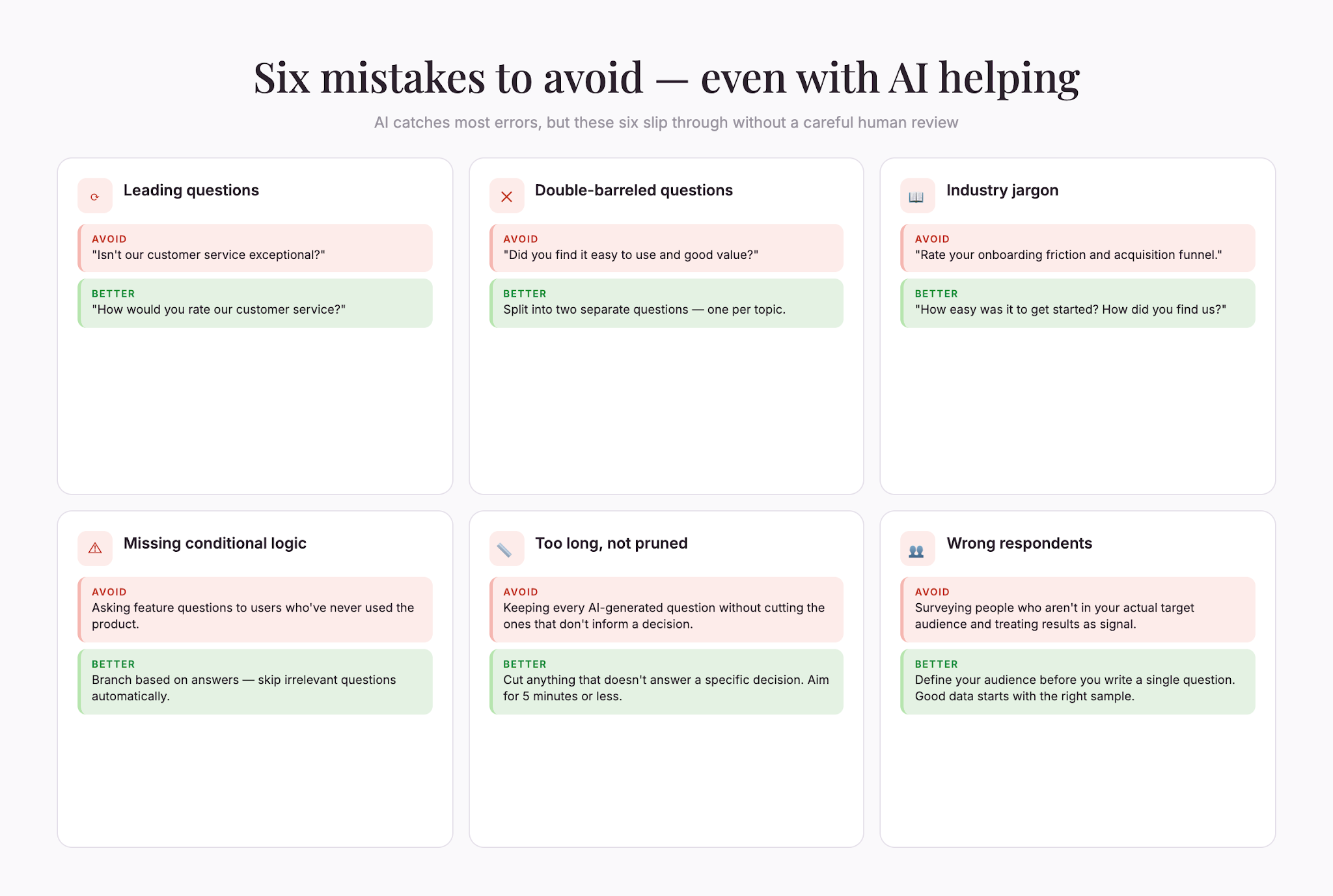
Asking leading questions. A leading question is worded in a way that nudges respondents toward a particular answer. Example: “Isn’t our customer service exceptional?” Instead, ask neutrally: “How would you rate our customer service?” An AI will often catch this, but not always, so stay vigilant.
Asking multiple questions at once. “Did you find the product easy to use and good value?” conflates two things. A respondent might think it’s easy but expensive. Split it into two questions. An AI sometimes makes this mistake; you need to fix it.
Using jargon. If you work in tech, finance, or healthcare, you’re probably fluent in industry-specific language. Your respondents might not be. An AI-generated survey should avoid jargon, but review it anyway. Replace “onboarding friction” with “easy to get started” or “user acquisition funnel” with “signing up new customers.”
Forgetting respondent context. An AI doesn’t know your audience. If you’re surveying people who speak English as a second language, a survey full of idioms and slang will confuse them. If you’re surveying teenagers, overly formal language will feel weird. Read the survey through their eyes and adjust accordingly.
Not setting up logic. Conditional branching makes surveys shorter and more relevant. If an AI generates a long survey but you don’t set up logic to skip irrelevant questions, respondents will quit halfway through. Take the time to add branching.
Ignoring response quality. An AI generates good questions, but if you survey the wrong people, you’ll get unreliable data. Make sure you’re reaching your actual target audience and that respondents are thoughtful (not just clicking randomly to finish fast).
The future of survey building
AI survey builders are still evolving. Today, they’re great at generating initial drafts, catching bias, and suggesting logic. Tomorrow, they’ll likely get even better at:
Predicting completion rates. AI could analyze your draft survey and estimate how many people will actually finish it, then suggest edits to boost that number.
Real-time sentiment analysis. As responses come in, AI could flag unexpected patterns or sentiment shifts and alert you instantly so you can make decisions faster.
Generating follow-up surveys automatically. If a respondent gives a surprising or concerning answer, AI could suggest a quick follow-up survey to dig deeper, all without manual intervention.
Multi-language surveys. AI could automatically translate surveys while preserving tone and meaning, making it easier to gather global feedback.
We’re still in the early days, but the trajectory is clear: AI will keep making survey building faster, less biased, and more accessible to people without research training.
Building surveys that work
An AI survey builder doesn’t replace your thinking—it amplifies it. It gets you past the blank page and into refinement mode. You still decide what matters, who to ask, and what to do with the answers. The AI just does the scaffolding faster.
The best surveys are built by humans who know their audience, their goals, and what good questions look like—working alongside AI that handles drafting, structure, and pattern detection. That partnership is where surveys go from adequate to genuinely useful.
If you’re spending hours writing and rewriting survey questions, an AI survey builder can cut that down to minutes. The time you save isn’t time to do nothing—it’s time to refine, test, and get better data back.
AI survey builder: create smart surveys in minutes
Free online trivia maker: custom trivia quizzes in minutes
Trivia is engaging. People love testing their knowledge, competing with friends, and proving they know random facts nobody asked them to memorize. That’s why trivia works as a learning tool, a marketing hook, an event activity, and just plain fun.