Free online trivia maker: custom trivia quizzes in minutes
10 min read
Last published
September 3, 2026
Free online trivia maker: custom trivia quizzes in minutes
Trivia is engaging. People love testing their knowledge, competing with friends, and proving they know random facts nobody asked them to memorize. That’s why trivia works as a learning tool, a marketing hook, an event activity, and just plain fun.
Share
Latest posts on
AI survey builder: create smart surveys in minutes
|
September 4, 2026
Read more
How to make a test online: tips and tricks
Typeform
|
September 4, 2026
Read more
How to build a landing page that converts
Typeform
|
September 4, 2026
Read more
How to make an online form: the ultimate guide
Typeform
|
September 4, 2026
Read more
Share
Trivia is engaging. People love testing their knowledge, competing with friends, and proving they know random facts nobody asked them to memorize. That’s why trivia works as a learning tool, a marketing hook, an event activity, and just plain fun.
But creating trivia from scratch is tedious. Writing good questions, checking answers, designing the quiz, and distributing it takes hours. A trivia maker skips all that friction. You build a quiz in minutes, share it immediately, and watch people engage.
What makes a good trivia quiz
Trivia seems simple—questions, answers, scoring. But good trivia is harder to build than it looks. Here’s what separates trivia that people finish from trivia people abandon after two questions.
Questions that feel fair
Trivia shouldn’t be gotcha questions where only the trivia expert in the room knows the answer. Good trivia is questions people might actually know or could reasonably figure out. Fair questions keep people engaged. Impossible questions frustrate them.
A fair trivia question is about a topic your audience has touched. You’re not asking marketing people about quantum physics. You’re asking questions where knowledge is probable, not accidental.
A mix of difficulty levels
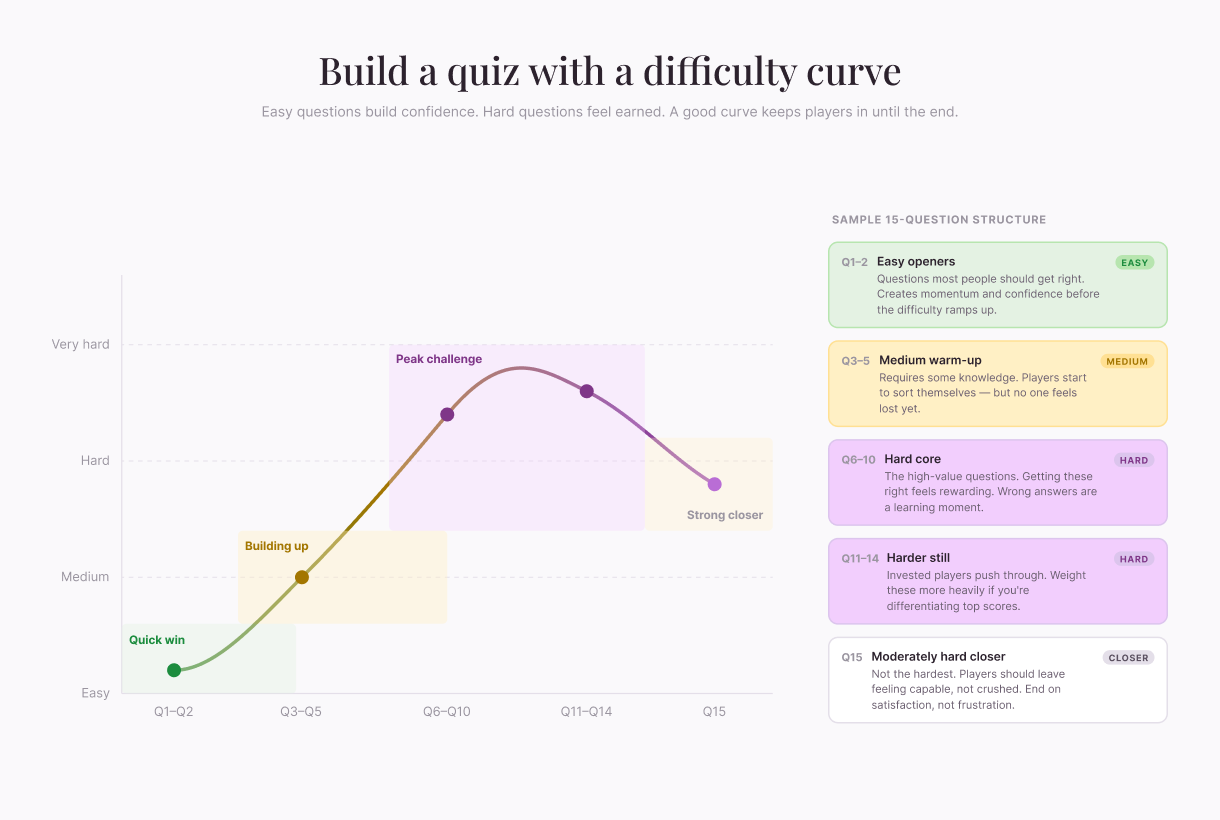
If every question is hard, people feel dumb. If every question is easy, they get bored. Mix it up. Easy questions early build confidence. Medium questions keep them engaged. Hard questions make them feel sharp when they get them right.
Clear, unambiguous questions
Confusing wording tanks trivia. “Which of these is not something?” makes people reread. Keep questions simple. One clear question. Obvious answer choices (for multiple choice). No trick wording.
Immediate feedback
Trivia should tell you right away if you’re right or wrong. Not just show a score at the end. Each question answered gets instant feedback. That’s satisfying. It keeps the momentum going. It makes trivia feel interactive, not like a test.
How to write good trivia questions
A trivia maker handles the mechanics, but you still have to write the questions. This is where most quizzes succeed or fail.
Fortunately, with these trivia maker best practices, you can write questions that shine:
Maintain one fact, one question. Each question should test one thing. If you’re asking about the year of an event and the person involved, split it into two. Compound questions confuse respondents and muddy scoring.
Read it aloud. If you stumble, the player will too. Trivia rewards rhythm. Short, punchy phrasing pulls people through faster than dense sentences.
Build a difficulty curve. Open with one or two easy questions for a quick win. Move into medium difficulty in the middle. Save hard questions for the back half, when the player is invested. End with a moderately hard question—not the hardest. You want players leaving the quiz feeling capable, not crushed.
Write fair distractors. Wrong answers shouldn’t be obviously wrong. The best distractors are answers a reasonable person might guess. If three options are clearly junk, the question is a yes/no in disguise. Make every option plausible enough that the player has to think.
Check for ambiguity. Have someone outside the project read your draft. If they argue that a “wrong” answer is actually right under one interpretation, rewrite. Trivia loses credibility fast when the “correct” answer turns out to be debatable.
Calibrate by testing. Authors always find their own questions easy. Send the draft to two or three people from your target audience. If everyone aces it, raise the difficulty. If everyone bombs it, ease up.
Keep the answer verifiable. Stick to facts you can confidently source. Contested or recent facts can change between when you write the quiz and when someone takes it.
How to create your own trivia quiz
Building a trivia maker yourself involves five straightforward steps.
Step 1: Choose your topic
Trivia works best when it has a clear focus. Broad general trivia is harder to write and less likely to engage a specific audience. Narrow topics are easier to create and more engaging.
Examples of strong trivia topics:
“How well do you know our company culture?”
“Test your knowledge of 1990s sitcoms”
“Can you name the capital of every state?”
“What do you know about sustainable fashion?”
“Marketing history: the early internet edition”
Narrow topics make it easier to write questions and easier to find an audience that cares.
Step 2: Write your questions
Aim for 10 to 20 questions per quiz. That’s long enough to be interesting but short enough that people finish. Longer quizzes have lower completion rates.
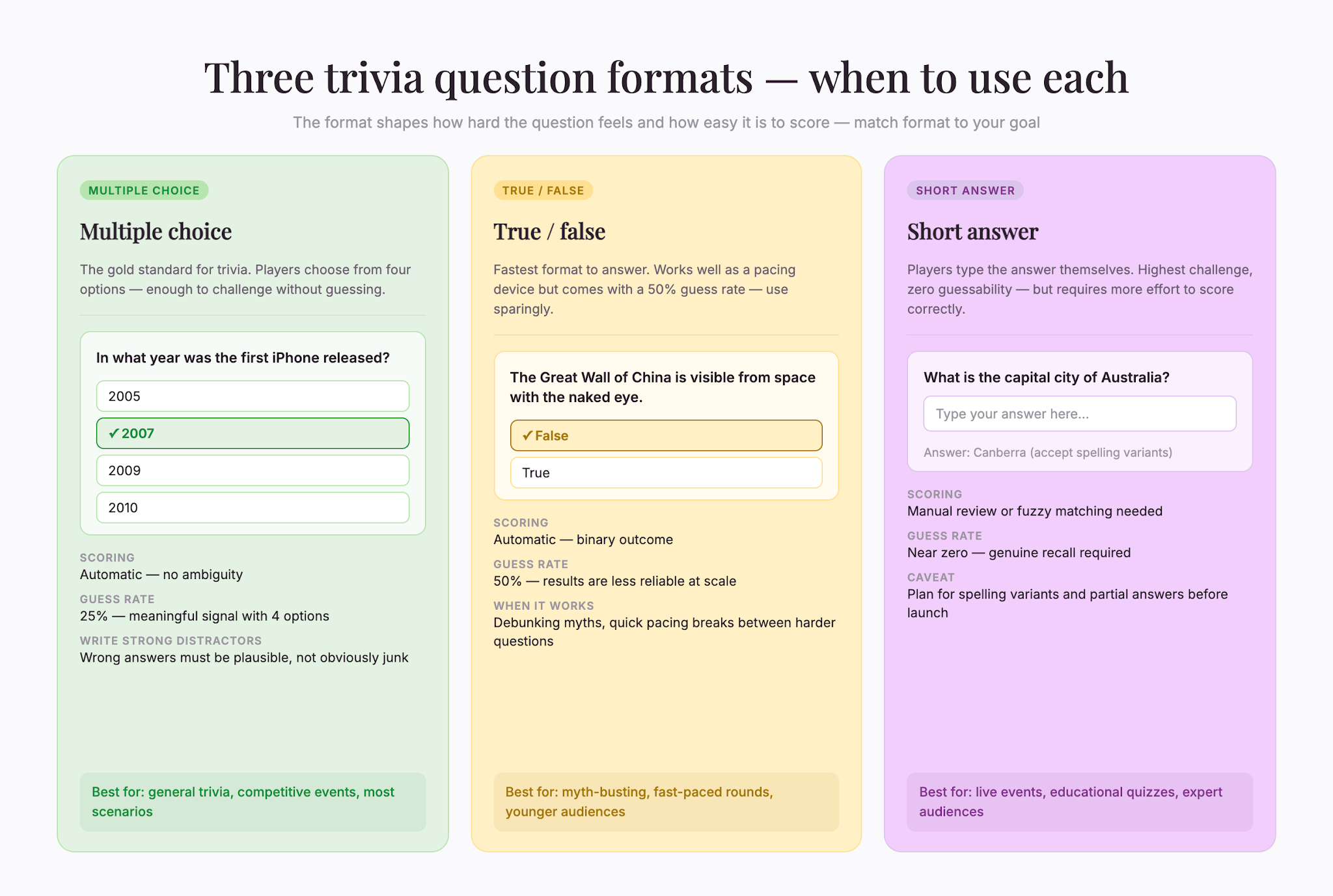
For each question, decide on format. Multiple choice is easiest for respondents and easiest to score. True/false is faster but gives people a 50% chance of guessing correctly. Free-text answers (where people type the answer) are harder to score automatically.
Write clear, unambiguous questions. Avoid double negatives. Avoid questions with multiple correct answers unless you specifically want debate.
For multiple choice, make sure incorrect options are plausible but clearly wrong. “What year was the internet invented?” with options “1969, 1975, 1983, 2001” isn’t good. Someone not paying attention might pick 2001 because it’s recent. “1969, 1972, 1974, 1983” gives people a harder time guessing.
Step 3: Set your scoring
Trivia can be scored in different ways. Simplest is one point per correct answer. If you want to weight questions by difficulty, harder questions could be worth more points.
Decide whether you’ll show the score at the end, by question, or both. Showing scores per question gives feedback as people go. Showing only the final score creates suspense.
Additionally, decide what happens when people get an answer wrong. Do you show the correct answer immediately? Do you let them keep guessing? Immediate feedback is more engaging for casual trivia. Letting people guess creates more challenge.
Step 4: Design and customize
Trivia doesn’t have to be plain. Add a title that catches interest. Use colors that fit your brand or your topic. Add an image if it fits.
Just make sure to keep the design simple enough that it’s readable on mobile. Too much visual clutter makes reading questions harder, and if the quiz isn’t mobile-friendly, completion will drop.
Step 5: Share and track
Once your trivia is built, share it. Email it to your audience. Post it on social media. Embed it on your website. Add it to your event agenda if it’s a live event.
Track completion and scores. How many people started? How many finished? What was the average score? Where did people get stuck? This tells you whether your trivia worked and how to improve it next time.
Use cases that actually work
Trivia bends to fit a lot of situations. While the format stays the same, the framing, length, and stakes change.
Classroom and learning. A teacher running a unit on the Civil War can drop a fifteen-question quiz at the end of the week. Students review without realizing they’re studying. The teacher gets a quick read on what stuck.
Live events and conferences. A trivia round during a networking break gives people something to do besides scroll their phones. Project questions on a screen, let attendees answer on their devices, and show a live leaderboard. Tie questions to the event topic.
Marketing campaigns. A skincare brand can run a “find your routine” quiz that’s part trivia, part recommendation. The trick is to make the trivia genuinely fun first—then let the brand connection feel earned. Quizzes that exist only to capture an email feel like a tax. Quizzes that entertain first feel like a gift.
Team building. A remote team can kick off a Monday standup with a five-question trivia about each other. Quarterly company trivia reinforces values, history, and product knowledge in a low-pressure way. Keep stakes light—the point is connection.
Onboarding new hires. New employees can take a quiz at the end of their first week covering company history, key people, and product basics. It surfaces gaps without feeling like a test.
Community events. Trivia nights at bars, libraries, and community centers scale from five players to fifty. The same maker that builds a corporate quiz builds the round for tonight’s pub.
The thread: trivia respects people’s time, gives them quick wins, and rewards a little knowledge.
Scoring and how to present results
Scoring sounds mechanical, but it shapes how the player feels at the end. A quiz with the same questions can feel either rewarding or punishing, depending on how you total things up.
Pick a scoring style that fits the goal. For casual entertainment, one point per correct answer keeps things simple. For learning, weighting harder questions more heavily encourages players to attempt them. For competitive trivia, adding a speed bonus rewards both knowledge and quick recall.
Show progress, not just the final number. A running tally during the quiz keeps players engaged. Seeing “7 out of 10 so far” gives a small jolt of momentum that drives them to finish.
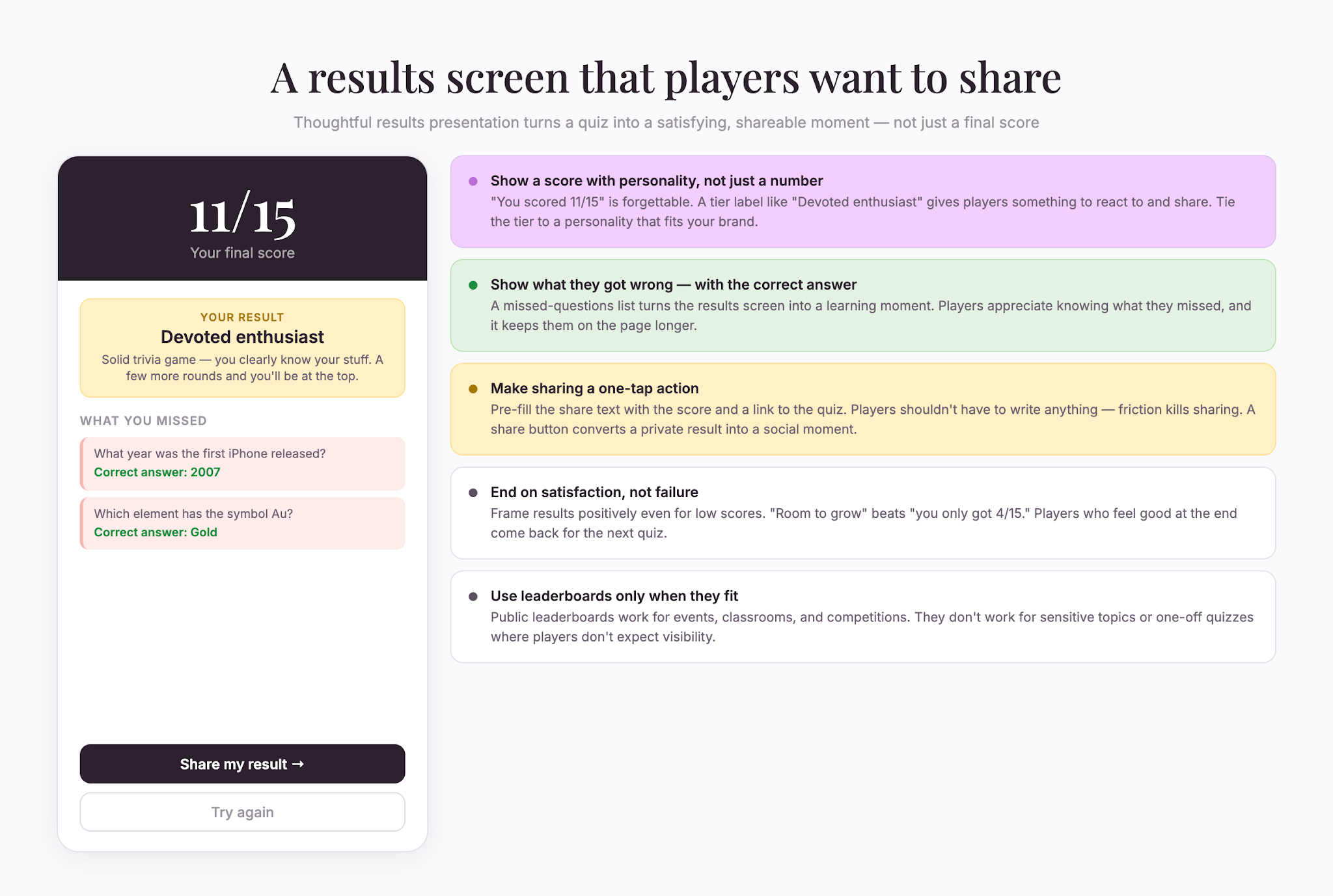
Frame the result with personality. A bare “You scored 8 out of 15” is forgettable. “You scored 8 out of 15—solid trivia game, room to grow” gives the player something to react to. For brand trivia, tie the result tier to a personality: “Casual fan,” “Devoted enthusiast,” “Walking encyclopedia.” People share results when the framing is fun.
Show what they got wrong. After the quiz, list missed questions with the correct answers and a brief explanation. This turns the quiz into a learning moment, not just a verdict. Players appreciate knowing what they missed.
Offer a leaderboard if it fits. Public leaderboards work for events, classrooms, and competitions. They don’t work for sensitive topics or one-off marketing quizzes where players don’t expect their score to be visible.
Make sharing easy. A “share your result” button at the end converts a private quiz into a social moment. Pre-fill the share text with the score and quiz link so the player doesn’t have to write anything.
Send results by email if useful. For longer quizzes, follow-ups with the score breakdown and a related read keep engagement going beyond the quiz itself.
The goal is to leave players wanting another quiz, sharing this one, or coming back. Scoring done well makes that happen.
Trivia ideas by industry
Need help getting started? Here are some fun trivia questions to ask based on various industries and scenarios:
Retail and ecommerce: Brand trivia about your products, history, or culture. “What year did we launch our flagship product?” Customers get closer to your brand while testing how well they know you.
Nonprofits: Trivia about your mission, the issues you address, or facts related to your work builds awareness without lecturing supporters.
Education: An obvious fit. Use trivia for review, for studying, or to test comprehension of material just taught.
Events: A crowd-pleaser at conferences, trade shows, networking events, and parties. It breaks the ice and creates friendly competition.
Tech and software: Trivia about product features, company history, or industry trends works well. Tech audiences enjoy trivia—use it to build community.
Publishing and media: trivia about your content, your authors, or topics your audience loves drives traffic and engagement.
Best practices for trivia that works
To ensure engaging trivia questions that keep your audience coming back for more, keep these best practices in mind:
Keep questions consistent in length. If some questions are one sentence and others are paragraphs, the quiz feels uneven. Consistency matters.
Avoid outdated references. Trivia ages. If you reference events, people, or trends from twenty years ago, it dates your quiz. Keep it current or make the time period clear.
Test your trivia before sharing. Take the quiz yourself. Have someone else take it. Are questions clear? Are answers obvious to you but not to others? Test catches problems.
Give context for hard questions. If you ask about something obscure, hint at the answer in the question. “In what year did musician X release album Y?” is easier to answer than “When was Y released?” if your audience isn’t music experts.
Use images when helpful. If a question is about identifying something visual, show the image. If images just distract, skip them.
Avoid negative language. “Which of these is NOT true?” makes people reread. “Which is true?” is cleaner. People answer faster and more accurately.
Trivia drives engagement
Trivia is one of the highest-engagement content formats. People finish quizzes they start. They share results. They tell friends.
Building trivia used to require hiring someone or learning complex tools. Now you can create polished trivia in minutes. Pick a topic, write questions, set scoring, customize the design, and share it.
Start with one quiz, and see how your audience responds. Then, use the data to improve the next one, and build a library that keeps people coming back.
Free online trivia maker: custom trivia quizzes in minutes
AI survey builder: create smart surveys in minutes
Creating effective survey questions is easier said than done. You need to ask the right things, in the right order, to the right people—and do it in a way that actually makes people want to answer. Most survey builders make this harder, not easier. You’re staring at a blank form, second-guessing every word, wondering if your logic flows or if you’ll get useful data back