Stop losing submissions to bad form design. An online form builder gives you cleaner data, higher completions, and hours back every week.
Share
Latest posts on
Free online trivia maker: custom trivia quizzes in minutes
|
September 4, 2026
Read more
AI survey builder: create smart surveys in minutes
|
September 4, 2026
Read more
How to make a test online: tips and tricks
Typeform
|
September 4, 2026
Read more
How to build a landing page that converts
Typeform
|
September 4, 2026
Read more
Share
The ultimate guide for an online form builder
Every day, billions of pieces of information move between people and businesses. Job applications, event registrations, customer reviews, purchase orders—and all of it flows through forms.
Yet most of those forms are a hassle to deal with. On one hand, creating them can be complicated, and analyzing all of your collected responses requires a lot of time-consuming manual data entry. On the other hand, forms can be so confusing, complicated, and long that respondents abandon them halfway through.
An online form builder changes that. It gives anyone—from a solo freelancer to a large operations team—the tools to create clean, intuitive forms that people actually finish, no coding required. Whether you're collecting contact details, processing orders, or gathering feedback, the right form builder helps you get better data with less friction.
Why online form builders matter
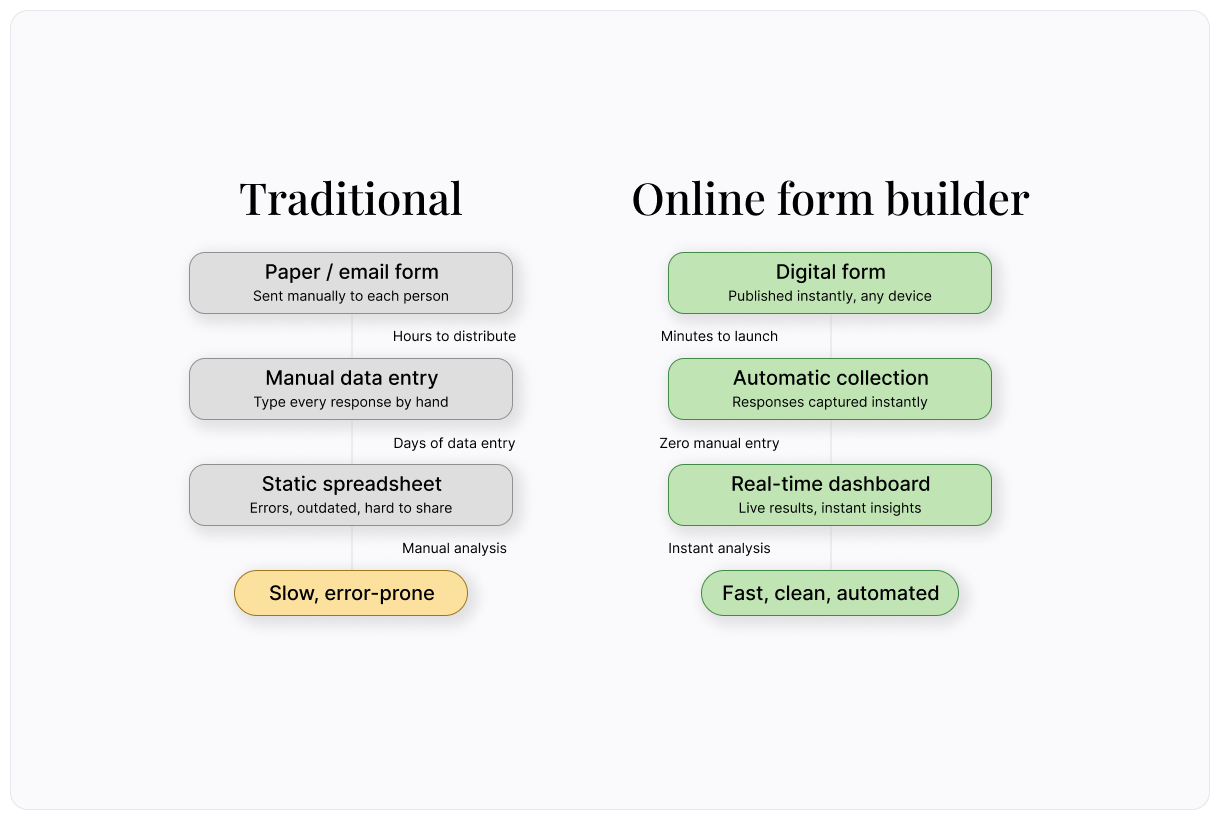
Paper forms and email threads worked well enough for a while. But they come with real costs: manual data entry, lost submissions, formatting headaches, and no easy way to analyze responses.
An online form builder solves these problems in one move. Responses flow directly into a database or spreadsheet. Conditional logic lets you show only the questions that are relevant to each person. And since the form lives online, it's accessible from any device, anywhere.
The result? Higher completion rates, cleaner data, and hours saved every week on manual work.
There's a compounding benefit, too. The more responses you collect digitally, the richer your dataset becomes. Over time, you can spot trends, identify patterns, and make better decisions—all because the data was structured properly from the start. What begins as a simple contact form can evolve into a system that drives real operational improvements across your organization.
How to choose the right form builder
Not all form builders offer the same ease of use and value. The right choice for you depends on what you're collecting, who's filling it out, and where that data needs to go. Here's what to evaluate.
Ease of use
The best form builders use drag-and-drop editors that let you create forms in minutes. If you need to read a manual to build a simple contact form, it's not the right tool. Look for an intuitive interface with pre-built templates you can customize.
Question types
Basic text fields and dropdowns are non-negotiables. You'll also want support for file uploads, date pickers, rating scales, payment fields, and signature capture. The more question types available, the fewer workarounds you'll need.
Conditional logic
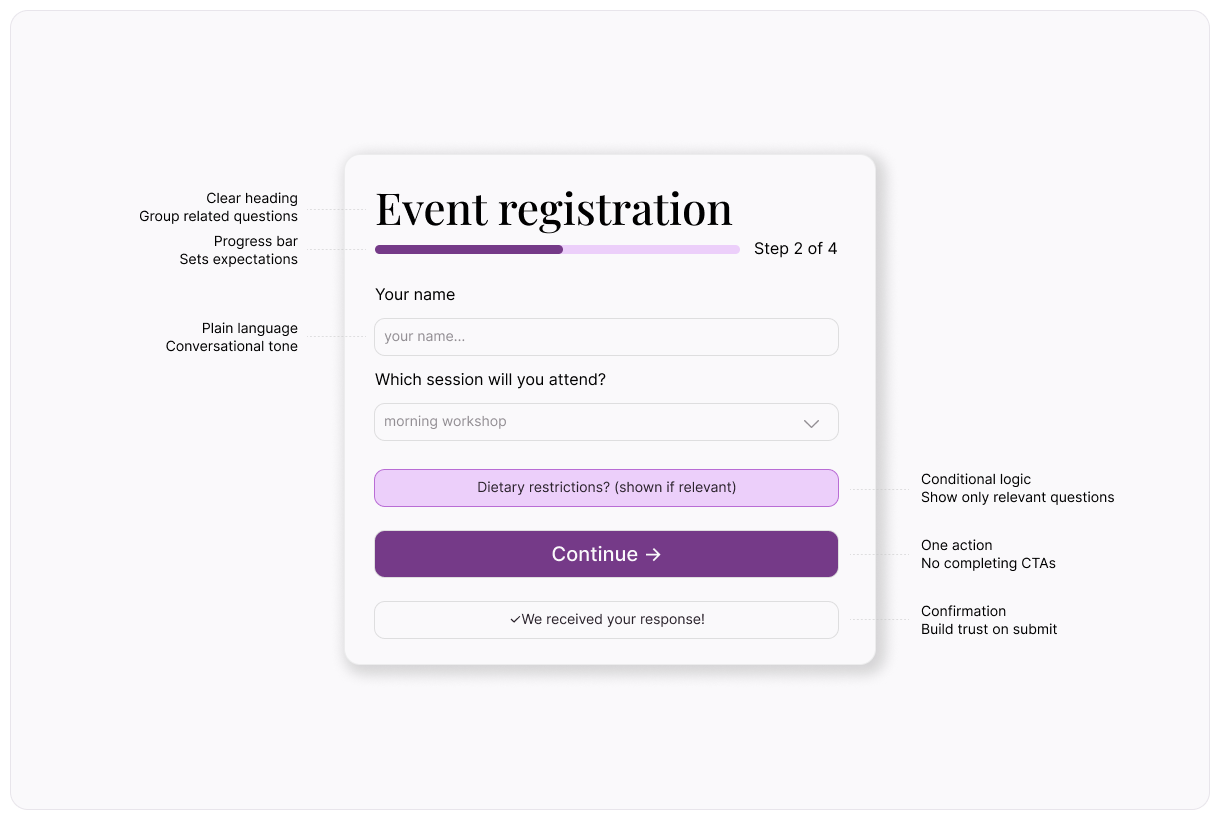
Also called "branching" or "skip logic," this feature lets you show or hide questions based on previous answers. It keeps forms short and relevant for each respondent, which directly improves completion rates. For example, if someone selects "No" on a question about dietary restrictions, there's no reason to show them a follow-up about specific allergies.
Integrations
Your form data needs to go somewhere useful. Look for native integrations with the tools you already use—CRMs, email marketing platforms, spreadsheets, project management apps, and payment processors. The fewer manual steps between form submission and action, the better.
Mobile responsiveness
More than half of web traffic now comes from mobile devices. If your forms don't look good and work smoothly on a phone, you'll lose respondents before they even start. Make sure the builder produces forms that adapt to any screen size automatically.
Security and compliance
You're collecting personal data, so security isn't optional. Look for SSL encryption, GDPR compliance options, HIPAA support (if you're in healthcare), and data residency controls. At a minimum, make sure the builder encrypts data in transit and at rest.
How to build an effective online form
Choosing the right form builder is step one. Building a form that people actually want to complete is step two—and it's where most of the value lies.
Here's how to do it:
1. Start with your goal
Before you add a single question, get clear on what you need. Are you registering attendees? Collecting feedback? Processing applications? Your goal determines everything—the questions you ask, the order you ask them, and where the data goes afterward. A form without a clear purpose collects noise, not insights.
2. Keep it short
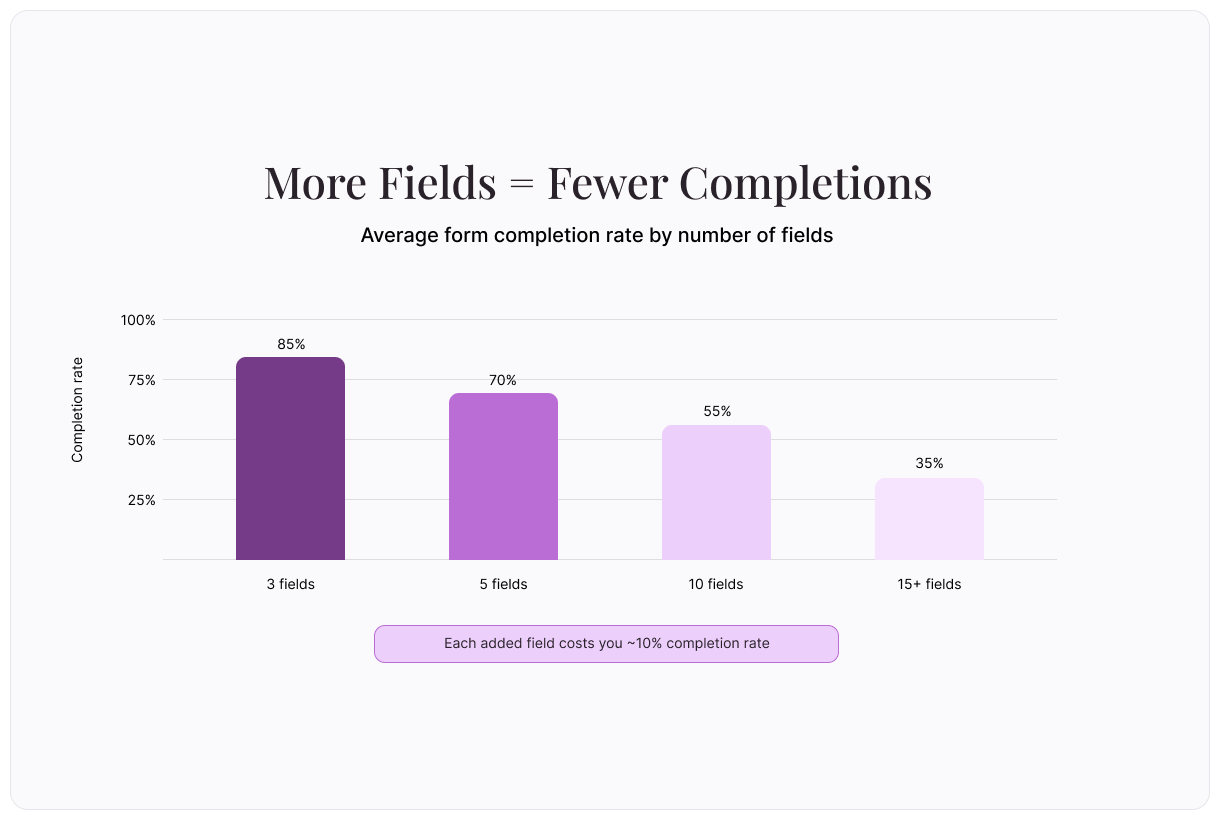
Every additional question reduces your completion rate. A good rule of thumb? If a question doesn't directly serve your goal, cut it. You can always follow up later with a second, shorter form.
3. Use plain language
Write questions the way you'd ask them in conversation. Instead of "Please indicate your preferred method of communication," try "How would you like us to reach you?" Clear language reduces confusion and speeds people through the form. If you're unsure whether a question is clear, read it out loud. If it sounds stiff, rewrite it.
4. Group related questions
Organize your form into logical sections. Put personal details together, preferences together, and feedback together. This makes the form feel structured and manageable rather than like a random list of questions. It also helps respondents estimate how much time they have left.
5. Set up confirmations and notifications
When someone submits a form, they should see a confirmation message (or be redirected to a thank-you page). You should also get notified—either by email or through an integration with your project management tool—so nothing falls through the cracks. A simple "We received your response" message goes a long way toward building trust.
Where online form builders shine
The versatility of form builders is one of their biggest strengths. Here are some of the most common use cases:
Customer feedback – Post-purchase surveys, net promoter scores (NPS), and support follow-ups help you understand what's working and what needs attention. The best feedback forms are short (three to five questions) and sent within 24 hours of the experience.
Event registration – Collect attendee details, dietary preferences, session choices, and payment in a single, streamlined form. Conditional logic is especially useful here—show session options only after someone selects a ticket type.
Job applications – Let candidates upload resumes, answer screening questions, and provide references without the back-and-forth of email. A well-designed application form respects the candidate's time while giving you the information you need to make decisions.
Order forms – Accept product selections, quantities, shipping details, and payment all in one place. For businesses that take custom orders (catering, printing, gifts), a form replaces the phone call or email chain.
Contact and inquiry forms – Embed a short form on your website so visitors can reach out without hunting for an email address. Pair it with conditional logic to route inquiries to the right team automatically.
Internal requests – IT tickets, supply orders, time-off requests, and expense reports all work well as online forms, especially when connected to workflow automations. What used to take an email chain and three follow-ups now takes a single submission.
Five tips to increase your form completion rate
As you build your online form using the steps above, implement these tips to encourage 100% completion every time:
1. Show progress
If your form has more than one page, add a progress bar. People are more likely to finish when they can see how far they've come. A progress indicator also sets expectations—respondents know upfront that the form won't drag on forever.
2. Make it conversational
Forms that ask one question at a time feel more like a conversation and less like a questionnaire. This approach tends to boost completion rates, especially on mobile, where screen space is limited and scrolling through a long form feels overwhelming.
3. Pre-fill what you can
If you already have some information about the respondent (their name, email, or company), pre-fill those fields. It saves time and shows that you value their effort. Pre-filling also reduces errors—people are less likely to mistype an email address that's already populated correctly.
4. Test before you launch
Fill out your own form on both desktop and mobile. Check for confusing wording, broken logic paths, and missing confirmation messages. A two-minute test can prevent dozens of abandoned submissions. Better yet, ask someone unfamiliar with the form to try it and watch where they hesitate.
5. Optimize your confirmation page
The confirmation screen is prime real estate. Instead of using it as a thank-you, consider leveraging it to set expectations ("We'll get back to you within 48 hours"), share a resource, or ask one more low-effort question.
Getting started
To build an effective online form, you don’t need technical skills or a big budget. The tools available today make it easy to create forms that look professional, work on any device, and connect to the systems you already use.
Ready to create your own? Just select your most common data collection need—a contact form, a feedback survey, an event registration—and build it. Start simple: a short form with five to seven fields, clear labels, and a confirmation message.
Once you see how much time it saves and how much cleaner your data becomes, you'll wonder where online form builders have been all your life.
About the author
We're Typeform - a team on a mission to transform data collection by bringing you refreshingly different forms.
Free online trivia maker: custom trivia quizzes in minutes
Trivia is engaging. People love testing their knowledge, competing with friends, and proving they know random facts nobody asked them to memorize. That’s why trivia works as a learning tool, a marketing hook, an event activity, and just plain fun.
AI survey builder: create smart surveys in minutes
Creating effective survey questions is easier said than done. You need to ask the right things, in the right order, to the right people—and do it in a way that actually makes people want to answer. Most survey builders make this harder, not easier. You’re staring at a blank form, second-guessing every word, wondering if your logic flows or if you’ll get useful data back