6 ways AI can help you build better marketing forms
AI helps you do what all new innovation promises to do—get your work done faster and easier, freeing up time for the plethora of tasks marketers face on the daily. Here are 6 ways AI can help you build better performing marketing forms.

Contents
Marketing forms are the bridge between interest and conversion. A form that’s well-designed and frictionless converts browsers into prospects. A form that’s confusing or burdensome sends people away.
Traditionally, building that bridge meant hours of manual work: deciding which questions to ask, testing different layouts, refining based on response rates. It’s work that pays off, but it’s slow.
Today, AI is changing how fast and how thoughtfully you can build. Here are six concrete ways AI tools and online forms creators are helping marketers design forms that engage visitors, collect better data, and convert more prospects.
1. AI question suggestions
One of the biggest decisions in form design is what to ask. Ask too much, and people abandon the form. Ask too little, and you don’t capture the information you need.
AI tools can suggest questions based on your goal. Tell it you’re collecting interest for a B2B software company, and it might suggest questions about company size, budget, timeline, and pain points. These suggestions are based on patterns from many successful forms across industries.
Instead of starting with a blank slate or copying questions from competitors, you get a shortlist of proven questions tailored to your situation. You can keep them, modify them, or discard them. It’s a starting point that saves hours of brainstorming.
2. Personalization for every visitor
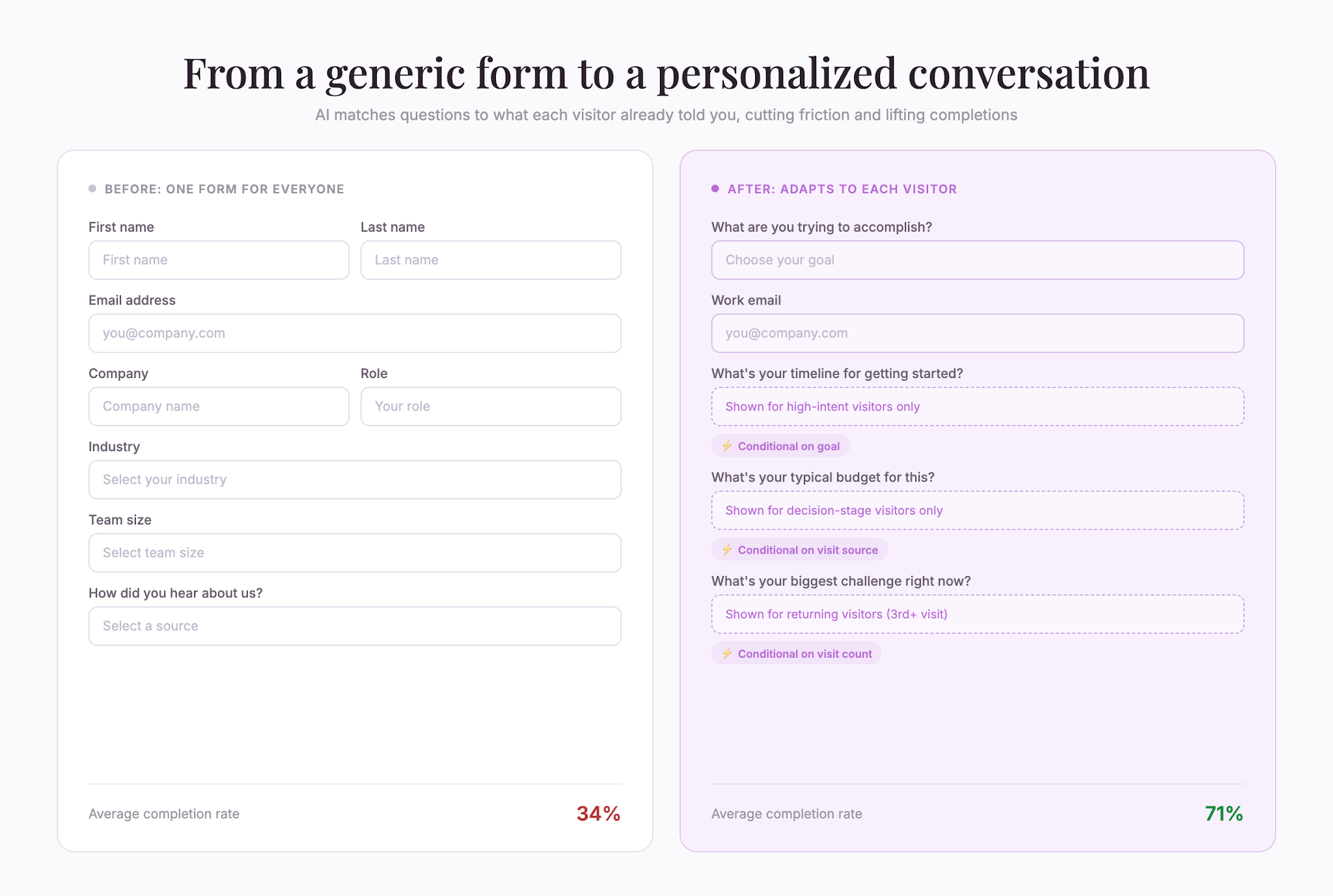
Showing everyone the same form used to be standard. Now, AI makes it possible to personalize forms based on what you know about the visitor.
If a visitor came from a landing page about pricing, show them questions about budget. If they came from a comparison page, ask about their current solution. If they’re returning to your site for the third time, skip the basics and jump to deeper qualification questions.
This dynamic approach means each visitor sees a form that feels relevant to them. Response rates go up because people aren’t answering irrelevant questions.
3. Real-time form analysis
Traditionally, you build a form, launch it, wait for responses, and then analyze what’s working. If the form is performing poorly, you’ve already collected bad data.
AI can flag issues in real-time. If a particular question has an unusually high abandonment rate, you get alerted immediately. If respondents are giving nonsensical answers to a question, AI can flag that the wording might be confusing.
This rapid feedback loop lets you make small adjustments quickly rather than waiting weeks for enough data to spot problems.
4. Intelligent field validation
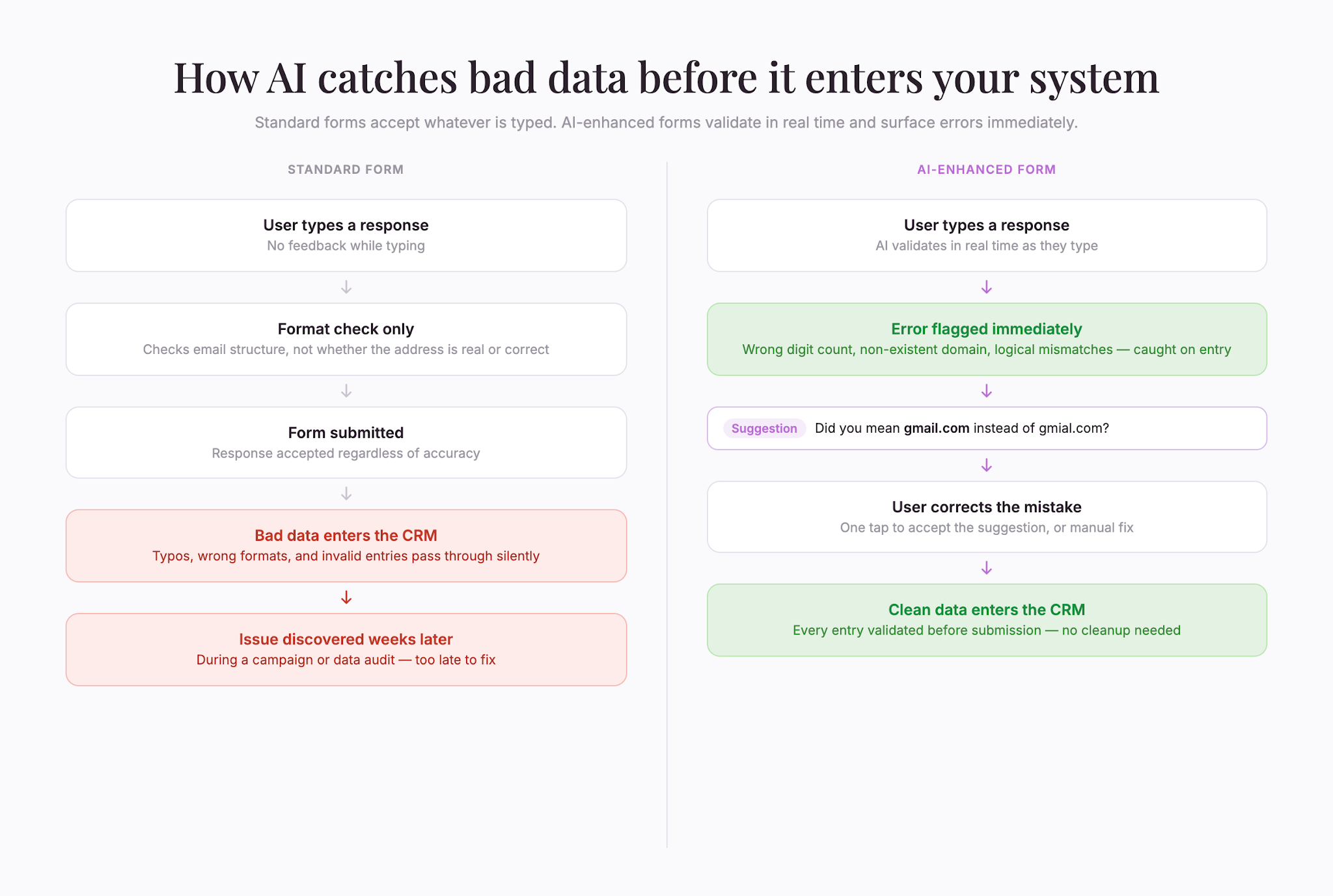
How does a form know if someone has actually entered their real email address? It checks the format. But AI can go further.
AI-powered form builders can validate not just format but logic. If someone enters a company name that doesn’t exist, or a phone number with the wrong number of digits for their country, the form can flag it in the moment. This catches bad data before it enters your system.
Some AI tools can also auto-correct common mistakes. Someone types “gmial.com” instead of “gmail.com,” and the form gently suggests the correction. Small frictions disappear.
5. Sentiment analysis and tone detection
If your form includes open-ended questions, you get text responses. Sorting through hundreds of responses to find common themes is tedious work.
AI can read through text responses and identify sentiment and themes automatically. It can flag responses that suggest frustration, excitement, or confusion. It can tag responses by topic—price concerns, feature requests, technical problems—without anyone manually reading each one.
This lets you surface insights from qualitative responses faster. Instead of sampling a small slice of responses and guessing what people meant, you can analyze every response and trust your findings.
6. AI-built conditional logic
Conditional logic is when a question or field only shows up if someone answers a previous question a certain way. It keeps forms shorter and more relevant.
Building complex conditional logic used to require technical skill. AI makes it simpler. Describe what you want to happen in natural language—“Only ask about timeline if they’re in the decision phase”—and the AI builds the logic.
This lets you create sophisticated, branching forms without coding. Forms adapt to each respondent’s situation, which keeps people engaged and focused on relevant questions.
A sample AI-assisted form workflow
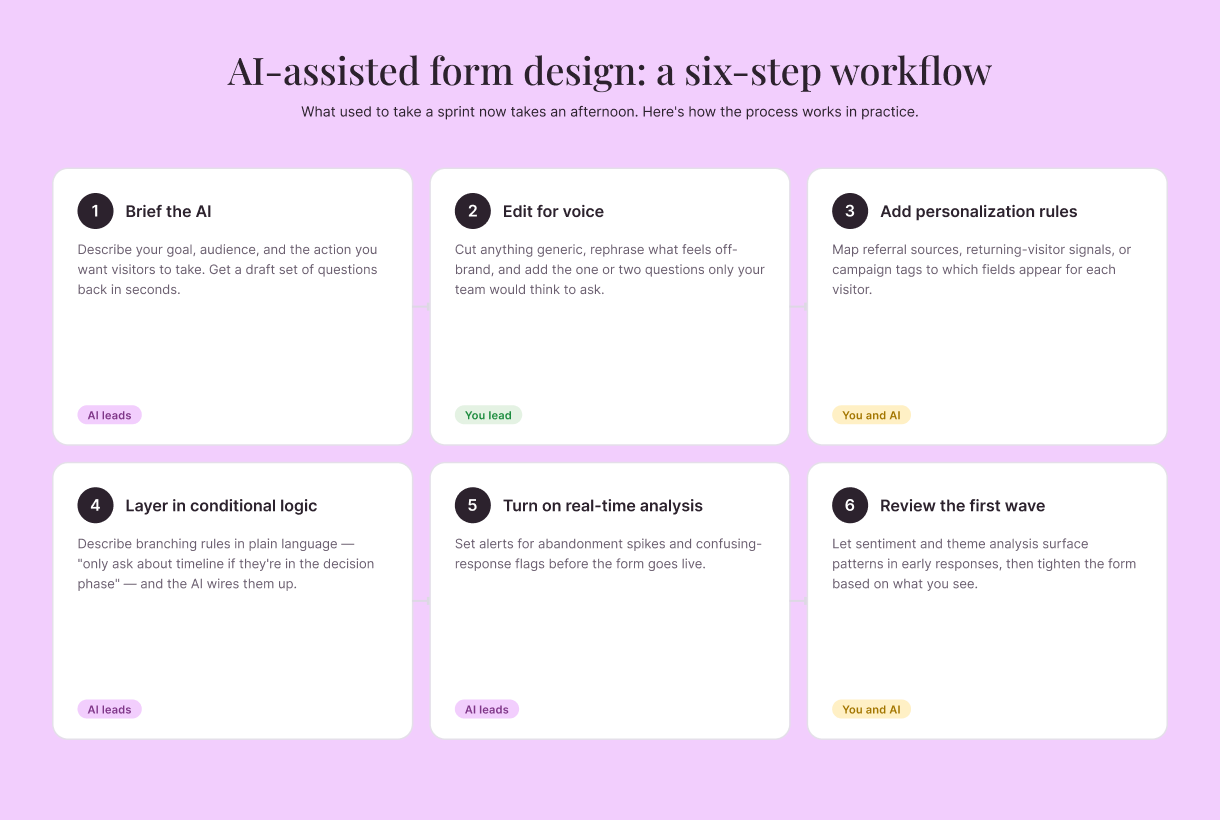
Putting these pieces together looks like this:
- Brief the AI – Describe your goal, audience, and the action you want visitors to take. Get a draft set of questions back
- Edit for voice – Cut anything that sounds off-brand, rephrase what feels generic, and add the one or two questions only you would think to ask
- Add personalization rules – Map referral sources, returning-visitor signals, or campaign tags to which fields appear
- Layer in conditional logic – Describe branching rules in plain language and let the AI wire them up
- Turn on real-time analysis – Set alerts for abandonment spikes and confusing-response flags before launch
- Review the first wave – Let sentiment and theme analysis surface patterns in the early responses, then tighten the form based on what you see
The whole workflow can run in an afternoon instead of a sprint, and the form keeps improving after launch.
Getting started with an online forms creator
You don’t need to overhaul your entire forms strategy to use these capabilities. Start with one. Try AI-suggested questions on your next form and see if they improve response quality. Or enable real-time form analysis to spot your biggest friction points.
Each of these tools exists to solve a real problem: making forms faster to build, better at converting, and more thoughtful about gathering useful data. The combination of all six creates a form experience that feels almost intuitive to the person filling it out, while giving you much clearer insights into what visitors actually want.

Liked that? Check these out:

Opinions and Expertise
What’s actually slowing research teams down (Hint: it’s not the research)
From recruiting participants and scheduling interviews to building the actual surveys, the operational drag is taking researchers away from what they do best. See what's actually slowing them down and how Research Flow fixes it.
Read more