Qualtrics Alternatives for UX Research
Find out more about the Qualtrics alternatives available, what they’re best for, and how to find the right fit for your research goals.
Key takeaways
- Qualtrics is built for enterprises: A steep learning curve, opaque pricing, and feature bloat push smaller UX teams toward lighter alternatives.
- Match the tool to the method: Maze and UserTesting lead for usability testing, SurveyMonkey for surveys, Hotjar for behavior analytics, and Optimal Workshop for information architecture.
- Pilot before you migrate: Run one small project on your chosen platform to test the workflow, reporting, and integrations before committing.
- Qualtrics alternatives serve different team needs: Maze supports rapid design validation, UserTesting helps with comprehensive usability testing, Hotjar reveals user behavior, and Optimal workshop specializes in information architecture research.
- The right alternative depends on your research workflow: Consider how often you run surveys, usability tests, interviews, or behavioral analysis before choosing a platform. Your most common method should guide the decision.
If you're evaluating enterprise research platforms, Qualtrics probably crossed your desk. It's robust, feature-rich, and built for large organizations. But robust doesn't always mean right for your team. Given its hefty price tag, it’s all the more important to consider your options.
Whether you need a lighter-weight alternative, better ease of use, or lower costs, there are platforms built to do UX research well without forcing you into an enterprise contract.
This guide walks you through solid Qualtrics alternatives, what each one does best, and how to pick the right fit for your research goals.
Why teams look beyond Qualtrics
Qualtrics dominates the enterprise research space, but that dominance comes with trade-offs.
For one, the platform has a steep learning curve. New users often need training to navigate the interface and set up surveys correctly. The customization options are vast, almost overwhelming if you just want a straightforward way to collect feedback.
There's also the cost factor. Qualtrics pricing isn't transparent upfront; you typically need to contact sales, which signals enterprise-level spending. For smaller teams, freelancers, or early-stage companies, that investment might not make sense.
And then there's feature bloat. If you're running focused UX research—not a massive, multi-department research program—you might never use most of what Qualtrics offers. That's wasted complexity.
Teams also find that Qualtrics is overkill for specific use cases. If you're running quick usability tests, gathering event feedback, or collecting customer satisfaction data in a healthcare setting, a more specialized tool often gets the job done faster and cheaper.

What to look for in a UX research alternative
Before diving into specific platforms, know what matters for your research. Not every tool is right for every project.
- Ease of use. Can you build a survey or usability test without tutorials? How steep is the learning curve for your team?
- Research methods supported. Do you need surveys, usability testing, card sorting, heat mapping, or a mix? Some platforms specialize; others are generalists.
- Data analysis. How deep do the insights go? Can you spot trends quickly, or do you need to export and analyze elsewhere?
- Pricing transparency. Can you see the cost upfront, or do you need to set up a sales call? Can you start small and scale up?
- Integrations. Does the platform connect with your existing tools, like CRM, analytics, project management, or data warehouses?
- Support. When you get stuck, is help available through docs, community, or dedicated support?
Surveys are among the most widely used research methods. The best alternative platforms let you combine methods without juggling multiple subscriptions.
Top alternatives to Qualtrics
Qualtrics is a powerful research platform, but it’s not the best fit for every team or project. Many UX teams are turning to specialized tools that offer faster setup, simpler workflows, and more affordable pricing. The best alternative depends on what you want to learn, whether that’s how users navigate a product, what customers think, or where experiences can be improved.
Here are the top Qualtrics alternatives and what each platform does best.
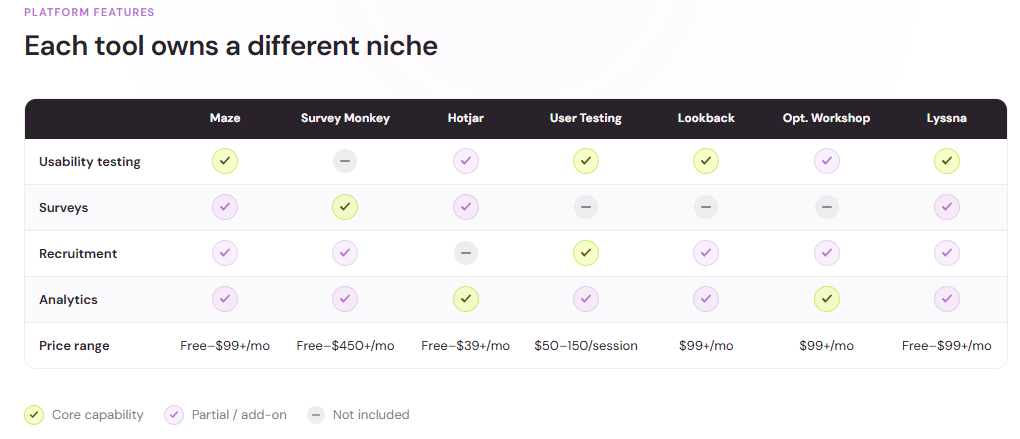
Maze
Maze started as a startup tool for unmoderated usability testing and has grown fast. 40,000 companies were already using it by early 2021. It's a strong choice if usability testing and design feedback are your primary goals.
What it does well: Maze excels at unmoderated usability testing. You record a prototype or live site, set up a task, and recruit testers. Results come back with video recordings, click maps, and task completion rates. The platform also handles surveys and interactive prototypes, so you can gather qualitative and quantitative feedback in one place.
Best for: Product teams running quick design validation rounds. Teams that want visual heat maps and user session recordings. Researchers who prefer self-serve recruitment over managing a panel.
Price point: Maze offers a free tier for basic usability tests. Paid plans start around $99/month and scale based on participant numbers and features needed.
SurveyMonkey
SurveyMonkey is one of the most recognizable survey platforms. It's simpler than Qualtrics, faster to learn, and costs less, but it’s still powerful enough for serious research.
What it does well: SurveyMonkey makes survey creation intuitive. The template library is massive, and question types cover most research scenarios. Analytics are accessible without a PhD. Distribution options include email, web links, SMS, and social. The platform also offers Audience, a panel of respondents you can buy access to.
Online surveys rank as the most-used quantitative method among market research professionals, with 85% relying on them regularly.
Best for: Researchers running customer satisfaction surveys, NPS tracking, or market research. Teams that value simplicity and speed over extreme customization. Organizations that want built-in access to a respondent panel.
Price point: Free tier includes basic surveys. Paid plans range from around $35/month to $450+/month depending on response volume and features.
Hotjar
Hotjar blends survey tools with behavior analytics. You can run surveys, but you also get heat maps, session replays, and feedback widgets that sit on your website.
What it does well: If you want to understand not just what users say (surveys) but what they do (behavior tracking), Hotjar combines both. Heat maps show where users click and scroll. Session replays show where they get stuck. Feedback widgets collect targeted input at moments of friction. Together, they paint a fuller picture than surveys alone.
Best for: Product and UX teams optimizing web experiences. Teams that want lightweight feedback collection without formal surveys. Organizations that need to justify UX investment.
Price point: Free tier includes basic heat maps and feedback. Paid plans start around $39/month and scale with site traffic.
UserTesting
UserTesting specializes in moderated and unmoderated user tests. You define your research question, and the platform recruits and manages participants for you.
What it does well: UserTesting removes recruitment friction. You set up your test (prototype, website, competitor site, or concept), specify your target audience, and UserTesting finds matching participants. Participants complete the test on their own time, and you get video recordings, transcripts, and insights. You can also run live moderated sessions if you prefer real-time interaction.
Best for: Teams that don't have time to recruit participants themselves. Research requiring specific audience segments (e.g., users aged 25-34 who own a home). Organizations running quarterly or ongoing research programs.
Price point: UserTesting offers customer pricing through a custom enterprise subscription model that’s based on credit bundles or consumption plans.
Lookback
Lookback is another moderated research platform, but it leans toward remote research sessions and collaborative analysis.
What it does well: Lookback lets you run live or asynchronous user interviews and usability tests. The interface is clean, and the platform emphasizes collaboration—your team can watch sessions, take notes, and highlight key moments. Built-in analysis tools help you organize insights and spot patterns.
Best for: Remote research teams doing interviews or think-aloud protocol testing. Organizations that want their entire team involved in research discovery. Research that benefits from facilitator guidance.
Price point: Pricing is session-based, starting around $99/month for a limited number of sessions, with higher plans supporting more concurrent research.
Optimal Workshop
Optimal Workshop focuses on specialized UX research methods: card sorting, tree testing, and first-click testing. If you're optimizing information architecture or navigation, this is purpose-built.
What it does well: These three methods are niche but powerful. Card sorting reveals how users mentally organize content. Tree testing validates whether your site structure is intuitive. First-click testing shows whether users can find what they need immediately. Optimal Workshop is lean, fast, and generates clear data on each.
Best for: Teams restructuring websites or apps. Information architects optimizing navigation. Organizations running focused IA validation.
Price point: Plans start around $199/month billed annually.
Lyssna (formerly UsabilityHub)
Lyssna—which rebranded from UsabilityHub in October 2023—offers quick feedback tests on designs, prototypes, and copy. It's lightweight and affordable, making it good for validation sprints and A/B testing design decisions.
What it does well: You upload a design or prototype and ask a specific question (e.g., "What do you notice first?" or "Which headline resonates more?"). Participants respond, and you get results in hours. Tests are unmoderated and quick, ideal for rapid iteration.
Best for: Design teams running quick validation rounds. Startups with tight budgets. Organizations doing design A/B testing or first-impression testing.
Price point: Free tier includes limited tests. Paid plans start around $199/month for higher volume and faster results.
How to choose
Picking the right alternative depends on three things: your primary research need, your budget, and your team's capacity.

If usability testing is your focus
Maze or UserTesting work best. Maze is faster and cheaper for unmoderated tests; UserTesting excels with moderated sessions or specific participant screeners.
If you're optimizing information architecture
Optimal Workshop's specialized methods (card sorting, tree testing) are hard to find elsewhere and worth the investment if that's your need.
If your team is remote and research-heavy
Lookback's collaborative features and moderated approach work well for teams that prioritize ongoing user engagement.
If the budget is tight and you need rapid iteration
Lyssna keeps costs low and cycles fast. It's not a full research suite, but for quick design validation, it punches above its weight.
Making the switch
If you've been using Qualtrics and are considering a move, the transition is usually smooth. Most alternative platforms let you import existing surveys or rebuild them quickly using templates.
The learning curve on most alternatives is shorter than on Qualtrics. Your team might be making headway in days, not weeks.
Consider running a small pilot project on your chosen alternative before migrating everything. Test the workflow, check the reporting, and make sure integrations work as expected. A single survey or small usability test gives you real-world confidence before you commit.
Find the right UX research platform for your team
Qualtrics works for large enterprises with complex, multi-disciplinary research needs and budgets to match. But for most teams doing focused UX research—validating designs, gathering customer feedback, or testing prototypes—a more specialized alternative does the job better and cheaper.
The platforms above each have distinct strengths. Pick the one that aligns with your primary research method and team size, and you'll likely find yourself more efficient, faster to uncover insights, and better able to iterate based on what you learn.