Remote usability testing: how to get started
Remote usability testing reveals user behavior fast, without lab setup. Choose moderated for insight into the 'why' or unmoderated testing for scale.
Remote Usability Testing: How to Get Started
Key Takeaways
- Choose moderated or unmoderated based on what you need: Moderated sessions reveal the "why" behind hesitation and confusion in real time, while unmoderated tests scale to more participants across time zones.
- Testing early is far cheaper than fixing after launch: Catching a usability issue during testing costs a fraction of fixing the same problem once it's already live.
- Five to eight participants surface most major issues: Diminishing returns set in quickly, so a handful of well-chosen sessions often reveals what a larger study would too.
- Real environments reveal real problems: Testing on a participant's own device and internet connection surfaces friction that a polished lab setup would never expose.
Remote usability testing lets you observe real users interacting with your product, without anyone leaving their desk. It's faster, more flexible, and often more realistic than traditional lab-based testing.
Whether you're a startup with a tight budget or an enterprise team testing across time zones, remote usability testing opens the door to better insights without the logistical headache of in-person sessions. By removing geographical barriers and reducing setup complexity, remote usability testing has become the default choice for teams that want continuous feedback throughout their product development cycle.
What is remote usability testing?
Remote usability testing evaluates how people use your website, app, or prototype while they're in their own environment: at home, in a coffee shop, or wherever they naturally work. Instead of bringing participants into a lab, you connect with them online or let them complete tasks independently using a testing platform.
The method breaks down into two main types:
Moderated remote usability testing: A facilitator guides the participant through tasks in real time via video call. You watch their screen, ask follow-up questions, and dig deeper into their thought process. This approach is particularly valuable when you want to understand the "why" behind user behavior: the hesitations, misconceptions, and decision-making process that drives how someone interacts with your product. Moderated sessions create a conversation, not just a recording, which means you can explore unexpected behaviors on the spot.
Unmoderated remote usability testing: Participants complete predefined tasks on their own schedule. The platform records their screen and voice as they work, so you can review sessions later. This method works especially well when you need to test with a large number of participants or when your audience is spread across multiple time zones. It's also ideal for validating specific hypotheses or running quick iterations.
Both approaches give you the insights you need: what's working, what's confusing, and where users get stuck. The choice between them depends on your research goals, timeline, and budget constraints.
Why remote usability testing works
The shift to remote testing isn't just about convenience. It solves real problems that teams face when trying to gather meaningful user feedback.
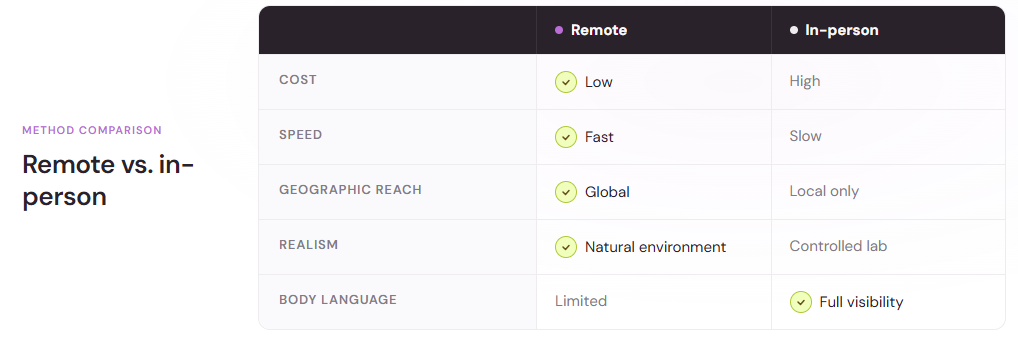
You can recruit participants from anywhere, not just your local area. That's especially valuable if your audience is geographically dispersed or hard to reach in person. A global audience isn't just easier to access; it also gives you a more accurate picture of how different regions, cultures, and user contexts interact with your product.
Remote testing also tends to be faster. There's no need to book a lab, coordinate travel, or wait for people to arrive. Sessions happen on participants' schedules, which means quicker turnaround from test setup to actionable insights. Many teams report cutting their testing timeline in half by switching from in-person to remote moderated sessions.
The cost savings are real, too. The global usability testing tools market was valued at $1.51 billion in 2024 and is projected to reach $10.41 billion by 2034, growing at a 21.3% CAGR from 2025 to 2034. That growth reflects widespread adoption of remote methods as teams realize they can get high-quality feedback without the overhead of physical labs. You're not paying for lab space rental, participant transportation, or coordination logistics.
And there's another advantage: participants use their own devices in their natural environment. You see how your product performs on a slow internet connection, an older laptop, or a cluttered browser with five tabs open. That's closer to reality than a pristine lab setup. This environmental authenticity often reveals usability issues that would never surface in a controlled setting.
When to use remote usability testing
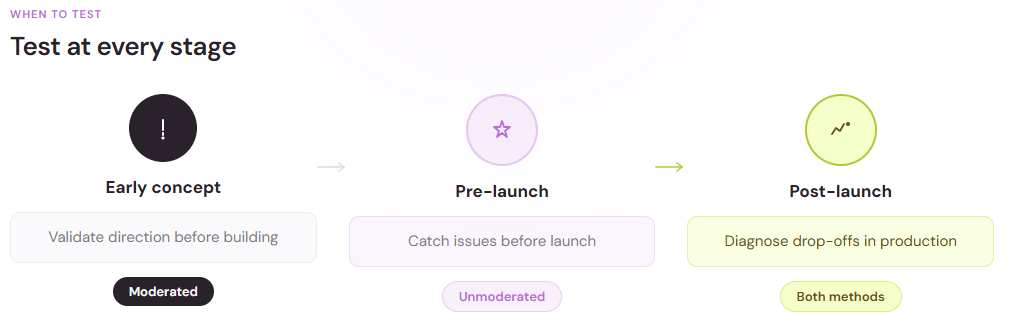
Remote testing fits into almost any stage of product development, from initial concept through post-launch optimization.
Early-stage concept validation
Test rough prototypes or wireframes before investing in design or code. Remote moderated sessions let you walk users through early ideas and gather feedback on direction. At this stage, remote usability testing is particularly valuable because you're testing big-picture concepts, not polished details. A simple video call and a clickable prototype are often all you need to validate whether you're heading in the right direction.
Pre-launch testing
Before shipping a new feature or redesign, run unmoderated tests with a larger sample to identify last-minute issues. Catching problems before launch saves you from costly fixes later. Fixing a critical UX issue after launch costs 10 to 100 times more than catching and fixing it during early usability testing. This is why many teams treat pre-launch remote usability testing as a non-negotiable checkpoint in their release process.
Post-launch optimization
Once your product is live, remote testing helps you understand where real users struggle. Use session recordings, task-based tests, or moderated interviews to diagnose drop-offs and friction points. Post-launch testing often reveals issues that your team didn't anticipate because you can now see how thousands of users actually behave in production, not just how a handful of testers behaved in a controlled environment.
Testing with hard-to-reach users
If your audience includes busy professionals, international users, or niche segments, remote testing is often the only practical way to reach them. Asking a busy executive to come into a lab is unrealistic; asking them to join a 30-minute Zoom call is much more feasible.
How to run moderated remote usability testing
Moderated sessions are your go-to method when you need rich, qualitative insights and want to understand the reasoning behind user behavior.
Set up your tools
You'll need:
- Video conferencing software (Zoom, Microsoft Teams, Google Meet)
- Screen sharing capability
- Recording permission from participants
- A script or discussion guide
Test your setup beforehand. Make sure screen sharing works, audio is clear, and you know how to record the session. Technical glitches at the start of a session create awkward moments and eat into your testing time. A quick dry run prevents these problems.
Recruit the right participants
Find people who match your target audience. Send them a screener survey to confirm they fit your criteria, then schedule 45–60 minute sessions.
Aim for five to eight participants for qualitative insights. That's usually enough to surface the major usability issues without overwhelming you with data. Research consistently shows that the majority of usability problems appear after testing with just a handful of users, and diminishing returns set in quickly after that.
Maze, originally a startup-focused usability testing platform, now serves more than 3,000 companies as of 2025. Many teams use such platforms to recruit participants or bring their own users into remote sessions. Whether you use a platform or recruit directly, the key is finding people who genuinely represent your target audience.
Prepare your tasks
Write realistic, scenario-based tasks. Instead of "Find the pricing page," try "You're interested in upgrading your plan. Show me how you'd find pricing information."
Focus on three to five key tasks. Don't overload participants with too many scenarios. When fatigue sets in, later tasks get less attention. Prioritize the tasks that matter most to your business and user goals.
Facilitate the session
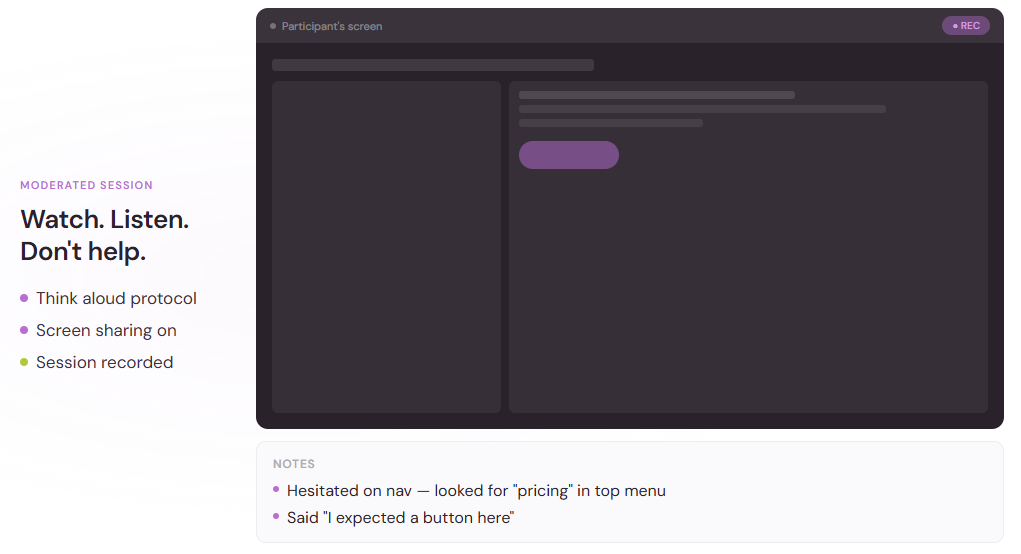
Start with a brief warm-up to make the participant comfortable. Explain that you're testing the product, not them, and encourage them to think aloud. This framing is important. Many users feel self-conscious about struggling with something, so reassuring them helps them relax and behave more naturally.
As they work through tasks, watch and listen. Take notes on where they hesitate, what they say, and when they succeed or struggle. You don't need perfect notes; flag the moments that stand out.
Resist the urge to help. If they get stuck, that's valuable data. Only intervene if they're completely blocked and you need to move on.
Ask follow-up questions: "What did you expect to happen there?" or "What's going through your mind right now?" These questions often surface mental models and assumptions that explain why users interact with your product the way they do.
Record and analyze
With the participant's permission, record the session. Later, review the video and pull out key moments, both successes and failures.
Look for patterns. If three out of five people struggle with the same step, that's a priority fix. If everyone completes a task easily, you've validated that part of your design.
How to run unmoderated remote usability testing
Unmoderated testing scales better and costs less, making it ideal for validating designs with larger samples and gathering quantitative data about task success rates and user satisfaction.
Choose a platform
Platforms like UserTesting, Maze, and TryMyUI let you set up tasks, recruit participants, and collect recordings automatically.
You define the tasks, write instructions, and add post-task or post-test questions. Participants complete the test on their own time, and the platform delivers videos and data to you. This approach is particularly useful when you need feedback from dozens or hundreds of users, or when you want to track metrics like task completion rate across a large sample.
Define tasks and questions
Be crystal clear in your instructions. You won't be there to clarify, so ambiguity will skew results.
Example: "Imagine you're looking for customer support. Find the page where you can contact the support team."
After each task, ask participants to rate difficulty or share what they were thinking. At the end, include a short survey to capture overall impressions. The more structured your questions, the more actionable your data will be.
Recruit participants
Many platforms offer built-in participant panels, so you can specify demographics, behaviors, or other criteria and have participants assigned automatically. Alternatively, invite your own users by sharing a test link.
Large enterprises accounted for 69.15% of the global usability testing tools market in 2024, often because they need access to large, diverse panels for unmoderated testing in high volumes. Having access to large participant pools enables these organizations to run multiple rounds of testing quickly and validate findings across diverse user segments.
Review and synthesize findings
Once responses come in, watch the session recordings and review the quantitative data: task success rates, time on task, satisfaction scores.
Create highlight reels by clipping key moments from multiple sessions. Seeing three users struggle with the same button is more persuasive than reading about it in a report. Video evidence is powerful because it removes ambiguity. Your team sees exactly what happened, not your interpretation of what happened.
Common challenges in remote usability testing
Remote testing is powerful, but it comes with trade-offs that you should understand before diving in.
Technical issues
Slow internet, software glitches, or unfamiliar tools can derail sessions. Always run a tech check before starting, and have a backup plan (like switching to a phone call if video fails). Building a few extra minutes into your session schedule also helps absorb technical delays without cutting into your testing time.
Reduced observational depth
You won't see body language as clearly over video. Participants might be distracted by things in their environment that you can't control.
This is a fair trade for the speed and reach remote usability testing provides, but be aware of what you're missing. If you need to observe body language and physical reactions closely, consider mixing in at least some in-person testing alongside remote sessions.
Self-selection bias in unmoderated tests
Participants who sign up for unmoderated testing might be more tech-savvy or motivated than your average user. Combine unmoderated tests with other research methods to get a fuller picture. Running both moderated and unmoderated tests, or combining remote usability testing with broader analytics data, helps mitigate these biases.
Best practices for remote usability testing
Whether you're running moderated or unmoderated sessions, a few principles improve results and make the research process smoother.
Keep it short
Remote sessions can feel more draining than in-person ones. Aim for 45 minutes or less for moderated tests, and limit unmoderated tests to 15–20 minutes. Shorter sessions keep participants engaged and reduce fatigue, which improves the quality of feedback you receive.
Test early and often
Don't wait until everything's polished. Test rough prototypes, iterate based on feedback, and test again. The earlier you catch issues, the cheaper they are to fix. On a system used by over 100,000 people, a usability investment of $68,000 generated $6.8 million in benefit within the first year of implementation. This ROI demonstrates that investing in remote usability testing throughout your development cycle pays dividends.
Make it easy for participants
Send clear instructions ahead of time. Provide a direct link, confirm the time zone, and let them know what to expect. The smoother the experience, the better the data. Participants who feel respected and well-supported provide more thoughtful, detailed feedback.
Share findings quickly
The value of usability testing lies in action. Create a short summary with the top issues, video clips, and recommended fixes. Share it with your team within a day or two while the insights are fresh. The longer you wait to share findings, the more momentum you lose and the harder it is to implement changes.
Getting started with remote usability testing
You don't need a big budget or a specialized team to run remote usability testing. Start with one moderated session using Zoom and a Google Doc for notes. Or set up a quick unmoderated test with a free trial of a testing platform.
Pick one critical user flow: signing up, making a purchase, finding support. Test it with five people. Identify the top three issues. Fix one. Test again.
Remote usability testing removes the friction from understanding your users. It's fast, flexible, and delivers the insights you need to build something people actually want to use. By making remote usability testing a regular part of your product development process, you stay connected to your users and catch problems before they impact your business.