The Best User Research Tools for 2026 (Compared)
Learn about the top user research tools for 2026 and what they’re best for to help narrow your search for the platform best suited for your needs.
Key takeaways
- Start with the question, not the tool: What you're trying to learn (test a prototype, recruit participants, gather feedback, or watch real behavior) determines which platform fits, since no single tool does all four well.
- Moderated tools for depth, unmoderated tools for speed: Lookback and UserTesting use live facilitation to capture the "why" behind user behavior, while Maze trades that depth for speed and volume on prototype tests.
- Surveys and analytics cover the other half: SurveyMonkey and Qualtrics scale structured feedback across large audiences, and Hotjar passively tracks how people actually move through your live site.
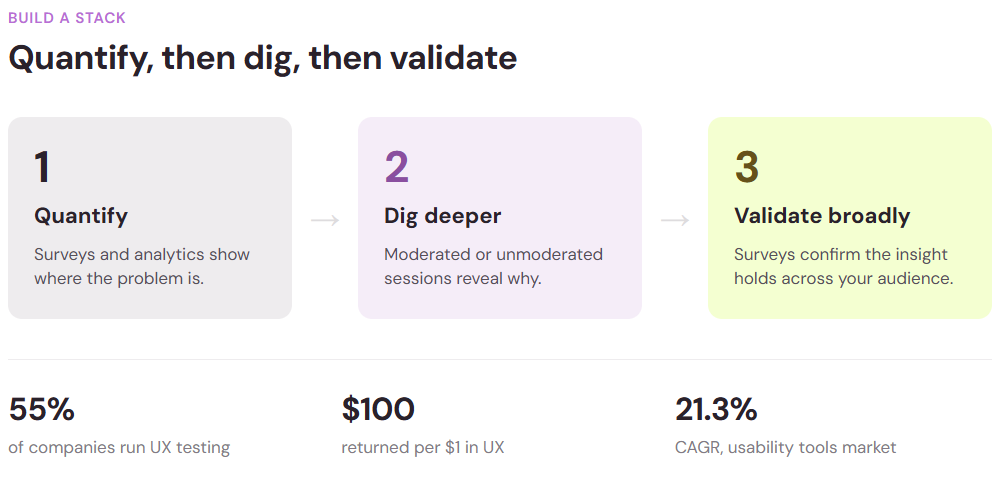
- Build a stack that grows with you: Most teams combine methods rather than betting on one tool: quantify the problem with surveys or analytics, dig into the why with moderated sessions, then validate broadly.
User research is essential to understanding what your audience actually wants. Whether you're validating a new feature, testing a redesign, or gathering customer feedback, the right tool makes the difference between insights that stick and data that sits unused.
The challenge is deciding which tool fits your needs. The landscape is crowded, and each platform claims to do everything. This guide cuts through the noise and compares the best user research tools available in 2026, so you can pick one that matches your goals, budget, and team size.
The user research market in 2026
User research has never been more valuable. The global usability testing tools market was valued at $1.51 billion in 2024 and is projected to reach $10.41 billion by 2034, growing at a 21.3% compound annual growth rate (CAGR). That growth reflects a simple truth: companies that invest in understanding their users see measurable returns.
Yet most companies aren't doing it. Only 55% of companies conduct UX testing, despite its impact on retention and ROI.
What counts as a user research tool?
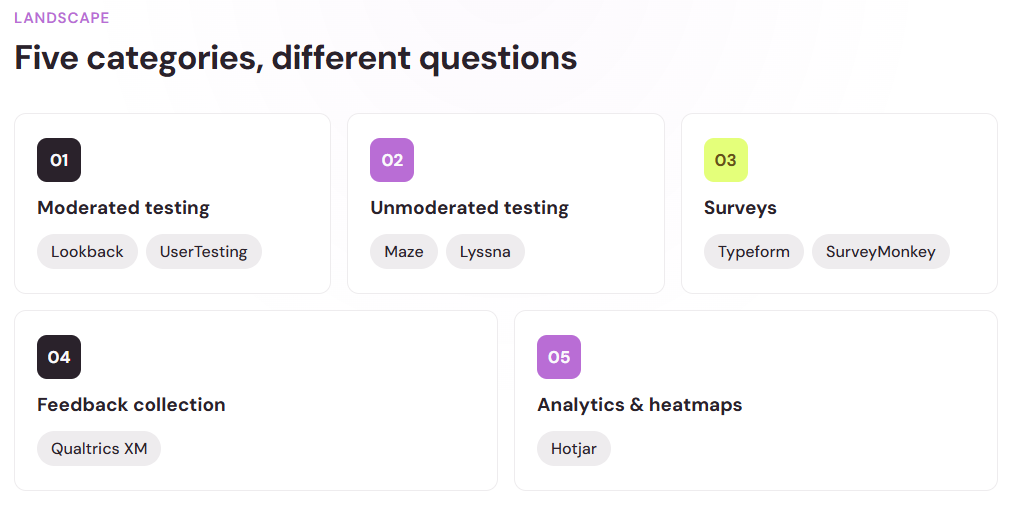
Before we compare specific platforms, let's define what we're looking at. User research tools fall into a few overlapping categories:
- Moderated usability testing – A facilitator guides participants through tasks in real time, observing reactions and asking follow-up questions.
- Unmoderated usability testing – Participants complete tasks on their own, often remotely, with video recordings and/or click tracking.
- Surveys and questionnaires – Structured questions sent to larger audiences gather quantitative and qualitative feedback.
- Feedback collection – Customer opinions are captured across multiple channels, including reviews, in-app prompts, and support tickets.
- Analytics and heatmaps – User behavior is tracked as they navigate and interact with your digital product.
Most modern platforms combine several of these approaches. The most popular UX research methods remain user interviews, usability testing, and user surveys.
Top user research tools compared
Finding the right user research tool doesn’t have to be difficult or time consuming. We have your look at the top options available to narrow your search and help you find the one best suited for your needs.
Lookback
Best for: Moderated and unmoderated studies with AI-assisted analysis.
Lookback is purpose-built for usability research. It supports both moderated sessions (where you guide participants in real time) and unmoderated studies (where participants work independently). The platform records video, audio, and on-screen behavior, making it simple to capture what users do and say.
The standout feature is Eureka, Lookback's AI assistant that automatically surfaces key insights from session recordings. Instead of manually reviewing hours of footage, the tool highlights moments where users struggled, expressed confusion, or showed delight—saving researchers days of work.
Lookback is strongest if your team runs frequent moderated sessions and values collaboration. It's less ideal if you need quick survey feedback or want to test with massive sample sizes.
Maze
Best for: Fast, unmoderated prototype testing with large participant pools.
Maze started as a startup-focused platform and has grown quickly. By early 2021, 40,000 companies were using Maze. The platform excels at rapid prototype testing. You can upload a design, set up tasks for participants, and launch to a global audience within hours.
Participants complete tasks on their own (unmoderated), and Maze captures clicks, scroll behavior, and time on task alongside video and written feedback. The analytics dashboard shows completion rates, task success, and time-to-action at a glance.
Maze is ideal if you want speed and don't need a live moderator asking follow-up questions. It works well for design validation and quick iteration cycles. The downside is that unmoderated testing can miss the "why" behind user behavior.
UserTesting
Best for: Moderated research with human moderators and video insights.
UserTesting brings human facilitation to the forefront. You recruit participants (or use their panel), and a trained moderator guides them through your prototype or website while recording video. Moderators ask follow-up questions in real time, capturing nuance that unmoderated tests can miss.
The platform includes a built-in panel of screened participants across demographics, industries, and geographies. You can also bring your own users. Reports include edited video clips of the most relevant moments, making it easy to share findings with stakeholders.
UserTesting is best if you have a budget for deeper, longer sessions and value the insight that live conversation brings. It's less ideal for rapid iteration or testing large numbers of concepts quickly.
Qualtrics XM
Best for: Enterprise-scale feedback and experience management across teams.
Qualtrics is built for large organizations managing customer experience across the entire company. The platform combines surveys, feedback collection, text analytics, and sentiment analysis into one system. It integrates with customer data platforms and operational systems, so feedback flows directly into business intelligence and action workflows.
Modern customer feedback platforms in 2026 integrate AI-powered analytics, multi-channel collection (surveys, reviews, support tickets, chats, in-app), and case management automation.
Qualtrics is powerful for organizations that want to centralize feedback from every touchpoint and act systematically. The learning curve is steep, and pricing scales with company size, so it's not ideal for small teams or one-off projects.
SurveyMonkey
Best for: Quick surveys and broader audience feedback.
SurveyMonkey is one of the most accessible platforms for building and launching surveys. It offers hundreds of templates, a straightforward builder, and sampling options so you can reach target audiences without recruiting your own participants.
The platform handles distributing surveys via email, web link, SMS, or social media, and includes response rate optimization recommendations. Analytics are straightforward: you get counts, percentages, cross-tabs, and themes from open-ended responses.
Response rates vary widely by channel, with SMS and in-app surveys typically outperforming email. SurveyMonkey helps you choose the right distribution channel to maximize response.
SurveyMonkey is ideal for straightforward feedback collection and quick validation. It's less suited for deep moderated research or prototype testing where you need to observe behavior directly.
Hotjar
Best for: Website analytics, heatmaps, and behavior tracking.
Hotjar is a passive observation tool rather than an active research platform. Install the Hotjar script on your website, and it captures where users click, how far they scroll, where they get stuck, and which form fields cause drop-off.
The platform also includes session recordings (which you can watch anonymously), feedback polls, and survey tools so you can add questions alongside behavioral data. This combination helps answer both "what happened" and "why did it happen."
Hotjar is best for ongoing website optimization. It continuously collects data on thousands of visitors, so you spot patterns quickly. It's not suited for testing prototypes, recruiting specific participant types, or running moderated research.
Optimal Workshop
Best for: Card sorting, tree testing, and information architecture validation.
Optimal Workshop specializes in studies that validate how people organize information. Use it for card sorting (understand how users group content), tree testing (test the structure of your navigation), and first-click testing (see if users can find key information intuitively).
These focused research methods are lightweight and inexpensive to run. You can launch a study in minutes, and Optimal Workshop handles recruiting participants.
Optimal Workshop is excellent if your main question is structural: "Does our navigation make sense?" or "Should this content go under Product or Solutions?" For broader usability research or feedback collection, you'll need additional tools.
Respondent.io
Best for: Recruiting research participants quickly.
Respondent.io is primarily a recruitment platform. It connects you with screened participants who match your criteria. Instead of building your own research panel, you post your study requirements (demographics, behaviors, qualifications), and Respondent matches you with qualified people.
Hubble
Best for: Running research across multiple methods, from recruitment to analysis, in one platform. Hubble brings study creation, recruitment, testing, and analysis into one platform, with AI-assisted workflows across each touch point. It supports both moderated interviews and a broad toolkit of unmoderated methods, including prototype, website, and mobile app testing, surveys, and AI-moderated interviews.
Recruitment integrates with User Interviews and Respondent, while a participant CRM helps teams manage their own research pool. Recordings, transcripts, and AI-assisted summaries support analysis and sharing findings.
Hubble suits teams seeking one primary platform for ongoing research, combining design validation and qualitative insights with scalable unmoderated testing. For occasional standalone surveys, a dedicated survey tool may be sufficient.
Many of the tools above (Maze, UserTesting, SurveyMonkey) include built-in panels. Respondent is best when you need specific, hard-to-reach audiences and want direct control over participant selection.
How to choose the right tool
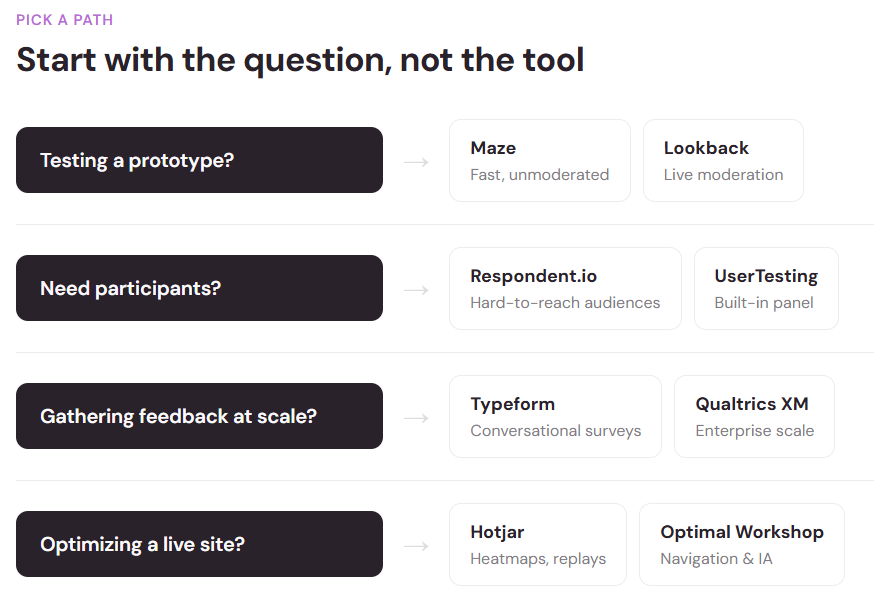
Picking a user research tool depends on what question you're trying to answer:
Are you testing a prototype or design? Maze and Lookback are built for this. Maze is faster and cheaper; Lookback gives you more depth if you run moderated sessions.
Do you need participant recruitment? UserTesting, Respondent.io, and Maze all include built-in panels. SurveyMonkey has sampling. If you have your own users ready to test, you may not need recruitment.
Is your main goal gathering customer feedback? Surveys and feedback collection platforms are right for you. When selecting a feedback platform, consider ease of form creation, response experience, analysis capabilities, integrations, and distribution options.
Are you optimizing an existing product or website? Hotjar gives you passive behavioral data. Surveys add the "why" behind the behavior. Combined, they're powerful for ongoing optimization.
Do you have a budget for in-depth, moderated research? UserTesting and Lookback both support live facilitation, which uncovers nuances that unmoderated methods miss. The trade-off is cost and time.
Are you a startup or agency with a tight budget? Start with surveys and, optionally, unmoderated testing (like Maze). As you grow, add moderated research or analytics tools.
Building a research stack that grows with you
Most teams don't use a single tool. They combine methods. A common approach:
- Quantify first – Surveys or analytics show where the problem is.
- Dig deeper – Moderated research or unmoderated testing with smaller groups reveals why.
- Validate broadly – Surveys confirm that your insights apply across your wider audience.
You have to start somewhere, and it’s okay if you can’t immediately do it all. Only 55% of companies conduct any UX testing at all, so even simple surveys or one moderated session puts you ahead. As your research practice matures, you'll know which tools solve your biggest problems and which are less useful for your team.
The ROI of user research
It's easy to deprioritize research when deadlines loom. But the numbers are hard to argue with. For every dollar invested in UX design, companies see roughly $100 in return.
Research tools are the infrastructure that makes this possible. They turn research from an ad-hoc, expensive activity into something sustainable and repeatable. Whether you're validating a feature, testing a design, or gathering customer feedback, the right tool lets you do it faster, cheaper, and with more confidence.
The user research market is growing because companies are finally understanding: you can't guess what users want. You have to ask, observe, and iterate. Pick a tool that matches your immediate needs, start gathering insights, and expand your practice as you learn what works for your team.