UserTesting Alternatives: 7 Options for 2026
Discover the seven UserTesting alternatives for 2026, the key features, and who the platform is best for to see which is better suited for your.
Key takeaways
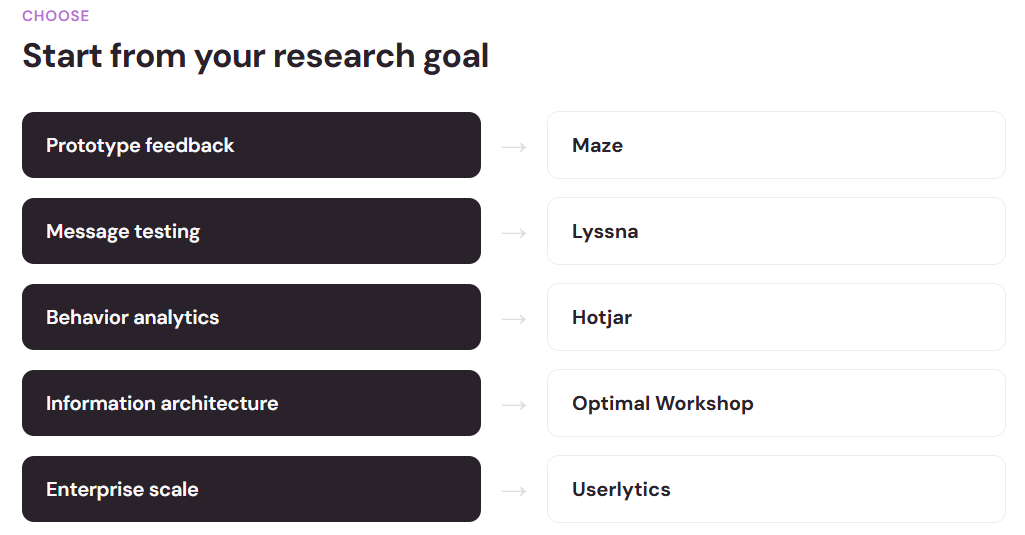
- Match the tool to the research question: Rapid prototype feedback, information architecture, behavior analytics, and enterprise-wide programs each have a different best-fit platform.
- Speed and budget point to Maze or Lyssna: Both deliver unmoderated results in hours to a day, making them ideal for design teams that need fast, affordable validation.
- Typeform excels at collecting qualitative feedback: Its conversational surveys complement usability testing because it makes participant screening, post-test questionnaires, and concept validation more engaging and much easier to finish.
- UserZoom is no longer an option: It merged into UserTesting in 2023, and Userlytics now fills the enterprise research slot it left behind.
- Testing pays for itself: Catching usability problems before release costs a fraction of fixing them after launch, with documented returns many times the original investment.
UserTesting built a strong reputation for connecting researchers with large participant pools. But it's not the only tool in the market. Depending on what you're trying to learn, you might find a better fit elsewhere.
The usability testing tools market is growing fast. The global market was valued at $1.51 billion in 2024 and is projected to reach $10.41 billion by 2034, showing real adoption and value of platforms like UserTesting.
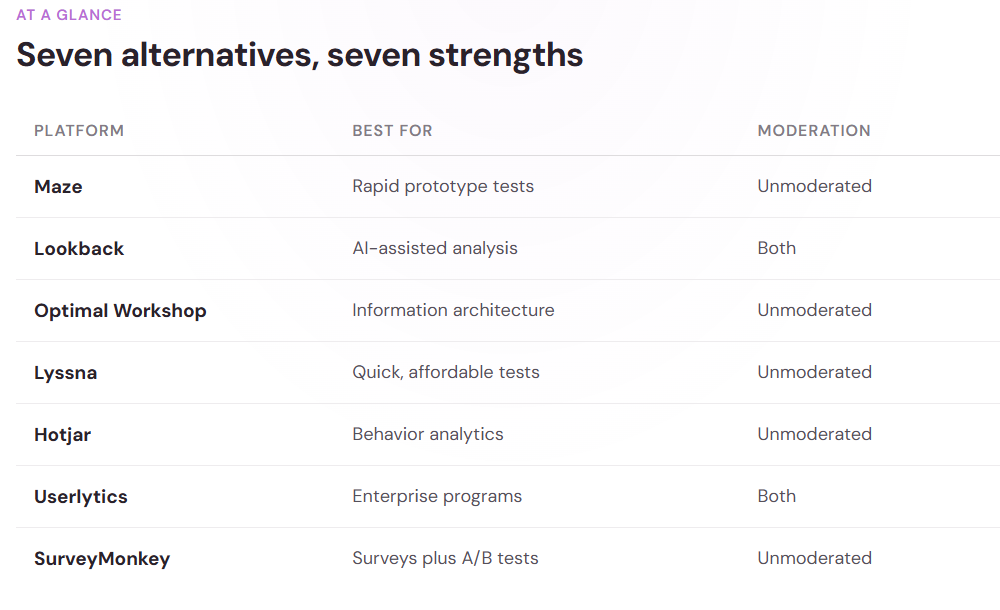
This guide covers seven UserTesting alternatives worth considering, whether you're evaluating tools for the first time or diversifying your research toolkit.
Maze: best for startups and design teams
Maze was built specifically for design-stage feedback and has stayed true to that focus, which has made it a common pick among product design teams.
What makes it stand out is simplicity. You can embed unmoderated tests directly into your prototype or live website with minimal setup. Maze handles participant recruitment and pays testers directly.
Key features:
- Unmoderated usability testing on prototypes and live sites
- Automated participant recruitment
- Built-in insights dashboard with heatmaps and recordings
- Quick turnaround (results often in 24 hours)
Best for: Design teams running rapid tests on prototypes, early-stage startups on tight budgets, and anyone who wants fast feedback without managing recruitment.
Lookback: best for moderated and unmoderated research
Lookback supports both moderated (live, one-on-one) and unmoderated (asynchronous) usability studies. The platform includes real-time team collaboration and an AI assistant called Eureka that surfaces insights from session recordings.
Sometimes you need a live conversation to dig deeper; other times you just need to watch someone navigate a flow.
Key features:
- Moderated and unmoderated testing in one platform
- Session recordings with searchable transcripts
- Eureka AI for automated insight extraction
- Real-time observation and team collaboration
- Integration with design tools like Figma and Framer
Best for: Research teams needing both moderated and unmoderated flexibility, companies wanting AI-powered analysis, and organizations wanting to reduce manual note-taking.
Typeform: best for conversational usability surveys and feedback
While Typeform is known, and praised, as a survey platform, it’s also a useful addition to usability research workflow. Its conversational, one-question-at-a-time format helps increase completion rates and encourages more thoughtful responses than traditional forms.
This isn’t a replacement for task-based usability testing, however, it works well for collecting feedback before or after a test. Many UX teams prefer to use it for participant screening, post-test questionnaires, customer satisfaction surveys, and concept validation.
Key features:
- Conversational, one-question-at-a-time survey experience
- Customizable forms with branching and logic jumps
- AI-powered form and question generation
- Integrations with tools like Slack, Google Sheets, Zapier, and HubSpot
- Built-in analytics and response reporting
Best for: UX researchers collecting pre- or post-test feedback, product teams validating concepts or messaging, and organizations that want engaging surveys with strong automation and integrations.
Optimal Workshop: best for information architecture testing
If you're working on site structure, navigation, or taxonomy, Optimal Workshop specializes in exactly that. Card sorting, tree testing, and first-click testing are all methods that measure whether your information architecture makes sense to users.
You can validate your site structure, label names, and menu logic with real users before building.
Key features:
- Card sorting (open, closed, hybrid)
- Tree testing for navigation validation
- First-click testing to measure task success
- Unmoderated participant recruitment
- Clear reporting on structure effectiveness
Best for: UX researchers validating information architecture, content teams testing labeling and taxonomy, and anyone optimizing site navigation.
Lyssna: best for quick, affordable testing
Lyssna (formerly UsabilityHub) is accessible and fast, letting you run multiple test types—preference tests, five-second tests, click tests, and prototypes—from one dashboard.
Five-second tests are useful for quick feedback on visual impact: show a design for five seconds, then ask what users remember.
Key features:
- Multiple test types (preference, five-second, click, prototype)
- Unmoderated testing with global participant pool
- Results in hours, not days
- Pay-per-test pricing model
- Integration with design tools
Best for: Quick feedback cycles, designers on budgets, teams needing fast validation of visual or messaging concepts, and A/B testing on landing pages.

Hotjar: best for behavior analytics plus testing
Hotjar combines heatmaps, session recordings, and feedback collection with usability testing. You can watch how users actually behave on your site, then run targeted tests to understand the "why" behind what you see.
You notice drop-off at checkout, run a test to understand friction, then validate your fix, all with one tool.
Key features:
- Heatmaps and scroll maps showing click behavior
- Session recordings (watch real visitors)
- Surveys and feedback polls on your site
- Unmoderated usability testing
- Form analytics to reduce abandonment
Best for: Teams focused on conversion optimization, product managers combining behavioral data with testing, and companies wanting behavior insights plus qualitative feedback.
Userlytics: best for large enterprise research programs
UserZoom once filled this slot, but it merged into UserTesting in April 2023.
Userlytics fills the enterprise gap with moderated and unmoderated testing, a global participant panel, advanced screening, and optional managed services where experienced researchers help design and analyze studies.
Key features:
- Moderated and unmoderated testing for large programs
- Global participant panel with custom screening
- Picture-in-picture recordings of screen and reactions
- Optional managed research services
Best for: Large enterprises running ongoing research programs, teams that want expert help with study design, and companies with strict compliance needs.
SurveyMonkey: best for combining feedback collection with testing
SurveyMonkey lets you go beyond surveys. You can collect feedback through multiple channels and analyze sentiment in open-ended responses. Many teams use it to gather broad customer feedback through surveys, then validate findings with targeted usability tests.
Key features:
- Survey and form creation
- A/B testing capabilities
- Multi-channel feedback collection
- Large participant panel (SurveyMonkey Audience)
- Integrations with CRM and analytics tools
Best for: Teams wanting to combine surveys with A/B testing, organizations needing a single platform for feedback collection and validation, and researchers building comprehensive customer insight programs.
How to choose the right alternative
Before picking a tool, clarify what you're actually testing:
- Testing a prototype or early concept? Speed matters more than a large participant pool. Maze or Lyssna will get you results fast and cheap.
- Running ongoing research across products? You need infrastructure and team collaboration. Userlytics or Lookback give you both.
- Validating messaging or visual design? Lyssna or Hotjar excel at five-second and preference tests, while Hotjar specializes in behavior analytics like heatmaps and session recordings.
- Fixing information architecture? Go straight to Optimal Workshop.
- Combining research methods? SurveyMonkey or Hotjar let you layer surveys, feedback, and testing into one workflow.
Most teams mix tools for rapid design feedback, far-reaching surveys, information architecture redesign. Pick the one that fits the research question you're asking.
What makes usability testing worth the investment
You don't need a massive budget to test. Start by running five-second tests with 20 users on your landing page, watch a few session recordings, or test your navigation with 10 users. The insights will surprise you.
Pick the tool that fits your research question, your budget, and your team's workflow. The goal is to learn what your users actually need before you invest heavily in building it. You can always scale up your testing from there.

Liked that? Check these out:

Opinions and Expertise
What’s actually slowing research teams down (Hint: it’s not the research)
From recruiting participants and scheduling interviews to building the actual surveys, the operational drag is taking researchers away from what they do best. See what's actually slowing them down and how Research Flow fixes it.
Read more