AI UX research: How it works
AI UX research automates transcription, theme tagging, and pattern detection, compressing research cycles from weeks to days for faster action.
User experience (UX) research tells you what people actually think, feel, and do when they interact with your product. It’s the difference between guessing and knowing.
But traditional UX research is time-intensive. Recruiting participants, scheduling sessions, transcribing recordings, analyzing results—it all takes weeks or months. That’s where AI comes in. Modern AI tools are speeding up every stage of the research process, from planning and collecting data to surfacing insights and spotting patterns humans might miss.
Here’s what you need to know about AI UX research, how it works, and when it matters most.
What is AI UX research?
AI UX research uses machine learning, natural language processing, and large language models to automate and accelerate the work researchers do by hand. It doesn’t replace human judgment. Instead, it handles the labor-intensive parts—transcribing interviews, coding responses, tagging themes in session recordings, spotting statistical anomalies—so your team can spend time interpreting what the data means and deciding what to do about it.
Two-thirds of go-to-market leaders rate AI extremely effective for market research, analysis, and measurement (ICONIQ State of Go-to-Market, 2025). Around 47% of researchers worldwide already use AI regularly in their market research activities (Backlinko, 2026).
The reality is that AI has become table stakes in research. It’s not about being cutting-edge anymore—it’s about keeping pace. Organizations that delay adoption risk falling behind competitors who are already running faster research cycles and responding to user feedback more quickly. The research landscape is shifting, and AI UX research is at the center of that shift.
Why AI UX research matters
Most companies still don’t invest in UX research at all. Only 55% of companies conduct UX testing, even though every $1 spent on UX returns $100 in value—a 9,900% return on investment (TrueList, 2025).
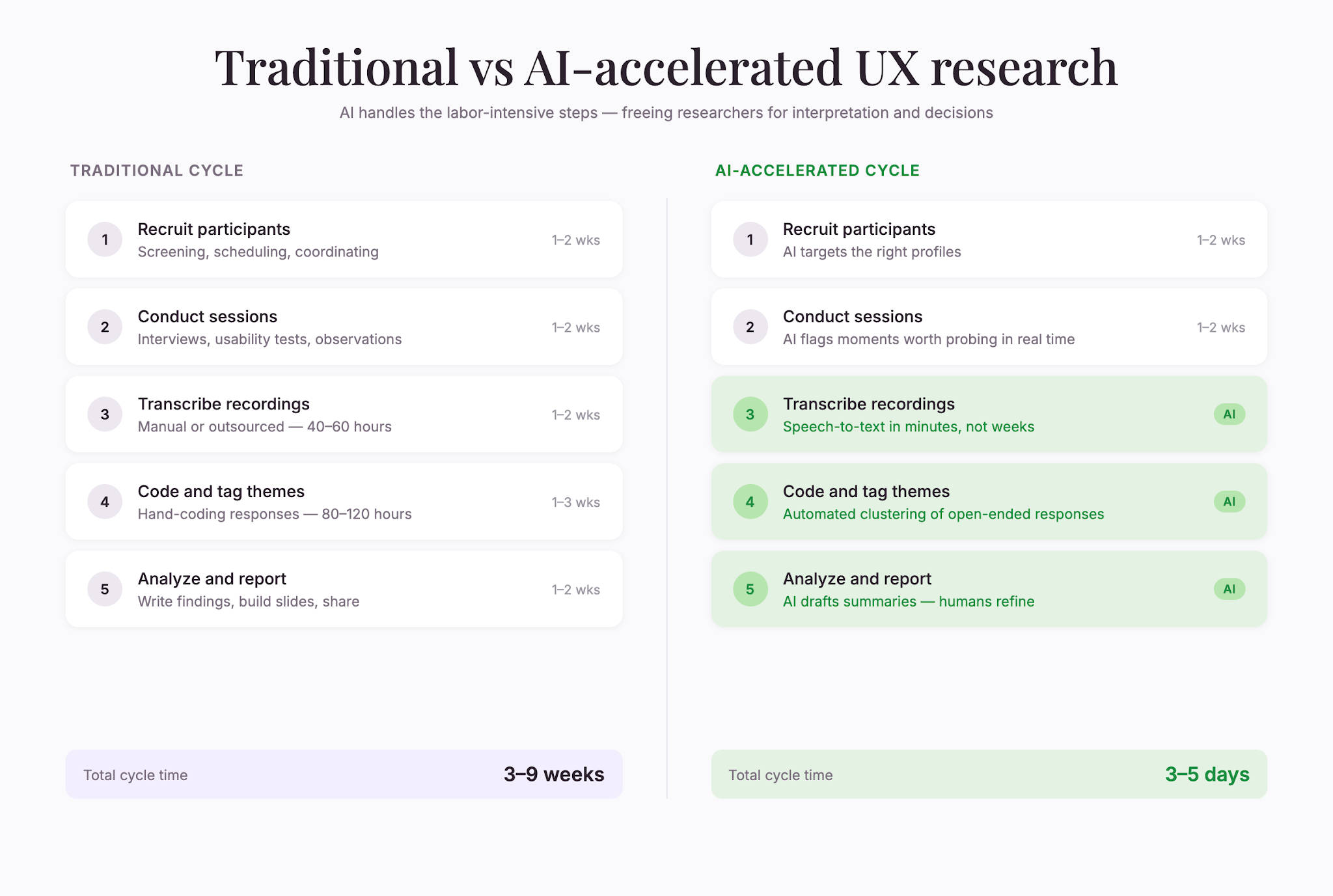
The gap isn’t about doubting UX’s value. It’s about resources. Recruiting, scheduling, transcribing, and analyzing research takes time and money that cash-strapped teams don’t have. AI shrinks that gap by cutting the labor out of the equation. Teams that would normally need months to complete a single research cycle can now compress that timeline significantly, making research accessible to organizations of all sizes.
Here’s what’s at stake: 63% of mobile users abandon apps due to avoidable usability issues (TrueList, 2025). Those are lost customers, lost revenue, lost trust—all preventable with faster feedback loops. When you can identify and fix these issues quickly through rapid research iterations, you protect your user base and improve retention metrics that matter to your bottom line.
AI UX research lets you run more frequent research cycles, test more ideas, and respond to problems faster. You can afford to do it. The cost barrier that once kept research out of reach for many teams has dropped significantly, democratizing access to rigorous user feedback.
How AI works in UX research
AI shows up at different stages of the research process. Here’s where it adds the most value:
Planning and designing studies
Before you talk to a single user, AI can help you:
- Generate research questions – AI suggests angles and hypotheses based on your product, industry, and past research. This helps you avoid the common trap of asking questions you think you know the answers to.
- Design survey questions – AI flags leading questions, scales that don’t align, or wording that could bias responses. (This matters: when the order of numbers is flipped, it can shift estimates by up to 4x, a phenomenon called the anchoring effect (Tversky & Kahneman, Science, 1974).) Well-designed questions are the foundation of reliable data, and AI catches subtle flaws before data collection begins.
- Recruit smarter – AI can help you target the right participant profiles and avoid recruiting the wrong people for your study. It analyzes your target audience characteristics and matches potential participants more accurately, saving time and improving data quality.
Collecting data
Once your study is live, AI can:
- Monitor responses in real time – Flag incomplete or suspicious data so you can catch problems before they derail your results. Real-time monitoring lets you pause, adjust, and restart if something’s going wrong rather than discovering issues after data collection ends.
- Suggest follow-up questions – Some platforms use AI to recommend intelligent follow-up prompts based on responses, deepening the insights you collect in a single session. This mimics what a good moderator does—pursue unexpected answers to understand the why behind the what.
- Moderate unmoderated tests – AI can watch usability test sessions and flag moments where participants struggle, hesitate, or express confusion—without a human moderator present. You get the benefit of observation without the scheduling complexity.
Analyzing results
This is where AI saves the most time. After data collection, AI can:
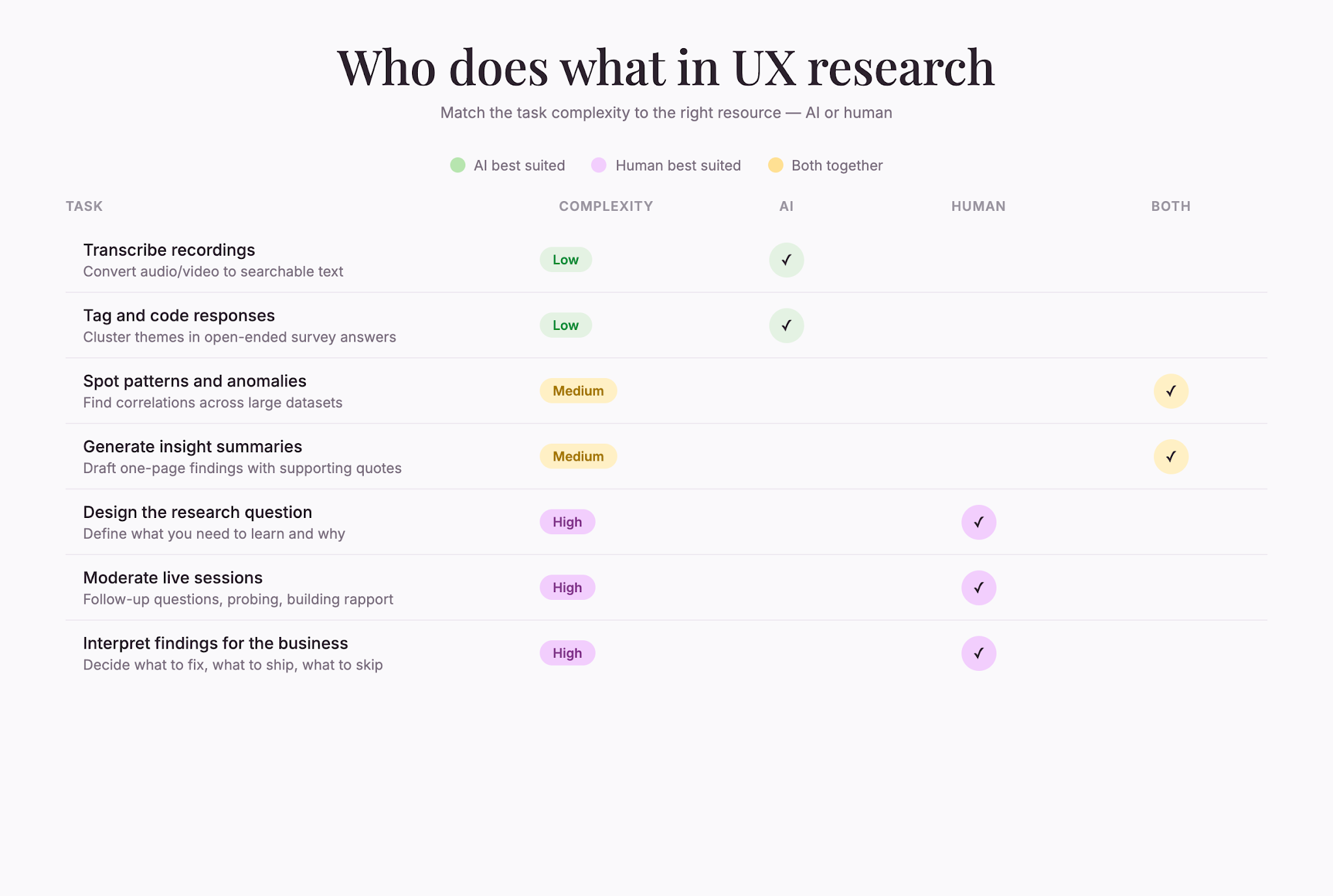
- Transcribe recordings automatically – Convert hours of video and audio into searchable text in minutes. What used to require outsourcing to professional transcription services or spending days on manual transcription can now be done in your platform automatically.
- Tag and code responses – AI clusters open-ended survey answers into themes, assigns tags to interview quotes, and identifies sentiment without manual coding. The consistency of machine learning means every response gets evaluated by the same standard, eliminating human coder fatigue and bias.
- Surface patterns and anomalies – AI spots correlations, outliers, and trends across your full dataset that would take humans days to spot. It can identify segments within your user base, reveal unexpected connections between user attributes and behaviors, and highlight the unusual cases that often contain the richest insights.
- Generate summaries – AI creates one-page overviews of key findings, complete with supporting quotes and data points, ready for stakeholders to read. These summaries serve as a starting point for your analysis, letting you skip the most tedious parts of the reporting process.
One platform, ResearchFlow, automates these tasks within a single workflow, letting you move from raw data to actionable insights in hours instead of weeks.
Reporting and sharing
When it comes to reporting, AI can:
- Create visualizations – AI can turn raw data into charts, heat maps, and dashboards that tell the story of your research. Visual presentations of findings help stakeholders understand results quickly and remember key takeaways.
- Draft insights documents – Rather than write findings from scratch, you start with AI-generated drafts and refine them to match your brand voice and emphasis. This collaborative approach between AI and human researchers balances speed with authenticity.
When AI UX research works best
AI UX research is most powerful for certain research types and questions. Here’s what to watch for:
Large datasets
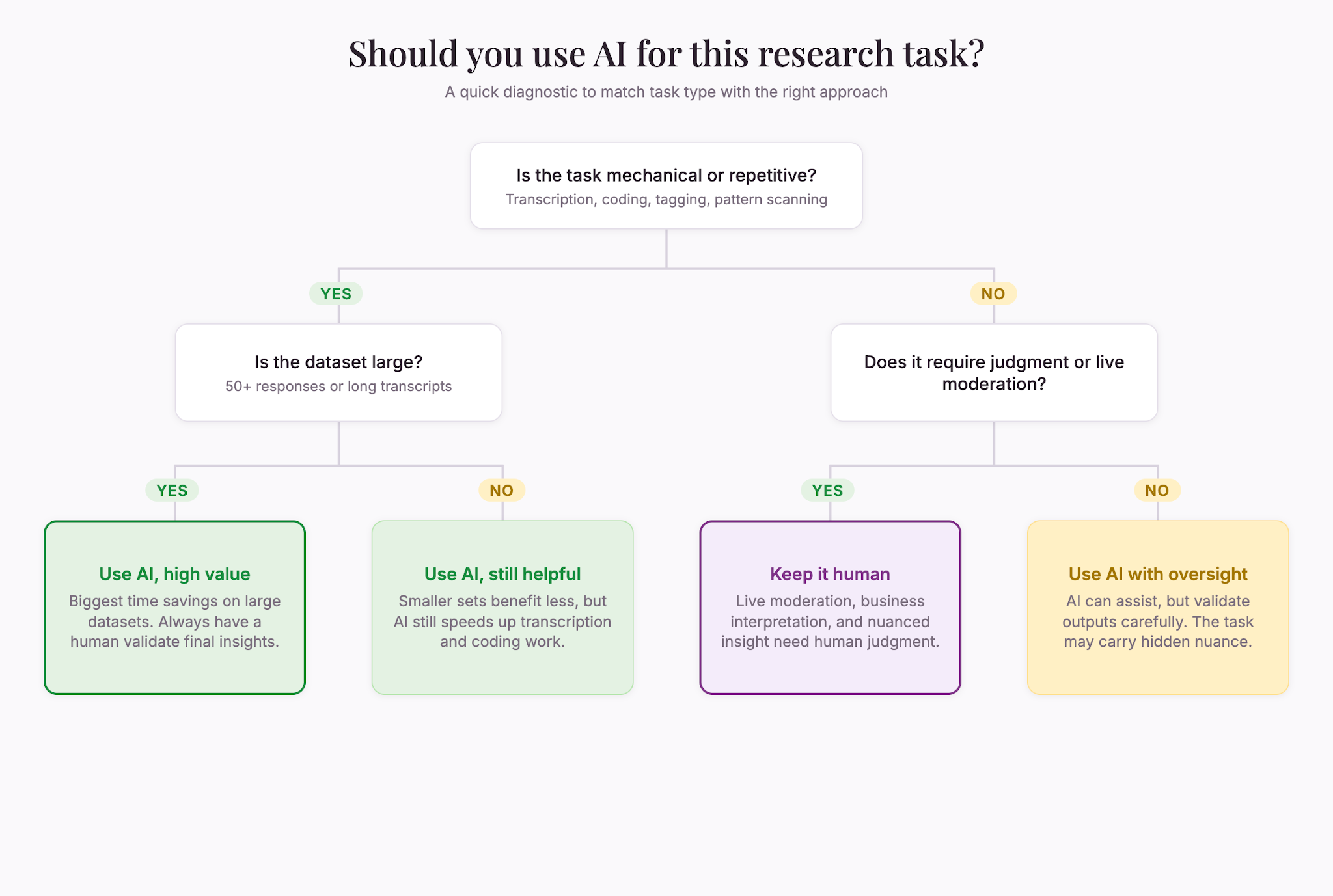
If you’re running a study with hundreds or thousands of respondents, AI is a game-changer. It can process volumes that would choke manual analysis. Survey responses, open-ended feedback, session recordings—AI handles the sorting and tagging in a fraction of the time. The larger your dataset, the more time AI saves you and the more reliably it can spot patterns that emerge only in large populations.
Repetitive research
Some research cycles happen often—weekly pulse surveys, monthly satisfaction checks, ongoing usability tests. AI gets better the more you use it. It learns your taxonomy, your priorities, and your quality standards. Over time, the AI becomes customized to your specific research needs and organizational context.
Unmoderated studies
When you’re not in the room watching, AI can watch for you. It flags confusion, identifies hesitation, and notes where participants drop off. You get the observations you’d get from a moderator, but without scheduling a live session. This opens up research to global audiences and eliminates the scheduling bottleneck that has traditionally limited the scope of UX studies.
Time-sensitive decisions
If you need answers fast, AI compresses the timeline. What used to take 3 weeks (recruiting, scheduling, conducting, transcribing, analyzing) can happen in 3 days. In competitive markets where speed matters, this acceleration can be the difference between staying ahead and falling behind.
What AI UX research can’t do
AI is powerful, but it has real limits. Understanding them keeps you from overselling it to stakeholders or relying on it where it doesn’t belong.
Replace the research question
AI works best when you know what you’re trying to learn. If your research question is fuzzy, AI won’t fix it. The quality of your question determines the quality of your insights—AI just processes faster. Garbage in, garbage out remains true, even with machine learning involved.
Handle complex moderation
Unmoderated studies work great with AI. But if you need a skilled moderator to ask follow-ups, redirect participants who’ve gone off track, or probe deeper on unexpected answers, AI still can’t replace that human judgment. Some of the best UX research happens in the nuanced back-and-forth between researcher and participant. That conversational depth requires human intuition and adaptability.
Guarantee data quality
AI can flag suspicious responses and inconsistent data, but it can’t force honesty. If people use AI to help answer open-ended survey questions, it can homogenize responses and make data less reliable—34% of online research panel respondents have reported doing this (Zhang, Xu, Alvero, Sociological Methods & Research, 2025). The presence of AI in the research ecosystem itself can change how people respond, introducing new biases to account for.
Human review of AI-tagged data is still essential. AI is a first pass, not the final word.
Interpret findings for your business
AI can tell you what the data shows. It can’t tell you what to do about it. That’s the human part. You have to decide which findings matter most to your roadmap, which problems to solve first, and how to communicate results to your team. Business context, strategy, and organizational constraints all factor into how you act on research insights.
Getting started with AI UX research
If you’re ready to move faster, here’s how to begin:
Start with one study type. Don’t overhaul your entire research operation at once. Pick one research cycle—maybe a weekly user survey or a monthly usability test—and run it with AI support. See how the workflow changes. Learn the tool’s quirks. Build confidence before scaling to other research types.
Set clear quality gates. Decide upfront what “good enough” looks like for AI output. Will you review 100% of AI transcripts, or spot-check 20%? Will a human verify all AI-coded themes, or just a sample? Having a quality standard keeps you honest and catches mistakes early, preventing problems from compounding across your analysis.
Keep humans in the loop. Use AI for the grunt work—transcription, tagging, organizing. Keep humans for the judgment calls—is this finding real or noise? Does this pattern matter for our product? What should we do next? This division of labor leverages each party’s strengths.
Plan for the research, not the tool. The tool is secondary. Your actual research question, your participant recruiting, your study design—those come first. Pick a tool that serves your research, not the reverse. A great tool can’t save poorly designed research.
The bottom line
AI UX research isn’t about replacing researchers. It’s about freeing them to do what they do best: understand people, spot patterns, and turn data into decisions. The automation handles transcription, coding, and initial analysis. Your team handles the thinking. Together, you move faster and learn more than either could alone.
The companies that win are the ones running UX research fast and often, and AI is becoming the only way most teams can afford to do that across teams.
If you’re still doing manual transcription and hand-coding interview notes, you’re burning time you could spend on insights. That gap won’t close on its own—you’ll need to change your process, starting with the tools you use.