Same Typeform, new approach: How Digital Hamster rethinks forms
Grab the playbook for using forms for more than data collection. See how Digital Hamster’s co-founder Aida Selimova turns Typeform into a tool for understanding people, from building relationships on the blog and rethinking NPS to personalizing onboarding.
.webp)
When you think of Typeform, a one-question-at-a-time format and beautifully designed forms probably come to mind. But you can do so much more than simply create forms with Typeform.
Aida Selimova, Co-founder and COO of martech agency Digital Hamster, knows this firsthand. Based in Barcelona, Digital Hamster serves clients through its digital marketing services—from paid ads and social media marketing to content and data analytics.
We sat down with Aida at our live Telethon event, where she handed over her playbook for customer engagement, NPS, and onboarding. We’re breaking down how she turns forms into a customer-first engine, with Typeform at the core (and how you can, too).
1. Lead capture: Build relationships on the blog
Paid ads and sales demos are meant to drive leads. Blog posts? Not so much. They’re typically top-of-funnel content that can bring serious search traffic, but they rarely convert. They’re not designed to.
For example, someone reading about back pain or dental implants is researching and not quite ready to buy. A “Book an appointment” CTA too early might drive them away, which is exactly why Aida takes a different approach.
Instead of chasing a sales conversation leads aren’t ready to have, Aida uses Typeform to build a relationship and understand their problem before asking for anything.
Take one of Digital Hamster’s clients: a dental clinic with a high-traffic blog post about implants. Instead of immediately selling, Aida added a banner to the blog inviting readers to see whether their case was suitable for an implant—no diagnosis, no hard sell, just guiding readers.
Using Logic, the form automatically routes respondents to the right ending based on their answers: they either learn that they need to take a few preliminary steps first, or they’re a strong candidate. Either way, they feel understood vs. sold to.
That’s the whole point. When you ask the right questions, readers feel like you understand their problem, so they come back when they’re ready for the service.
The payoff? Across Aida’s clients, these top-of-funnel forms had a 0.5–2.7% conversion rate. For blogs that usually don’t convert traffic, that’s strong.
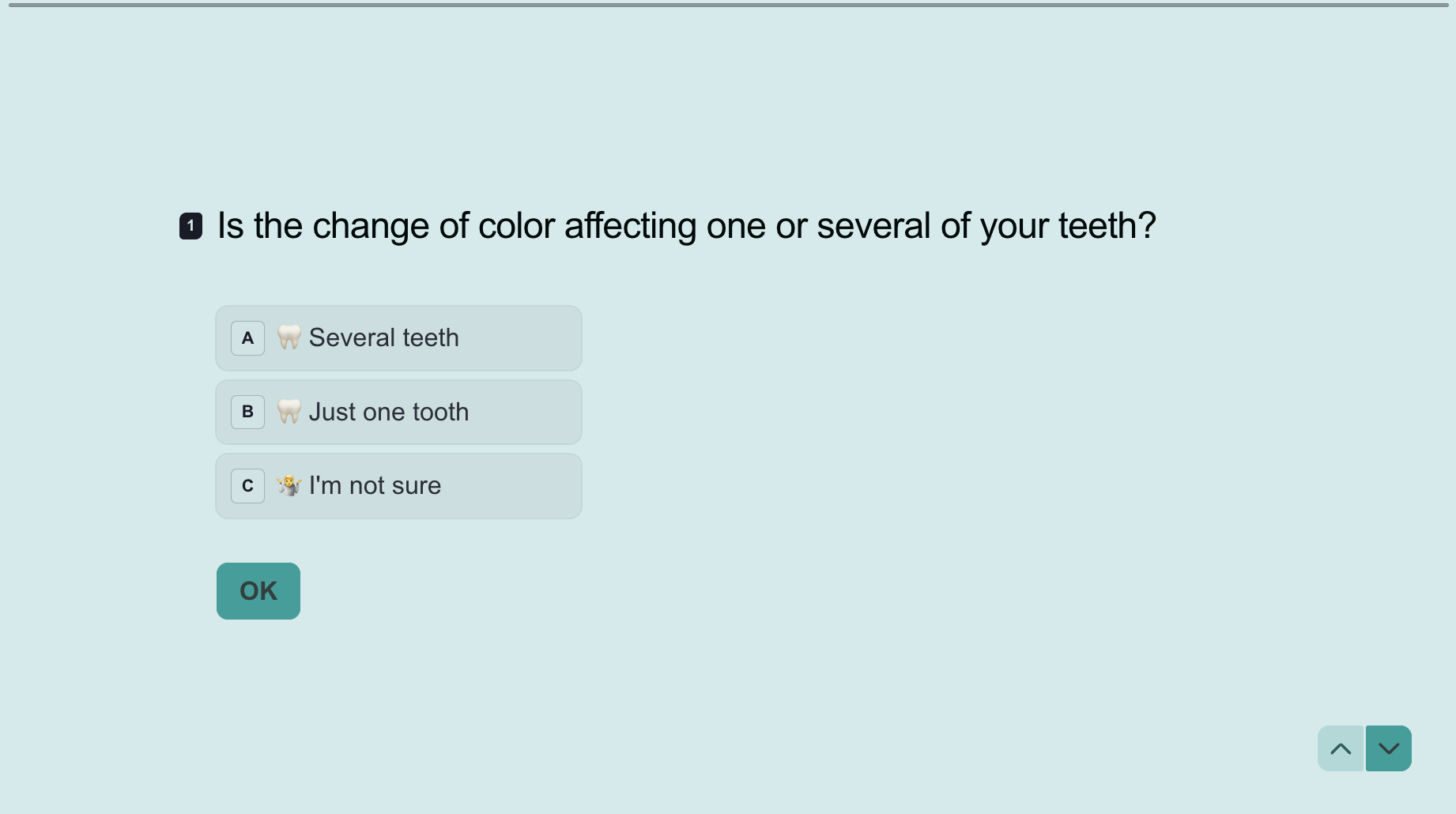
Aida takes it a step further, asking respondents whether they want to be contacted. If they say yes, the form response is sent to the clinic for direct follow-up. If they say no, they’re added to the newsletter nurture list.
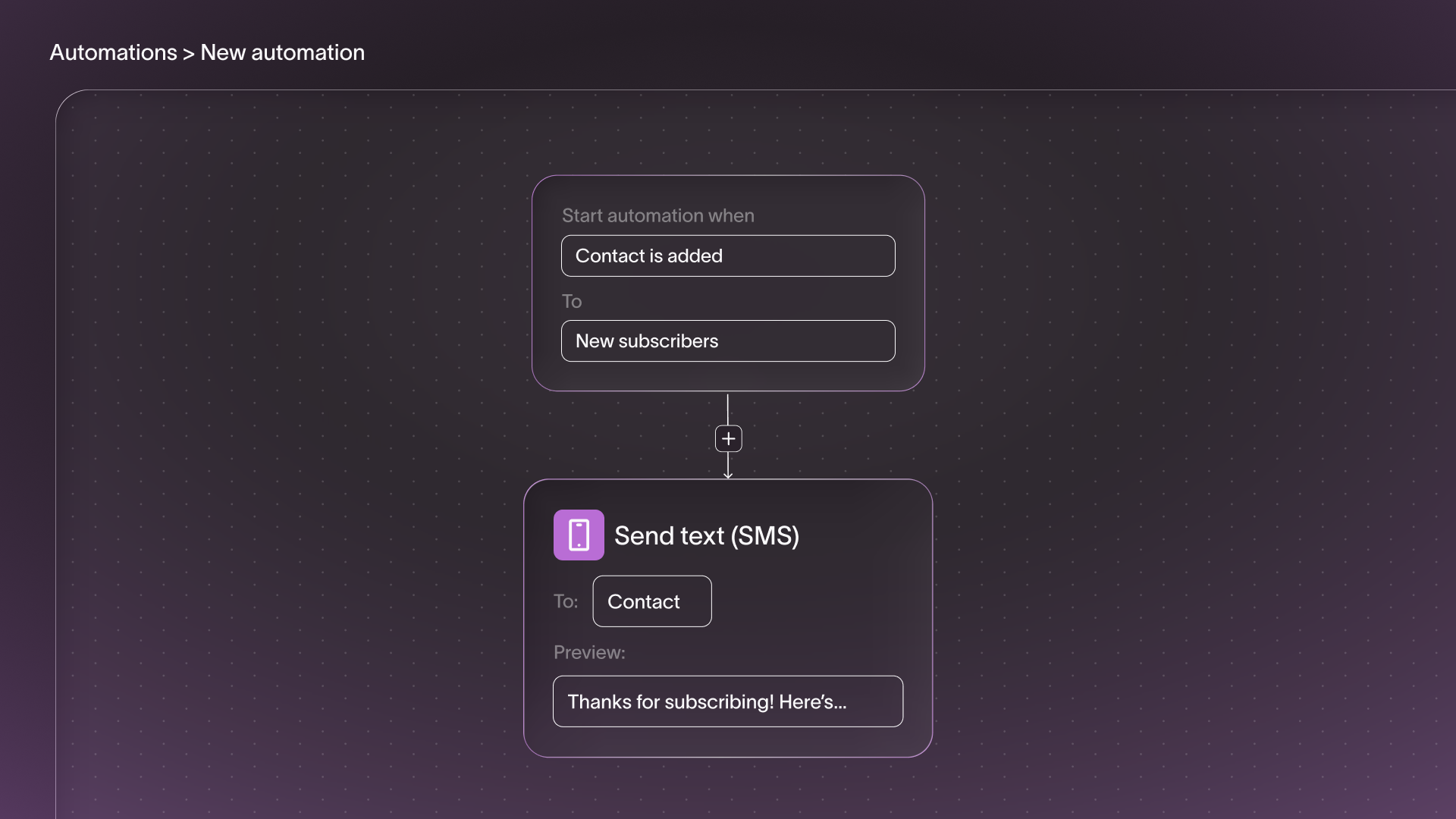
While Aida’s setup flows lead data into her clients’ existing tools—CRMs, HubSpot, Salesforce—through integrations, you can actually do all of this right in Typeform.
With Contacts & Automations, Typeform captures, segments, and nurtures leads automatically. It triggers SMS or follow-up emails and organizes contacts without handing off to another platform.
Aida's pro tip: Not sure what to ask? Brainstorm question ideas with ChatGPT. Aida describes the blog post and the reader's stage, then asks what concerns someone at that point in their journey would have. It's a quick and easy way to ask questions that resonate.
2. NPS: Go deeper than a number
The difference between a one and a 10 is obvious, but what about the difference between a six and a seven? According to Aida, that’s one of the biggest problems with NPS surveys—the numbers don’t really tell you much.
The numbers can show that you’re doing well overall, but they don’t tell you what to fix or why customers are satisfied (or not). So Aida rethinks the scale entirely.
"Traditional 1-10 ratings produce poor data, so I make short micro-questionnaires with answers as phrases, not numbers. People respond more naturally, the completion rate is higher, and the data is more useful." - Aida Selimova, Co-founder and COO, Digital Hamster
Instead of asking customers to rate Digital Hamster or its clients on a scale, she uses feelings to describe how someone experiences the product or service. The result? You get data you can act on.
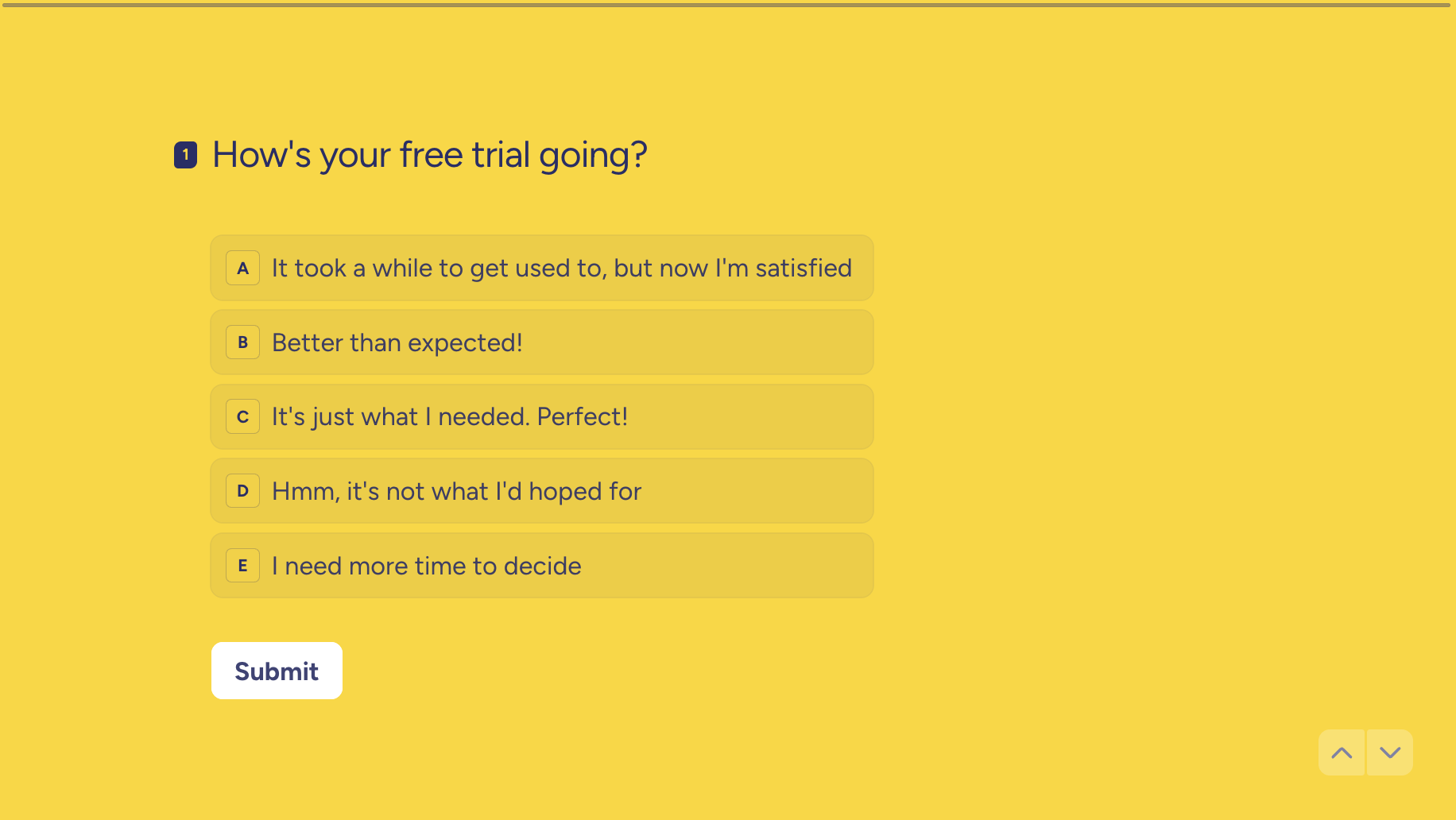
Her micro-NPS surveys all follow the same rule: keep it short, keep it specific. She doesn’t create long surveys that try to cover everything. In fact, most of her surveys are one question, two at most.
She asks small, targeted questions about a single feature or moment, like how the checkout process felt or a specific part of the experience. Then she spaces them out over time: one question this week, another the next.
While it may require sending more surveys, Aida says there’s a reason for her restraint: higher completions. The second a respondent answers the first question, they know a dozen more are coming, so they abandon it.
Keeping NPS surveys short shows respondents you respect their time while also boosting response rates.
Aida's pro tip: Embed a one- or two-question Typeform directly inside your emails—not a "Click here to give feedback" link, but the actual question, right there in the email. For Aida, this often leads to higher completion rates.
3. Onboarding: Personalize the entire journey
We’ve all been there. You sign up for a new SaaS product and are immediately sent a 4-part onboarding email series. Then it’s radio silence.
With Aida’s commitment to deeply understanding Digital Hamster’s clients and their audiences, that’s simply not enough. She knows her clients' users show up for different reasons, so she helps them personalize their entire user journey.
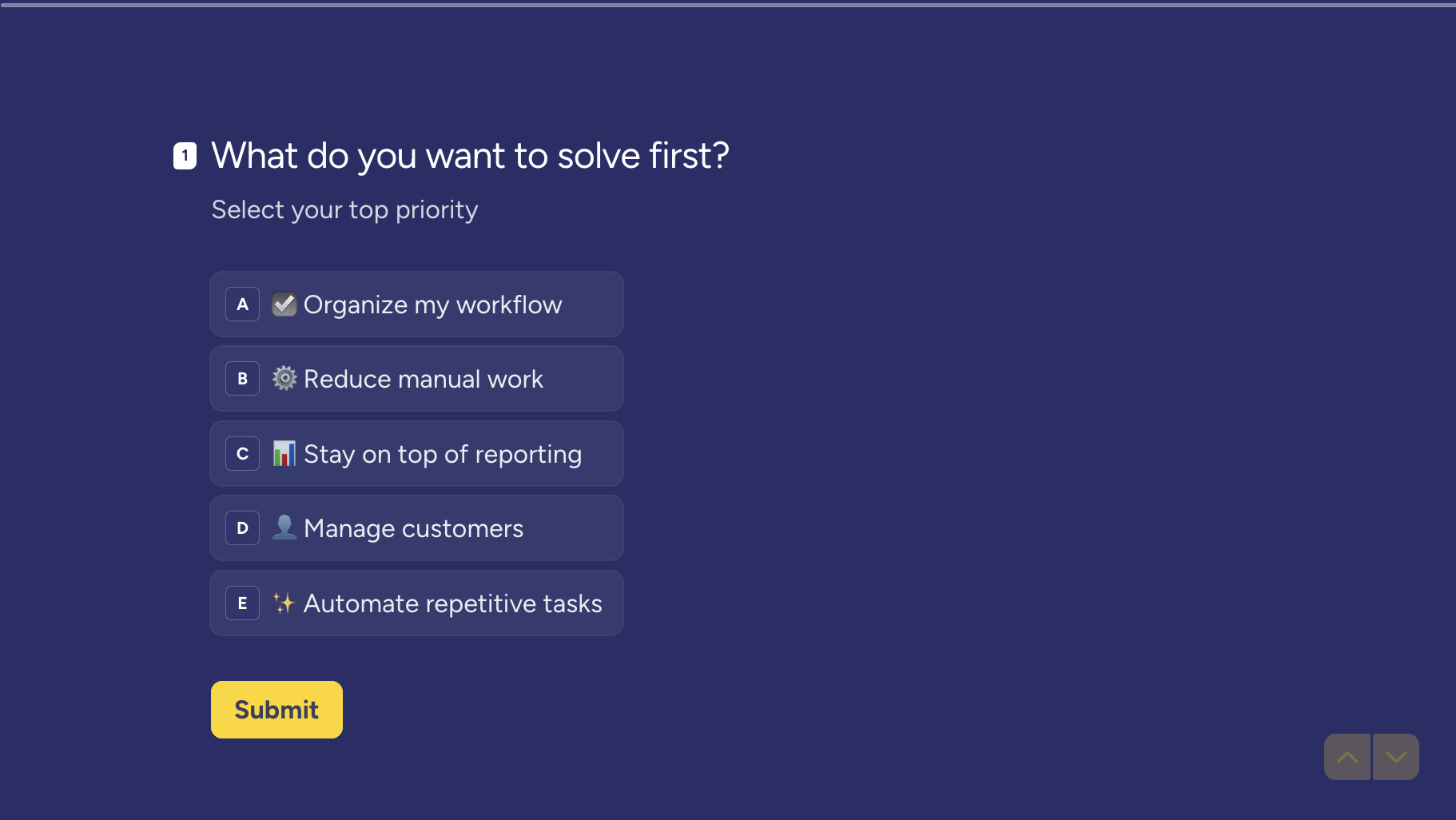
Using Typeform, she asks a single question in the welcome email: What do you want to solve first? The user selects their top priority—organizing their workflow, staying on top of reporting, reducing manual work—and Aida’s team uses that answer to direct what happens next.
The Typeform-Ortto integration automatically saves responses into Ortto’s custom fields, segments users, and then routes them to the onboarding follow-up emails built around their goal.
Instead of a generic onboarding series, every user gets content tailored to what they actually came to do.
The mid-trial check-in
Midway through the product trial, Aida’s team sends another Typeform asking what most customer onboarding flows don’t: Are we meeting the expectations you had when you started?
True to form, the team asks users to select which phrase fits best, from “Better than expected” to “Not really,” instead of a standard 1-10 scale. Users who respond positively continue the journey. Uncertain or negative responses trigger an open follow-up:
What feels unclear, missing, or not as expected?
Aida then reviews that feedback manually to decide what to do next:
- Adjust the journey
- Explain a feature better
- Loop in the support team
This approach catches friction while there's still time to fix it, helping the Digital Hamster team create a more personalized customer experience.
The trial end check-in
Most onboarding flows simply end. Aida’s does not. For inactive users, the final email's CTAs are all Typeform entry points—if someone says they'd like a second chance, a Typeform asks why they didn't engage.
Time and again, it wasn't lack of interest. Turns out, people were on vacation, buried at work, or simply hadn't found the time.
"Instead of assuming inactivity means lack of interest, we now treat it as a signal that the user may need more time, a different onboarding rhythm, or a more relevant reason to come back." - Aida Selimova, Co-founder and COO, Digital Hamster
Based on those answers, Aida manually extends a trial and gives the user another shot. Here's how the full flow comes together:
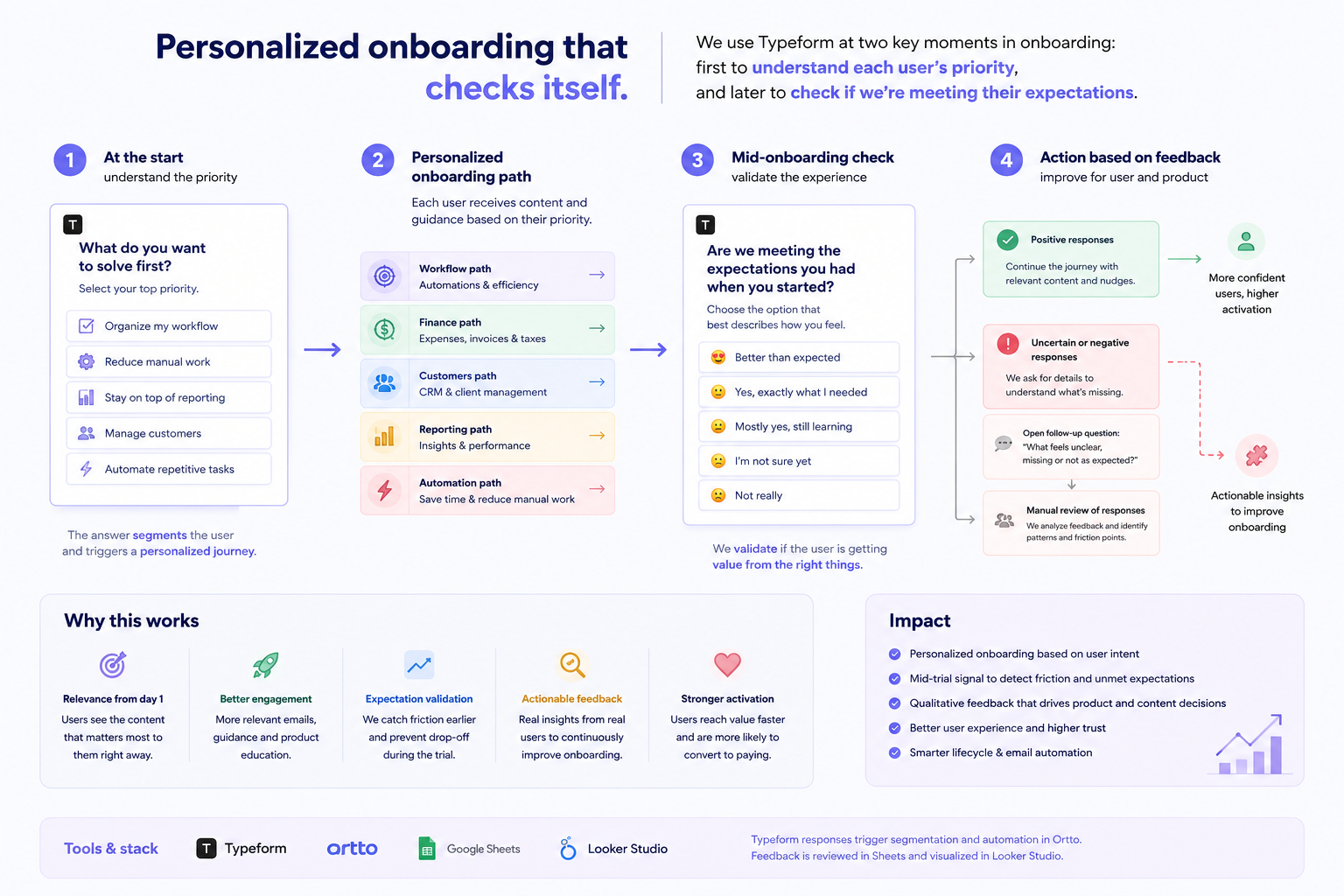
Whether it’s at the start or the end, Typeform does the same job for Aida and her team. It turns answers into intent signals for the rest of the customer lifecycle.
Aida runs this through her own stack. Responses trigger segmentation and automation in Ortto. Feedback’s reviewed in Google Sheets and visualized in Looker Studio. But you don’t need separate tools for every step—you can do it all in Typeform.
With Contacts & Automations, Typeform can capture responses, segment users, and trigger the right follow-up automatically, without ever leaving the platform.
Go beyond data collection with Typeform
Forms are there to capture data, right? Yes and no. While forms can certainly bring in data, Aida approaches them as a way to understand people. She then uses that understanding to build better onboarding flows and design an intentional customer experience across the lifecycle.
That’s what makes her playbook worth snagging. It works at every stage of the customer journey: cold traffic just discovering a brand, existing customers you want honest feedback from, and trial users deciding whether to stick around. It’s all built around human understanding.
Want more tips and to see some tune-ups? Check out the recap. And when you’re ready to try out Aida’s playbook for yourself, give Typeform a try and start understanding your audience.

.webp)