Ranking survey questions: 14 examples and how to use them
Ranking survey questions reveal true priorities by forcing trade-offs ratings can't. Get 14 examples, best practices for list length, and ordinal tips.
Sometimes you need to know not just whether people like something, but which option they prefer most. Ranking survey questions ask respondents to order items by priority, importance, or preference. Instead of rating each option independently, people stack-rank them.
Ranking reveals priority and trade-offs in a way rating scales can’t. A well-designed ranking question yields rich, comparative data. A poorly designed one frustrates respondents and produces unreliable results.
This guide covers 14 ranking question examples, when to use them, and how to avoid common pitfalls.
What is a ranking survey question?
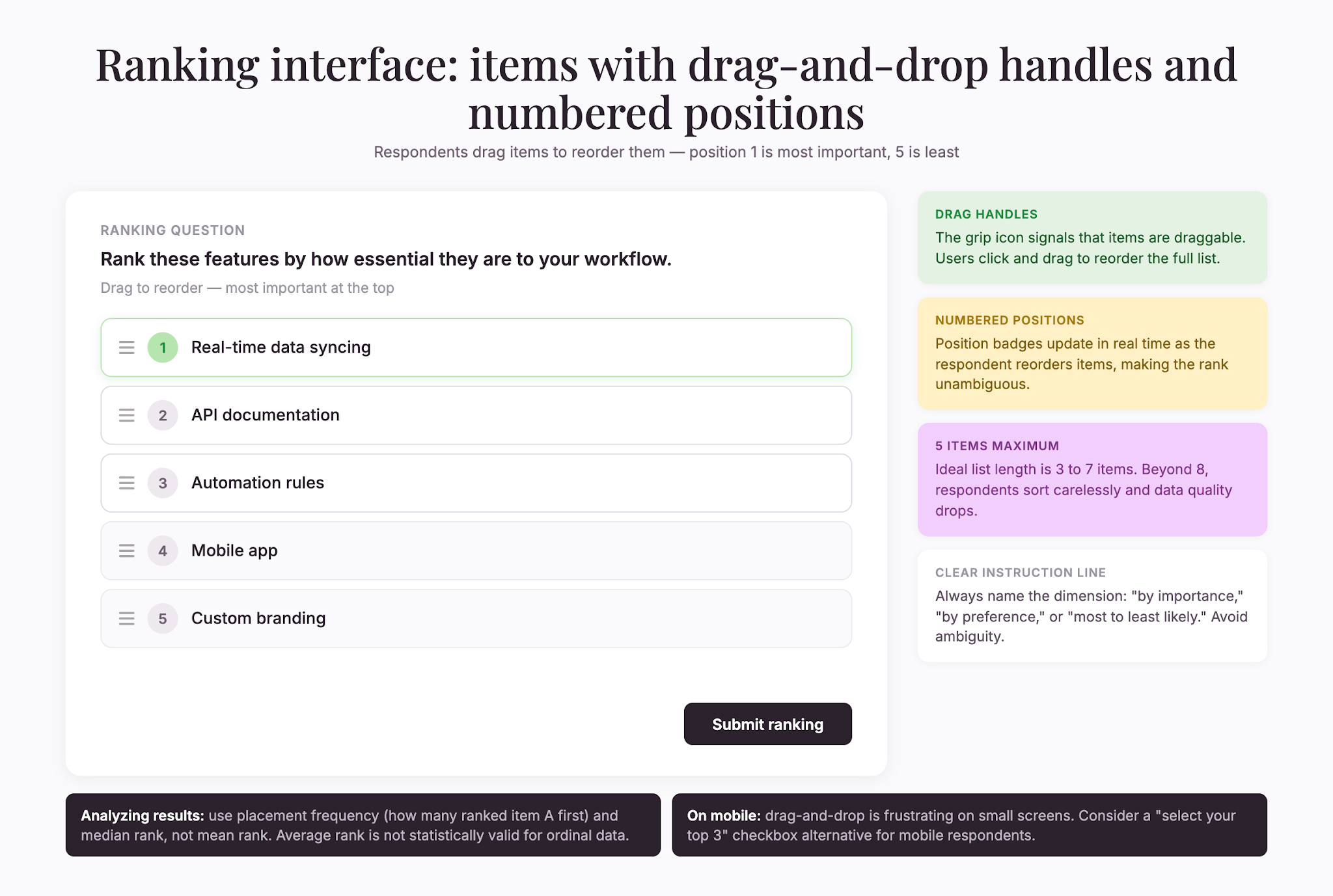
A ranking question presents a list of items and asks the respondent to arrange them in order. The order reflects some dimension—importance, preference, likelihood, urgency, or quality.
Example: “Rank these features in order of importance to your workflow (most important at the top):”
- API documentation
- Real-time data syncing
- Mobile app
- Automation rules
- Custom branding
Ranking forces trade-offs. You can’t say everything is equally important. When someone rates all features as 5/5, you learn nothing. When they rank them, you see what actually drives their decisions.
14 ranking question examples
Let’s take a look at some ranking question examples so that you can build an effective survey.
Product features:
- “Rank these features by how essential they are to your workflow.”
- “Rank these product improvements by which would help you most.”
- “Rank these capabilities by importance to your team.”
Purchase decision factors:
- “Rank these factors when choosing a vendor: Price, Customer Support, Security, Feature Set, Ease of Use.”
- “Rank these reasons for considering a switch to a competitor, from most to least likely.”
- “Rank what matters most when evaluating software: Reliability, Speed, Cost, Usability, Integration Options.”
Content and topics:
- “Rank these content topics by what you’d most like to learn about.”
- “Rank these blog post ideas by how valuable they’d be to you.”
- “Rank these training formats: Video, Written guide, Live webinar, Interactive tutorial, One-on-one coaching.”
Business priorities:
- “Rank these company initiatives by importance to your department.”
- “Rank these hiring criteria by importance for our team.”
- “Rank these customer pain points from most to least severe.”
Preference and satisfaction:
- “Rank these communication channels: Email, Phone, Chat, SMS, In-App notification.”
- “Rank these pricing models: Per-user monthly, Annual subscription, Usage-based, One-time purchase, Freemium.”
When to use ranking questions
Ranking is powerful but not universal. Use it when:
- You need priority. Ranking tells you what people prioritize when forced to choose.
- You have a manageable number of options. Five to seven items is ideal. With 10+, ranking becomes tedious.
- You want comparative data. Ranking produces relative preferences, not absolute scores.
- You’re not in a time crunch. Ranking is slower than rating. Plus, surveys with 1–3 questions are completed by 83.34% of respondents (SurveySparrow Survey Response Rate Benchmarks, 2025), so each ranking question costs you.
Avoid ranking when you need absolute satisfaction (use Likert instead), when you have too many items (ranking 8+ exhausts respondents and produces careless sorting—Zonka Feedback, 2024), or when the ordering is arbitrary.
Best practices
Here are some additional best practices to keep in mind:
Keep lists short. Ideal: 3–7 items. Cap at 8. Avoid lists longer than 10.
Use a clear instruction. Name the dimension: “by importance,” “by preference,” “from most to least likely.”
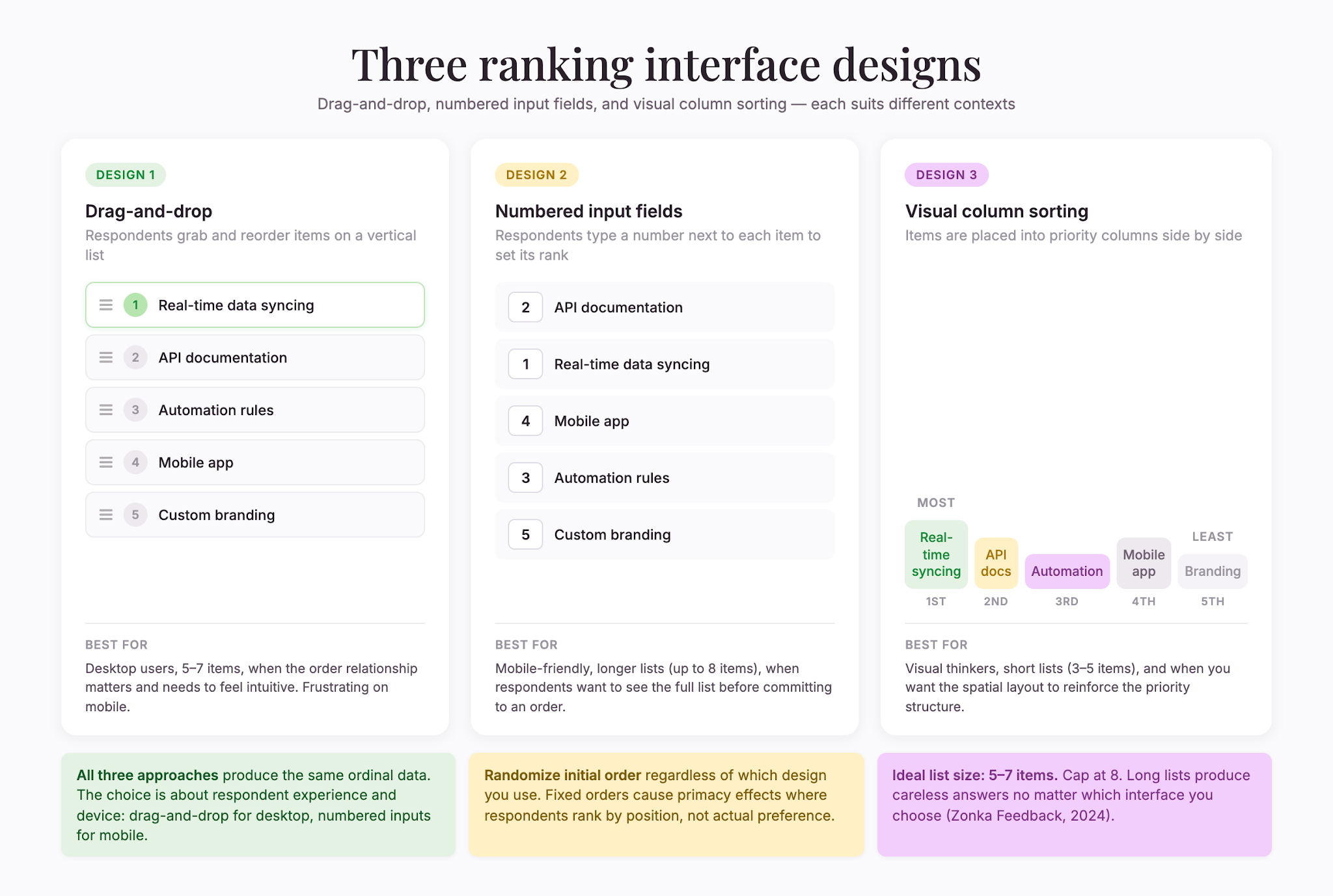
Randomize the initial order. Fixed orders invite primacy effects—people rank by position rather than preference.
Use specific labels. “Real-time customer data” beats “data.” “Speed” beats “quickness.”
Test with real users. Watch how long it takes and where they hesitate.
Limit rankings per survey. One or two is plenty. More causes fatigue.
Show the full list. Especially on mobile, respondents need to see everything they’re ordering.
Use consistent scales across multiple ranking questions.
Analyzing ranking data
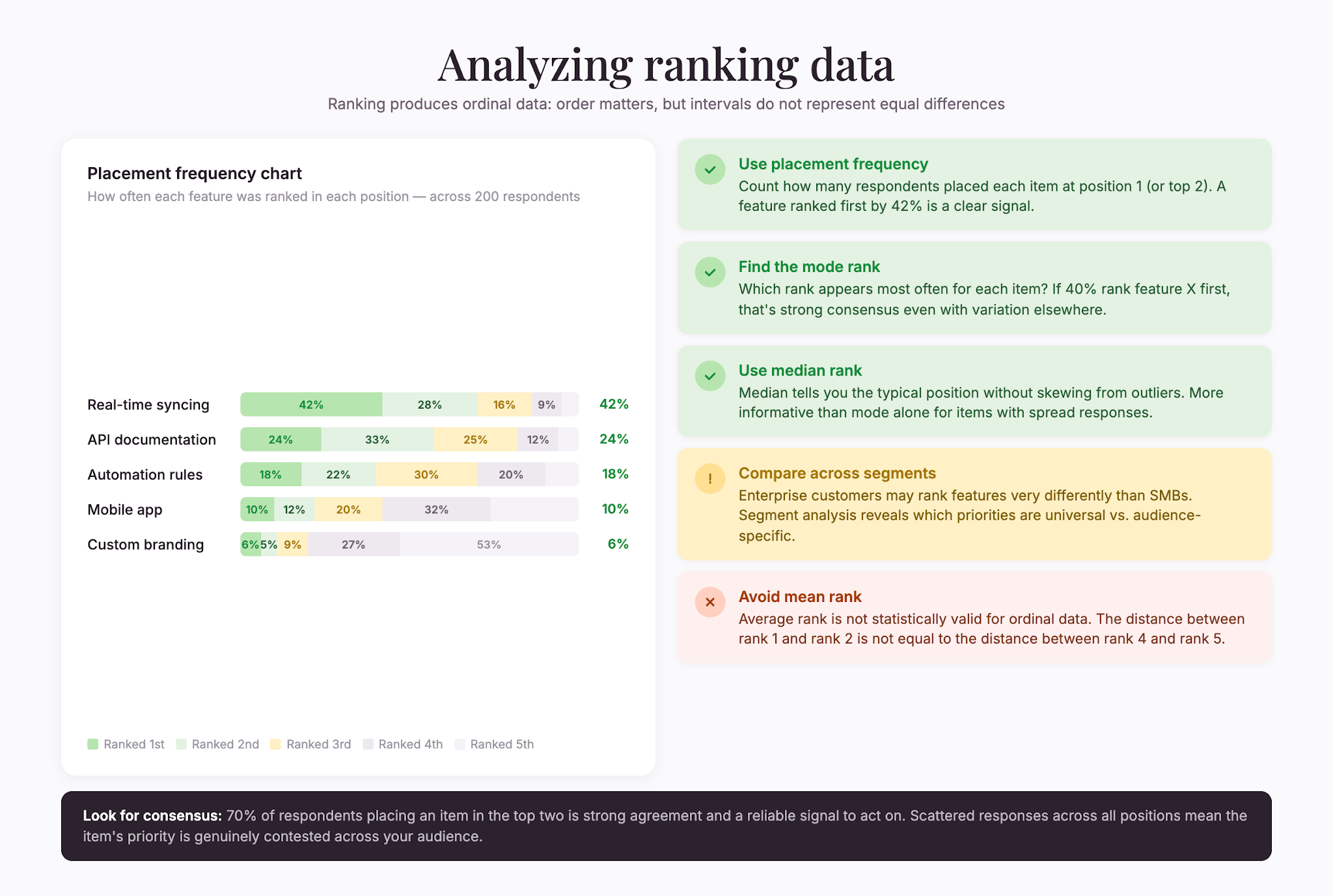
Ranking produces ordinal data—order matters, but intervals don’t represent equal differences. Here’s how to understand your results:
- Calculate placement frequencies. How many respondents put Item A at #1?
- Find the mode. Which rank shows up most often for each item? If 40% rank Feature X first, that’s a strong signal.
- Use median rank. Tells you the typical position without skewing from outliers.
- Compare across segments. Do enterprise customers rank differently than SMBs?
- Avoid means. Average rank isn’t statistically valid for ordinal data. Use mode, median, and frequency distributions.
- Look for consensus. 70% placing Item A in the top two is strong agreement. Scattered responses are also informative.
Common mistakes
In addition to best practices, it’s important to know common mistakes to avoid:
- Don’t force rankings that don’t matter. Tie the dimension to a real decision.
- Don’t rank too many items. Long lists produce careless answers.
- Don’t mix question types poorly. “Rate these 1–5” followed by “Rank these” confuses respondents.
- Don’t ignore response bias. Acquiescence bias and social desirability bias both show up here (Qualtrics, 2025)—respondents may rank what sounds good instead of what they’d actually choose.
- Don’t forget mobile. Drag-and-drop is clunky on small screens. Consider a “Select your top 3” checkbox alternative.
Ranking vs. other question types
How do ranking questions compare to other survey question types?
- Ranking vs. Rating: Rating asks, “How much do you like X?” Ranking asks, “Which do you like most?”
- Ranking vs. Yes/No: Yes/no is binary screening (SurveySparrow Dichotomous Questions, 2024). Ranking captures priority.
- Ranking vs. Multiple choice: Multiple choice picks one favorite. Ranking orders the whole list.
- Ranking vs. Open-ended: Open-ended explores reasoning. Ranking quantifies comparison. Pair them.
Combining ranking with other questions
Ranking works best in combination:
- Yes/no screener to confirm relevance.
- Ranking question to reveal priority.
- Open-ended follow-up: “Why did you rank X highest?”
Together, they tell a complete story: whether someone cares, what they prioritize, and why.
Final takeaway
Ranking survey questions reveal priority in ways other question types can’t. They force real trade-offs and show what actually matters when everything can’t be equally important. But they take cognitive effort and work best with short, focused lists.
Use them strategically—in shorter surveys, with 5–7 items maximum, paired with open-ended follow-ups. Done well, ranking questions produce insights that drive genuine product and business improvements.


.webp)
