Screener Survey Guide: How to Screen Research Participants
Screener surveys prevent unqualified participants from skewing your data. Use simple yes/no questions and strategic oversampling to recruit the right people.
Key Takeaways
- Screener surveys filter for fit before research begins: Specific criteria, like "adults 25-45 who've used a fitness app in the past 6 months," catch mismatches that vague criteria like "people interested in fitness" would miss.
- Yes/no and multiple-choice questions keep completion rates high: Short surveys with one to three questions get completed 83.34% of the time, while open-ended questions slow people down and complicate filtering.
- Sequence the most restrictive questions first: If someone doesn't qualify on question one, they're done, which saves both their time and yours.
- Oversample to account for attrition: Not everyone who takes the screener will qualify or respond, so plan for 30-50% more candidates than the number of participants you actually need.
When you're planning research, the people you talk to matter as much as the questions you ask. The wrong participants can skew your findings, waste time, and lead you in the wrong direction. A screener survey is a brief set of questions designed to identify and filter participants who fit your study's exact criteria, before they enter your main research.
This guide walks you through building screener surveys that work, why they're essential, and how to use them to recruit the right people for your research.
What is a screener survey?
A screener survey is a short questionnaire that determines whether someone qualifies for your study. It's a gatekeeper. You ask a few targeted questions upfront, and based on the answers, you either invite someone to participate in your main research or politely move on to the next candidate.
Screener surveys are common in academic research, product development, user testing, customer research, and market research. They solve a concrete problem: recruiting unqualified participants wastes everyone's time and contaminates your data.
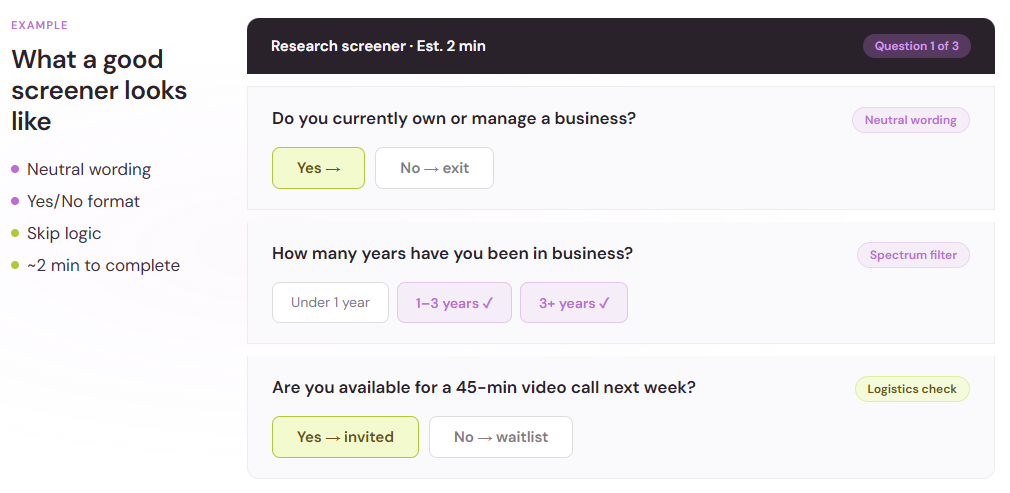
Think of it this way. You're running a study on how small business owners use project management tools. If you accidentally enroll someone who's never run a business, their answers won't help you. A screener asks questions like: "Do you currently own or manage a business?" and "How many years have you been in business?" Only people who meet your criteria move forward.

Why screener surveys matter
Quality research starts with quality participants. Screener surveys prevent three major problems:
Sampling bias: If you enroll the wrong people, your sample doesn't reflect your target population. A screener ensures your participants actually match the group you're trying to study. This is critical because a skewed sample leads to invalid conclusions. When your sample isn't representative, every insight drawn from your research becomes questionable. You might discover patterns that seem important but only apply to your biased subset, not to the broader population you're trying to understand.
Wasted resources: Paying or compensating unqualified participants, moderating sessions with the wrong people, and analyzing irrelevant data all drain your budget and timeline. A screener stops this upfront. Beyond direct financial costs, there's an opportunity cost: the time spent managing unqualified participants is time not spent on the people who actually matter to your study. This becomes especially costly in longitudinal research, where you're investing weeks or months in participant relationships.
Data quality issues: Unqualified participants may guess, rush, or give answers that don't reflect real experience. Their responses introduce noise into your dataset, making it harder to spot real patterns in the people who do qualify. Noisy data obscures true signals. If 40% of your respondents are unqualified guessers, you're spending significant effort filtering their answers from the meaningful ones. A screener eliminates this problem before it starts.
Online surveys rank as the most used quantitative method among market research professionals, with 85% using them regularly. That's because surveys are scalable and cost-effective, but only when you enroll the right people. Without a screener survey, you lose that efficiency advantage entirely.
Building an effective screener survey
A good screener is short, clear, and designed to quickly eliminate mismatches. Here's how to build one.
Step 1: Define your participant criteria
Before you write a single question, list exactly who you need. Be specific.
Instead of "people interested in fitness," say: "Adults aged 25–45 who work out at least three times per week and have used a fitness app in the past 6 months." The more detailed your criteria, the sharper your screener can be.
Write down:
- Age range or life stage – Do you need a specific age group?
- Job title or industry – Are you recruiting HR professionals? Freelancers? Healthcare workers?
- Experience level – Beginner, intermediate, or expert?
- Geographic location – Does region or country matter?
- Device usage – Mobile-only, desktop, both?
- Purchasing behavior – Have they bought in this category?
- Attitudes or values – Do they need to care about sustainability, privacy, or something else?
- Availability – Can they commit to a 90-minute session next week?
The more criteria you have, the longer your screener becomes. Balance precision with brevity. Too many questions, and people abandon the survey without finishing. This is why defining criteria upfront helps you recognize which questions are truly essential and which are nice-to-have—a distinction that keeps your screener lean.
Step 2: Choose question types that move quickly
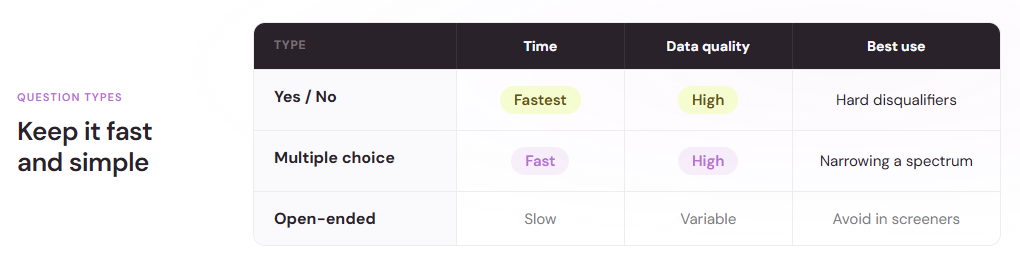
Time matters in a screener. Short surveys with one to three questions are completed by 83.34% of respondents. As surveys grow longer, completion drops and fatigue sets in.
Yes/no questions are your ally here. They're fast to answer, reduce respondent fatigue and dropout, produce categorical data that's easy to quantify without complex software, and are well-suited to screening.
Example screener questions:
- "Do you currently own a business?" (Yes/No)
- "Have you used a project management tool in the past 12 months?" (Yes/No)
- "Are you available for a one-hour video interview next week?" (Yes/No)
Multiple choice also works when you need to narrow down a spectrum:
- "How often do you exercise per week?" (Never, 1–2 times, 3–4 times, 5+ times)
- "What's your annual household income?" (Under $50k, $50k–$100k, $100k–$150k, $150k+)
Avoid open-ended questions in your screener. They slow people down and eat up your time in analysis. Open-ended responses require manual coding and interpretation, which defeats the purpose of using a screener to filter participants quickly.
Step 3: Sequence questions strategically
Start with the broadest, most important criteria. If someone doesn't qualify on question one, they're done. This saves everyone time.
Example sequence for a product research study:
- "Do you currently use a mobile phone?" (eliminates non-mobile users fast)
- "How often do you check social media?" (narrows by engagement level)
- "Have you purchased a subscription app in the past year?" (identifies likely early adopters)
Place the most restrictive questions first. If you need people in a specific income bracket, ask that early so you don't spend time on people who don't fit. This front-loading strategy minimizes the number of respondents who complete unnecessary questions, keeping completion times down and morale up.
Step 4: Avoid common survey biases
Even screener surveys can fall prey to response bias. Common survey biases include acquiescence bias (the tendency to agree with statements regardless of content) and social desirability bias (overreporting good behavior, underreporting bad behavior when facing sensitive questions).
This matters because a participant might say "yes" to a question just to move forward, not because it's true. In a screener context, this means you could enroll people who don't actually qualify, undermining the entire purpose of the screening process.
To reduce bias:
- Be neutral in wording. Don't hint at the "right" answer. Instead of "You do care about privacy, right?", ask "How important is data privacy to you?" without suggesting an answer.
- Avoid loaded language. Words like "always," "never," "amazing," or "terrible" bias responses. Stick to neutral language.
- Don't ask leading questions. "Most people prefer remote work. Do you?" leads the respondent. Just ask "Do you prefer remote or office work?"
The framing effect causes people to avoid risk when options are positively framed but seek risk when negatively framed. Even the way you present screener options shapes how people answer. Present choices neutrally to ensure your screener survey filters based on genuine qualifications, not psychological persuasion.
Step 5: Test and refine
Before launching your screener to real candidates, test it yourself. Answer the questions as a respondent would. Time how long it takes. Note any confusing wording or logic issues.
If you're using branching logic (where later questions depend on earlier answers), test every path. A "no" to question 1 should skip irrelevant follow-ups. This keeps the experience short and clear. Have a colleague test it as well and ask them to flag any ambiguous phrasing or unexpected question sequences.
Determining sample size for screener recruitment
Not everyone who takes your screener will qualify. Plan for attrition.
An acceptable margin of error is typically three to six percent at the 95% confidence level. If you need 20 qualified participants and you expect 60% to pass your screener, send the screener to roughly 33 people. If your pass rate is lower (say, 40%), aim for 50.
To calculate:
- Decide how many qualified participants you need
- Estimate what percentage will pass your screener (based on how restrictive your criteria are)
- Divide needed participants by pass rate
If you're unsure of your pass rate, start conservative and assume 50%. You can adjust after the first batch of responses. This iterative approach lets you refine your estimates based on real data rather than guessing.
For quantitative research at large sample levels, sample size formulas get more complex. If you're surveying a population of 500,000 at 95% confidence with a five percent margin of error, a sample of 384 is needed. But for most screener research, you're solving a different problem: filtering for quality, not statistical power.
Distributing your screener
Where you send your screener shapes who responds. A few common channels include:
Email lists or existing customers: Fast and targeted. You're reaching people you already know something about, so pass rates tend to be higher. Downside: you're recruiting from a pool you've already filtered.
Recruitment panels: Third-party panel providers let you buy access to groups of pre-screened respondents. This is faster than cold outreach but costs money. It's worth it when you need specific demographics or hard-to-reach populations.
Social media ads: Reach a broad audience and filter with your screener. Pass rates are usually lower, but volume can be high. Useful when you need diversity or specific interest groups.
Referrals and snowballing: Ask existing participants to refer others who match your criteria. This works well for niche research, though it risks introducing homogeneity.
User testing platforms: Dedicated usability testing tools often have built-in screener functionality. If you're running usability research, these platforms integrate screeners with testing workflows, which saves you from juggling separate tools.
After the screener: moving to your main study
Once you've identified qualified participants, communicate clearly about next steps. Send a clear invitation that confirms:
- What the study is about
- How long it takes
- When and how it happens (video call, survey, in-person, etc.)
- What they'll get in return (compensation, early access, etc.)
- Any prep they should do
This reduces no-shows and sets expectations. Qualified participants who understand what they're signing up for are more engaged and produce better data.
Common screener mistakes to avoid
Making it too long: Every question you add drops completion. Keep it to three to five questions whenever possible. If you need more information, save it for after they're confirmed as qualified.
Using vague language: "How tech-savvy are you?" is subjective. People interpret it differently. Instead: "Can you navigate phone settings and install an app without assistance?" is concrete and easier to answer.
Forgetting to validate: If someone says "yes" to everything, are they being truthful or rushing? Consider asking a verification question. For example, if they claim to own a business, ask "What industry?" Their answer either confirms knowledge or reveals they guessed.
Not accounting for attrition: Plan to oversample. You'll always have screeners that are incomplete, people who don't respond to follow-ups, or those who change their minds. Oversample by 30–50% depending on your confidence in the pass rate.
Mixing screener logic with research questions: Your screener's job is to filter. Your main study gathers the data. Keep them separate. Don't ask "Have you used a CRM?" in the screener and then "Which CRM do you prefer?" in the main survey. That confuses the purpose of each tool.
Takeaway
A screener survey is one of the most efficient tools you have. It takes two to five minutes to complete, costs little to deploy, and dramatically improves the quality of your research by ensuring you're talking to the right people. Done well, a screener filters out mismatches before they enter your study, saves you time and money, and produces data you can actually trust.
Start by being clear about who you need. Keep questions short and neutral. Test before launch. And always oversample to account for the people who don't qualify or don't respond.
When recruiting research participants, the screener is where rigor begins.