Voice Surveys: How Audio Responses Improve Research Quality
Are voice surveys right for your research? Learn how Typeform Research Flow can improve research quality, simplify analysis, and help people feel heard.
Key takeaways
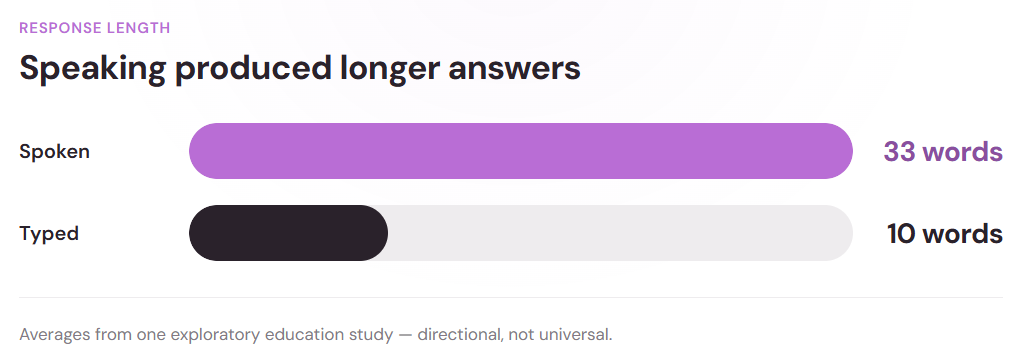
- Speaking often produces richer answers than typing: One study found spoken responses averaged 33 words versus about 10 for typed answers, though the finding comes from an education study and shouldn't be generalized too broadly.
- Audio preserves signals a transcript can't: Pauses, tone, and pacing add context to how someone experienced something, without confirming exactly what they felt.
- Match the format to the question: Voice suits open-ended "why" or "tell us about" prompts, while text works better for short, precise answers or noisy settings.
- Offering response format options beats mandating one: Willingness to use voice varies widely by person, so letting participants pick text, audio, or video creates a more comfortable and inclusive experience.
We are human, and we have a lot to say. We want to feel heard and understood, especially when an experience leaves us excited, frustrated, or confused. But a small text box does not always leave enough room for the full story.
Most of us have stared at an open response field and wondered, “How do I explain this clearly without writing an essay?” Voice surveys offer another option. Instead of condensing every thought into text, participants can answer open-ended questions through recorded audio by using their natural tone and phrasing.
Text-based surveys remain an efficient way to collect feedback. But when researchers and marketers need to understand what worked, what went wrong, or why someone made a decision, the format matters. This article explores how voice surveys compare with other survey response formats, when audio makes sense, and how to design and analyze a voice-based study.
What are voice surveys?
A voice survey lets people answer research questions through recorded audio instead of typing. Depending on the study, someone might respond to a fixed question, choose between text and audio, or receive follow-up questions based on what they say.
Unlike a traditional phone menu with limited options, audio responses give participants room to explain an experience in their own words.
Voice surveys don’t require participants to appear on camera, so they skip the friction that comes with video interviews. They also differ from basic voice-to-text tools because some platforms preserve the original recording alongside a transcript, giving researchers both versions to review.
The format of a voice survey sits between a standard survey and a qualitative interview. Typeform’s Research Flow supports text, audio, and video responses, while its AI can ask adaptive follow-up questions based on what someone has already shared. This helps researchers gather more context without manually moderating every conversation.
Why audio responses can reveal richer feedback
Typing out a detailed explanation takes time, especially on a mobile phone. Tiny keyboards, autocorrect, and the effort of organizing a complicated experience may lead respondents to shorten an answer or leave out important details. Speaking can feel easier, giving people more room to explain what happened.
Spoken responses may offer more detail
Are people interested in using voice input for open-ended mobile survey questions? A study published in Survey Practice found mixed results. Audio will not suit everyone, but more than half of the participants said they would definitely or probably consider using it. That suggests it can be useful when a question requires more than a quick sentence.
One exploratory study involving fifth- and sixth-grade students answering mathematics questions found that spoken answers were longer and contained more explanatory detail than typed responses. Spoken answers averaged about 33 words, compared with around 10 typed words. Because the study focused on education rather than customer or market research, the findings should not be generalized too broadly. Still, they show that response format can influence how much people share.
Audio preserves more than words
Audio can preserve elements a transcript may miss, including pauses, hesitation, emphasis, pacing, and a participant’s natural tone. These signals may help researchers understand how someone experienced a product, service, or decision, but they should be treated as clues rather than proof of emotion or intent.
The benefit is not simply hearing someone speak. It is giving people room to explain their experience and reasoning. The way someone tells a story can matter alongside the words they use. Audio can provide a fuller picture.
Voice vs. text, video, and live interviews
Audio can add depth, but it is not the best format for every study. Choosing the right one depends on what researchers want to learn, where participants will respond, and how much detail each question requires.
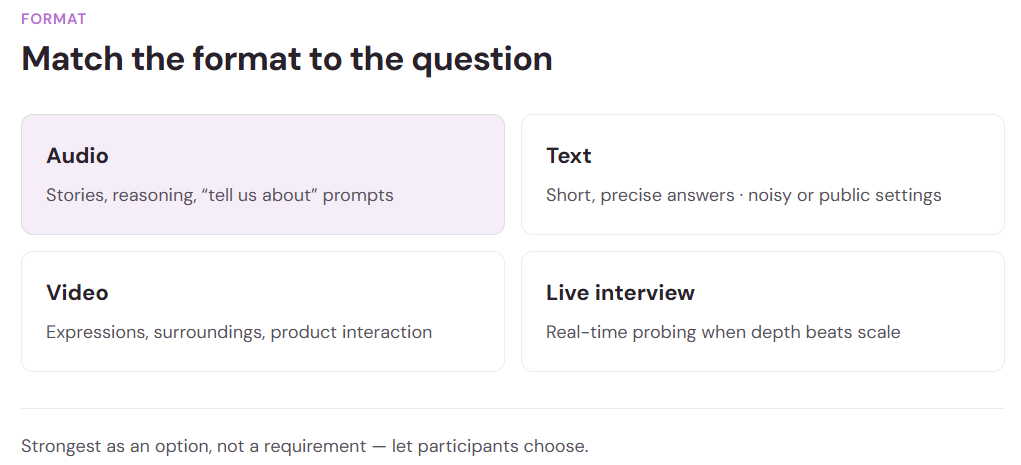
Voice may work well when someone needs to explain why they made a decision, tell a story, or describe an experience naturally. Text may be the better choice when answers need to be short or precise, or when someone is responding in a noisy or public setting.
Text also gives users more control when they want to review and revise an answer before tapping submit. Research comparing voice recording, dictation, and typing suggests that there is no one-size-fits-all format. Different people and questions call for different approaches.
Video allows researchers to observe facial expressions, surroundings, and product interactions. However, appearing on camera may feel intrusive or require extra preparation. Audio offers a useful middle ground by preserving vocal context without asking participants to be seen.
Live interviews provide the most direct interaction. A moderator can notice confusion, clarify an answer, and guide the conversation in real time. But scheduling and conducting interviews one by one takes time. When scale and flexibility matter, voice-based responses may be a better fit.
Before choosing among different survey question types, start with the research objective. Once the goal is clear, the most appropriate format becomes easier to identify.
When audio responses make sense
Audio responses are most useful when a researcher needs more than a quick answer. They can support:
- Customer discovery
- Product and concept testing
- Post-purchase feedback
- Employee research
- UX studies
- Brand perception research
- Emotionally nuanced experiences
Audio can also support Voice of the Customer research by giving customers more room to explain what they think, need, and experience in their own words. Typeform’s own VOC process combined feedback from surveys, support tickets, and customer calls to identify patterns and build a clearer picture of the customer experience.
Questions that invite explanation are usually a natural fit. Think: “Tell us about…,” “Walk us through…,” “Why did you…,” or “What happened next?” These prompts give participants room to explain what shaped an experience or decision.
However, audio may not be appropriate for sensitive topics, accessibility needs, language barriers, weak internet connections, or speech-recognition limitations. Participant comfort matters too. A study on willingness to use audio and voice inputs in smartphone surveys found that interest varied, with many respondents still preferring written communication.
The takeaway is simple: voice surveys are often strongest as an option rather than a requirement. Giving participants a choice can help them respond in the format that feels most comfortable.
How to design a better voice-based study
A successful voice-based study takes more than turning on the microphone. Clear goals, focused questions, and participant comfort all shape the quality of the responses. These six practical tips can help.
1. Start with a clear research objective
Before choosing audio, text, or video, decide what you need to learn and what decision the findings will support. Typeform’s guide to AI-powered surveys recommends starting with a clear goal rather than adding technology without a defined purpose.
2. Ask questions that invite explanation
Design questions around the kind of response you need. Broad prompts such as “What do you think?” can lead to vague answers.
Instead, ask something more focused, such as, “Tell us about the moment you realized the product did not meet your needs.” This gives people a clear place to begin.
3. Keep the experience conversational
Remember, you are talking to people. Use easy-to-understand language, ask one question at a time, and avoid long or complicated prompts.
4. Use follow-up questions selectively
Every follow-up question should serve a purpose. Use them to clarify a vague answer, ask for an example, explore a motivation, or uncover what happened next.
Research Flow can support this process by asking adaptive follow-up questions across multiple response formats based on what a participant has already shared.
5. Give participants a choice
Whenever possible, let users choose how they respond. Some may enjoy appearing on camera, while others may feel more comfortable using text or audio.
6. Be clear about recording and data use
Explain up front how each recording will be handled. Participants should know whether their response will be transcribed, how it will be analyzed, who will have access, and how long the information will be retained.
Clear expectations can help create a more comfortable and responsible research experience.
Turning audio responses into useful insights
Once you have collected the responses, how do you turn them into useful insights? Richer feedback gives researchers more detail to work with, but it also creates more material to review. Traditional audio research can take hours to analyze. For example, researchers may need to:
- Listen to recordings
- Create transcripts
- Code responses
- Group recurring themes
- Identify useful participant quotes
- Compare sentiment and response patterns
Instead of spending an entire afternoon reviewing every response manually, AI-assisted analysis can help reduce some of that work. It can support tasks such as transcription, theme tagging, and pattern detection, making it easier for researchers to organize large amounts of feedback and identify areas that deserve a closer look.
Research Flow brings these capabilities into one research process. After collecting text, audio, or video responses, the platform can synthesize the results into:
- Summaries
- Themes
- Sentiment
- Participant quotes
- Highlight clips
That can make the review process far more manageable. Research Flow is designed to turn transcripts into digestible findings while reducing the manual work involved in synthesis.

However, faster AI-generated conclusions still require human review. Typeform’s article on AI user research reinforces that point. Human judgment is still needed to interpret the data, challenge assumptions, and decide what the findings actually mean.
Voice adds depth, but choice protects research quality
Audio can make it easier for participants to explain a complicated experience in their own words. It can also preserve details, phrasing, pauses, and vocal context that a typed response may not fully capture.
Still, voice is not the best choice for every person or every study. The right format depends on the research question, the participant, the setting, privacy needs, and how the responses will be reviewed. Offering more than one response option can create a more flexible and inclusive experience because people communicate in different ways.
Research Flow supports that flexibility by allowing teams to collect text, audio, and video responses within the same research process.
The takeaway is simple: use voice when understanding how someone explains an experience matters just as much as recording the answer itself.